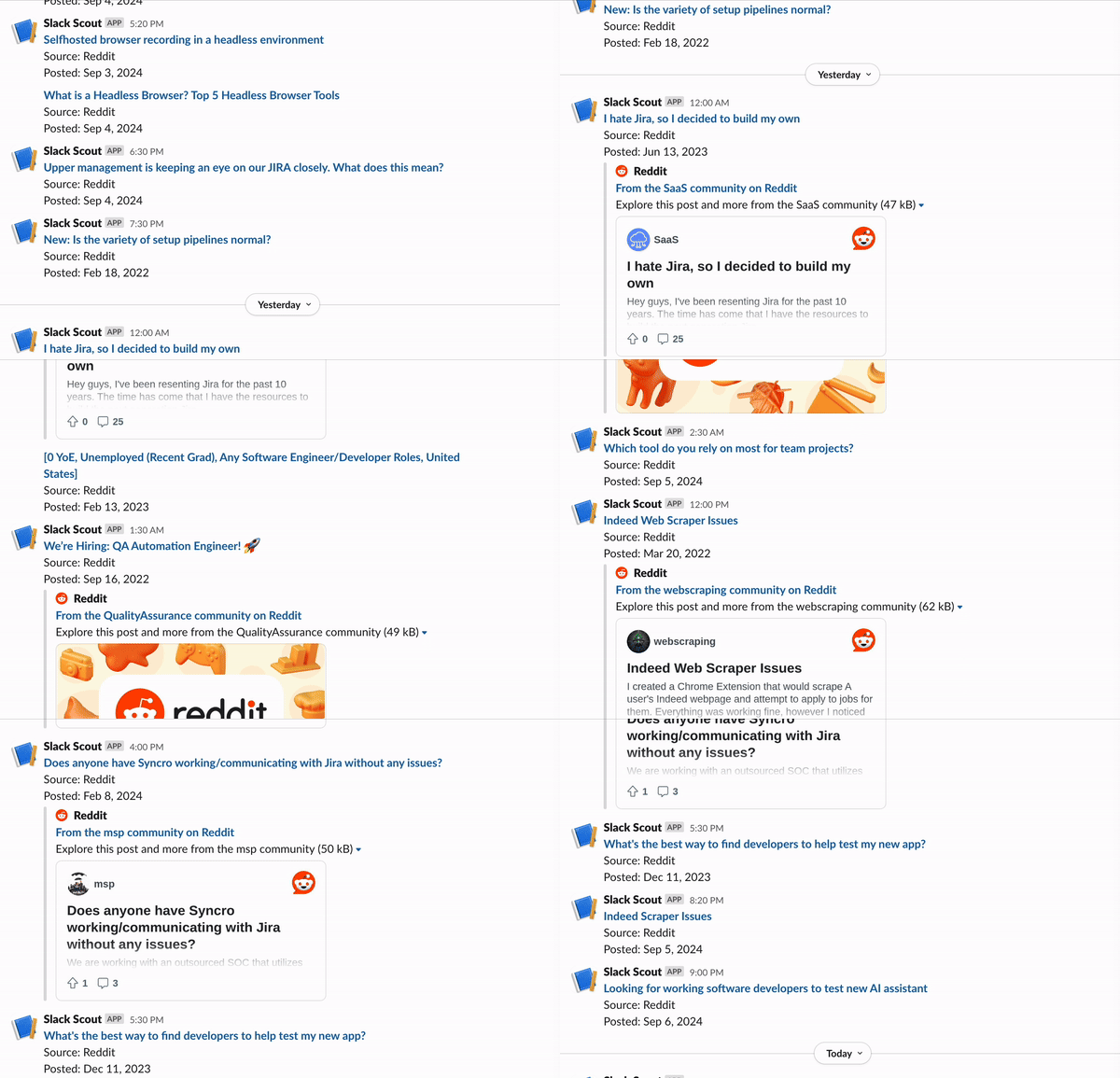
Slack scout sends a Slack notification every time your keywords are mentioned on Twitter, Hacker News, or Reddit. Get notified whenever you, your company, or topics of interest are mentioned online.
Built with Browserbase and Val Town. Inspired by f5bot.com.
What this tutorial covers
-
Access and extract website posts and contents using Browserbase
-
Write scheduled functions and APIs with Val Town
-
Send automated Slack messages via webhooks
Getting started
In this tutorial, you’ll need a
-
Browserbase API key
-
Val Town account
-
Slack Webhook URL: create it here
Browserbase
Browserbase is a developer platform to run, manage, and monitor headless browsers at scale. This tutorial uses Browserbase to navigate and extract data from different news sources. It also uses Browserbase’s Proxies to provide consistent network identity across multiple browser sessions.
Sign up for free to get started!
Val Town
Val Town is a platform to write and deploy JavaScript. You’ll use Val Town for three things.
-
Create HTTP scripts that run Browserbase sessions. These Browserbase sessions will execute web automation tasks, such as navigating Hacker News and Reddit.
-
Write Cron Functions (like Cron Jobs, but more flexible) that periodically run the HTTP scripts.
-
Store persistent data in the Val Town provided SQLite database. This built-in database lets you track search results, so you only send Slack notifications for new, unrecorded keyword mentions.
Sign up for free to get started!
For this tutorial, you’ll use the Twitter API to include Twitter post results.
You’ll need to create a new Twitter account to use the API. It costs $100 /
month to have a Basic Twitter Developer account.
Once you have the SLACK_WEBHOOK_URL, BROWSERBASE_API_KEY, and TWITTER_BEARER_TOKEN, input all of these as Val Town Environment Variables.
Creating the APIs
The same method applies to create scripts that search and extract data from Reddit, Hacker News, and Twitter. First, start with Reddit.
To create a new script, go to Val Town → New → HTTP Val. The script takes in a keyword and returns all Reddit posts from the last day that include that keyword.
For each Reddit post, the output should include the URL, date_published, and post title.
For example:
{
source: 'Reddit', // or 'Hacker News' or 'Twitter'
url: 'https://www.reddit.com/r/browsers/comments/vdhge5/browserbase_launched/';
date_published: 'Aug 30, 2024';
title: 'Browserbase just launched';
}
In the redditSearch script, start by importing Puppeteer and creating a Browserbase session with proxies enabled. Be sure to get your BROWSERBASE_API_KEY from your Browserbase settings.
import puppeteer from "https://deno.land/x/puppeteer@16.2.0/mod.ts";
const browser = await puppeteer.connect({
browserWSEndpoint: `wss://connect.browserbase.com?apiKey=${apiKey}&enableProxy=true`,
ignoreHTTPSErrors: true,
});
Next, you’ll want to:
-
Navigate to Reddit and do a keyword search
-
Extract each resulting post
To navigate to a Reddit URL that already has the keyword and search time frame encoded, write a helper function that encodes the query and sets search parameters for data collection.
function constructSearchUrl(query: string): string {
const encodedQuery = encodeURIComponent(query).replace(/%20/g, "+");
return `https://www.reddit.com/search/?q=${encodedQuery}&type=link&t=day`;
}
const url = constructSearchUrl(query);
await page.goto(url, { waitUntil: "networkidle0" });
Once you’ve navigated to the constructed URL, you can extract each search result. For each post, select the title, date_published, and url.
const posts = document.querySelectorAll("div[data-testid=\"search-post-unit\"]");
return Array.from(posts).map(post => {
const titleElement = post.querySelector("a[id^=\"search-post-title\"]");
const timeElement = post.querySelector("faceplate-timeago");
return {
source: "Reddit",
title: titleElement?.textContent?.trim() || "",
url: titleElement?.href || "",
date_published: timeElement?.textContent?.trim() || "",
};
});
// Example
{
source: 'Reddit', // or 'Hacker News' or 'Twitter'
url: 'https://www.reddit.com/r/browsers/comments/vdhge5/browserbase_launched/';
date_published: '1 day ago';
title: 'Browserbase just launched';
}
You’ll notice that Reddit posts return the date_published in the format of ‘1 day ago’ instead of ‘Aug 29, 2024.’ To make date handling more consistent, create a reusable helper script, convertRelativeDatetoString, to convert dates to a uniform date format. Import this at the top of the redditSearch script.
import { convertRelativeDateToString } from "https://esm.town/v/sarahxc/convertRelativeDateToString";
const date_published = await convertRelativeDateToString({
relativeDate: post.date_published,
});
You can see the finished redditSearch code here.
Follow a similar process to create hackerNewsSearch, and use the Twitter API to create twitterSearch.
See all three scripts here:
Reddit → redditSearch
Hacker News → hackerNewsSearch
Twitter → twitterSearch
Creating the Cron Function
For the last step, create a slackScout cron job that calls redditSearch, hackerNewsSearch, and twitterSearch that runs every hour. To create the cron file, go to Val Town → New → Cron Val.
In the slackScout file, import the HTTP scripts.
import { hackerNewsSearch } from "https://esm.town/v/alexdphan/hackerNewsSearch";
import { twitterSearch } from "https://esm.town/v/alexdphan/twitterSearch";
import { redditSearch } from "https://esm.town/v/sarahxc/redditSearch";
Then create helper functions that call the Reddit, Hacker News, and Twitter HTTP scripts.
// Fetch Reddit, Hacker News, and Twitter results
async function fetchRedditResults(topic: string): Promise<Website[]> {
return redditSearch({ query: topic });
}
async function fetchHackerNewsResults(topic: string): Promise<Website[]> {
return hackerNewsSearch({
query: topic,
pages: 2,
apiKey: Deno.env.get("BROWSERBASE_API_KEY") ?? "",
});
}
async function fetchTwitterResults(topic: string): Promise<Website[]> {
return twitterSearch({
query: topic,
maxResults: 10,
daysBack: 1,
apiKey: Deno.env.get("TWITTER_BEARER_TOKEN") ?? "",
});
}
Next, to store the website results, set up Val Town’s SQLite database. Import SQLite and write three helper functions.
-
createTable: creates the new SQLite table
-
isURLInTable: for each new website returned, checks if the website is already in the table
-
addWebsiteToTable: if isURLInTable is False, adds the new website to the table
const { sqlite } = await import("https://esm.town/v/std/sqlite");
const TABLE_NAME = "slack_scout_browserbase";
// Create an SQLite table
async function createTable(): Promise<void> {
await sqlite.execute(`
CREATE TABLE IF NOT EXISTS ${TABLE_NAME} (
source TEXT NOT NULL,
url TEXT PRIMARY KEY,
title TEXT NOT NULL,
date_published TEXT NOT NULL
)
`);
}
async function isURLInTable(url: string): Promise<boolean> {
const result = await sqlite.execute({
sql: `SELECT 1 FROM ${TABLE_NAME} WHERE url = :url LIMIT 1`,
args: { url },
});
return result.rows.length > 0;
}
async function addWebsiteToTable(website: Website): Promise<void> {
await sqlite.execute({
sql: `INSERT INTO ${TABLE_NAME} (source, url, title, date_published)
VALUES (:source, :url, :title, :date_published)`,
args: website,
});
}
Finally, write a function to send a Slack notification for each new website.
async function sendSlackMessage(message: string): Promise<Response> {
const slackWebhookUrl = Deno.env.get("SLACK_WEBHOOK_URL");
if (!slackWebhookUrl) {
throw new Error("SLACK_WEBHOOK_URL environment variable is not set");
}
const response = await fetch(slackWebhookUrl, {
method: "POST",
headers: { "Content-Type": "application/json" },
body: JSON.stringify({
blocks: [
{
type: "section",
text: { type: "mrkdwn", text: message },
},
],
}),
});
if (!response.ok) {
throw new Error(`Slack API error: ${response.status} ${response.statusText}`);
}
return response;
}
The main function initiates the workflow, calling helper functions to fetch and process data from multiple sources.
export default async function(interval: Interval): Promise<void> {
try {
await createTable();
for (const topic of KEYWORDS) {
const results = await Promise.allSettled([
fetchHackerNewsResults(topic),
fetchTwitterResults(topic),
fetchRedditResults(topic),
]);
const validResults = results
.filter((result): result is PromiseFulfilledResult<Website[]> => result.status === "fulfilled")
.flatMap(result => result.value);
await processResults(validResults);
}
console.log("Cron job completed successfully.");
} catch (error) {
console.error("An error occurred during the cron job:", error);
}
}
Done! You can see the final slackScout here.
And that’s it!
Optionally, you can use Browserbase and Val Town to create additional HTTP scripts to monitor additional websites like Substack, Medium, WSJ, etc. Browserbase has a list of Vals you can get started with in your own projects. If you have any questions, concerns, or feedback, reach out to the team.
support@browserbase.com