> ## Documentation Index
> Fetch the complete documentation index at: https://docs.browserbase.com/llms.txt
> Use this file to discover all available pages before exploring further.
# Stagehand
> Build browser agents with Stagehand + Browserbase
There's a new way to automate the web: by prompting.
But a single prompt fails on complicated scripts. Stagehand lets you prompt at multiple levels of granularity—from agents to single actions—and interweave Playwright or traditional frameworks when you need them.
Use any major model provider. 22k GitHub stars, 700k+ weekly downloads. Get started in 5 minutes.
This quickstart uses [Model Gateway](/platform/model-gateway/overview) — LLM requests for Stagehand are routed through your Browserbase API key, so you don't need a separate model provider account. You can also [bring your own API key](https://docs.stagehand.dev/v3/configuration/models) if you prefer.
Community support
Full documentation
Ready-to-use examples
## Quickstart
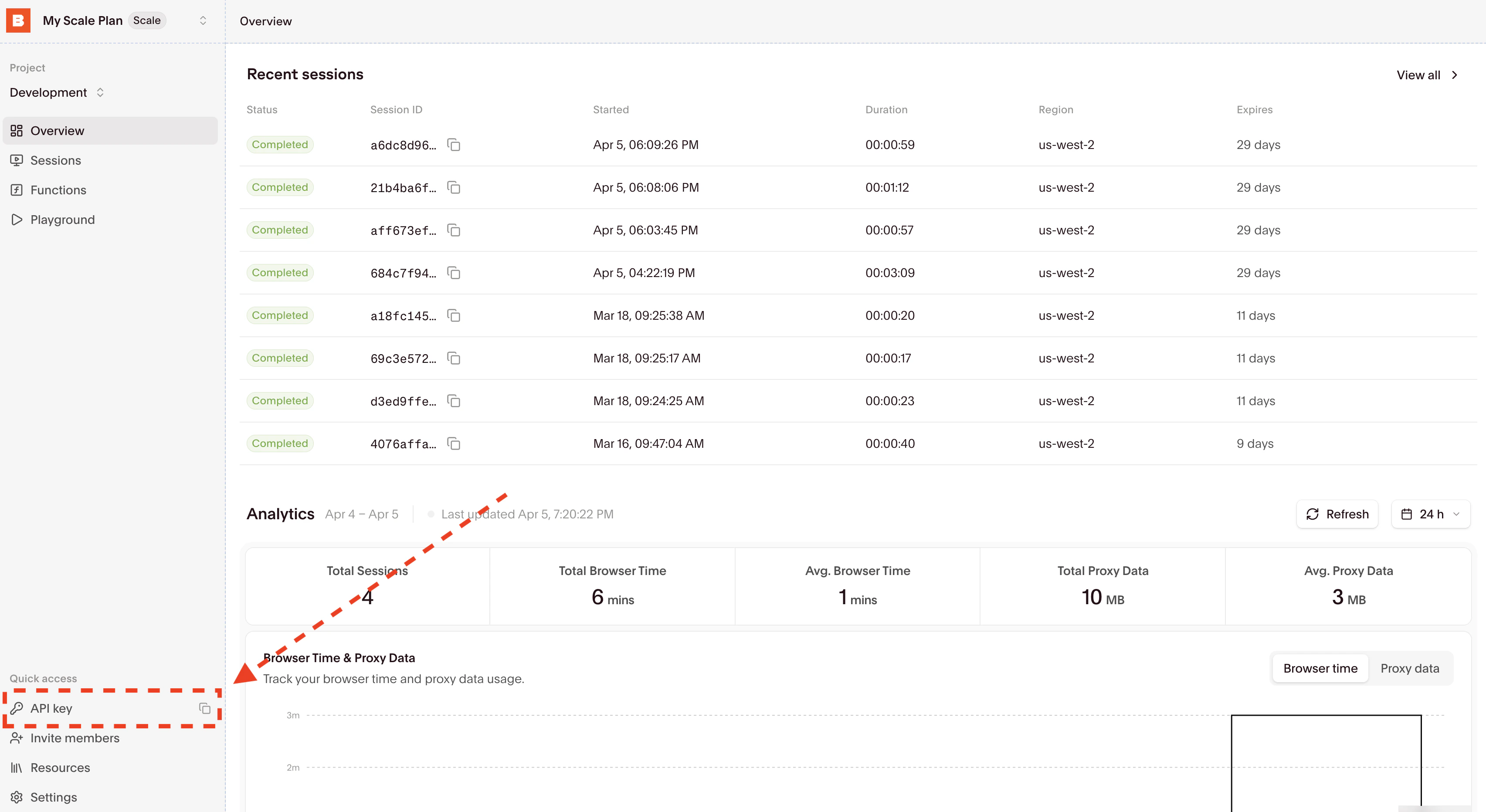
Your API key and Project ID are displayed in the [Dashboard Navigation row](https://www.browserbase.com/sessions):
 ```bash theme={null}
export BROWSERBASE_API_KEY="your-api-key"
```
```bash pnpm theme={null}
pnpm add @browserbasehq/stagehand
npm pkg set type=module
```
```bash npm theme={null}
npm install @browserbasehq/stagehand
npm pkg set type=module
```
```typescript theme={null}
import { Stagehand } from "@browserbasehq/stagehand";
const stagehand = new Stagehand({
env: "BROWSERBASE",
model: "google/gemini-3-flash-preview",
});
await stagehand.init();
const page = stagehand.context.pages()[0];
await page.goto("https://news.ycombinator.com");
// Let AI click
await stagehand.act("click on the comments link for the top story");
// Extract structured data
const data = await stagehand.extract("extract the title and points of the top story");
console.log(data);
await stagehand.close();
```
Save as `script.ts`, then run:
```bash pnpm theme={null}
pnpm dlx tsx script.ts
```
```bash npm theme={null}
npx tsx script.ts
```
```bash theme={null}
uv init
uv add stagehand
```
```python theme={null}
from stagehand import Stagehand
def main():
client = Stagehand()
response = client.sessions.start(model_name="google/gemini-3-flash-preview")
session_id = response.data.session_id
print(f"Session started: {session_id}")
client.sessions.navigate(id=session_id, url="https://news.ycombinator.com")
print("Navigated to Hacker News")
# Let AI click
act_result = client.sessions.act(id=session_id, input="click on the comments link for the top story")
print(f"Act result: {act_result}")
# Extract structured data
result = client.sessions.extract(
id=session_id,
instruction="extract the title and points of the top story"
)
print(f"Extracted: {result}")
client.sessions.end(id=session_id)
if __name__ == "__main__":
main()
```
Save as `script.py`, then run:
```bash theme={null}
uv run script.py
```
See the [Java SDK documentation →](https://docs.stagehand.dev/v3/sdk/java)
See the [Go SDK documentation →](https://docs.stagehand.dev/v3/sdk/go)
See the [Ruby SDK documentation →](https://docs.stagehand.dev/v3/sdk/ruby)
See every AI decision in the **[Stagehand tab](/platform/browser/observability/observability#stagehand)** of your session at `https://browserbase.com/sessions/{session_id}`.
## Next steps
Learn about Stagehand primitives, models, and Browserbase configurations
Scaffold a Stagehand project in one command. TypeScript, zero-config.
```bash theme={null}
export BROWSERBASE_API_KEY="your-api-key"
```
```bash pnpm theme={null}
pnpm add @browserbasehq/stagehand
npm pkg set type=module
```
```bash npm theme={null}
npm install @browserbasehq/stagehand
npm pkg set type=module
```
```typescript theme={null}
import { Stagehand } from "@browserbasehq/stagehand";
const stagehand = new Stagehand({
env: "BROWSERBASE",
model: "google/gemini-3-flash-preview",
});
await stagehand.init();
const page = stagehand.context.pages()[0];
await page.goto("https://news.ycombinator.com");
// Let AI click
await stagehand.act("click on the comments link for the top story");
// Extract structured data
const data = await stagehand.extract("extract the title and points of the top story");
console.log(data);
await stagehand.close();
```
Save as `script.ts`, then run:
```bash pnpm theme={null}
pnpm dlx tsx script.ts
```
```bash npm theme={null}
npx tsx script.ts
```
```bash theme={null}
uv init
uv add stagehand
```
```python theme={null}
from stagehand import Stagehand
def main():
client = Stagehand()
response = client.sessions.start(model_name="google/gemini-3-flash-preview")
session_id = response.data.session_id
print(f"Session started: {session_id}")
client.sessions.navigate(id=session_id, url="https://news.ycombinator.com")
print("Navigated to Hacker News")
# Let AI click
act_result = client.sessions.act(id=session_id, input="click on the comments link for the top story")
print(f"Act result: {act_result}")
# Extract structured data
result = client.sessions.extract(
id=session_id,
instruction="extract the title and points of the top story"
)
print(f"Extracted: {result}")
client.sessions.end(id=session_id)
if __name__ == "__main__":
main()
```
Save as `script.py`, then run:
```bash theme={null}
uv run script.py
```
See the [Java SDK documentation →](https://docs.stagehand.dev/v3/sdk/java)
See the [Go SDK documentation →](https://docs.stagehand.dev/v3/sdk/go)
See the [Ruby SDK documentation →](https://docs.stagehand.dev/v3/sdk/ruby)
See every AI decision in the **[Stagehand tab](/platform/browser/observability/observability#stagehand)** of your session at `https://browserbase.com/sessions/{session_id}`.
## Next steps
Learn about Stagehand primitives, models, and Browserbase configurations
Scaffold a Stagehand project in one command. TypeScript, zero-config.