> ## Documentation Index
> Fetch the complete documentation index at: https://docs.browserbase.com/llms.txt
> Use this file to discover all available pages before exploring further.
# Start your first session with Playwright
> Connect Playwright to Browserbase cloud browsers in minutes. Run headless browser automation at scale with session recording and debugging.
Get started with Browserbase and Playwright in Node.js.
Get started with Browserbase and Playwright in Python.
Your API key is displayed in the [Dashboard Navigation row](https://www.browserbase.com/sessions). The API key is all you need to get started. The project is inferred from your API key.
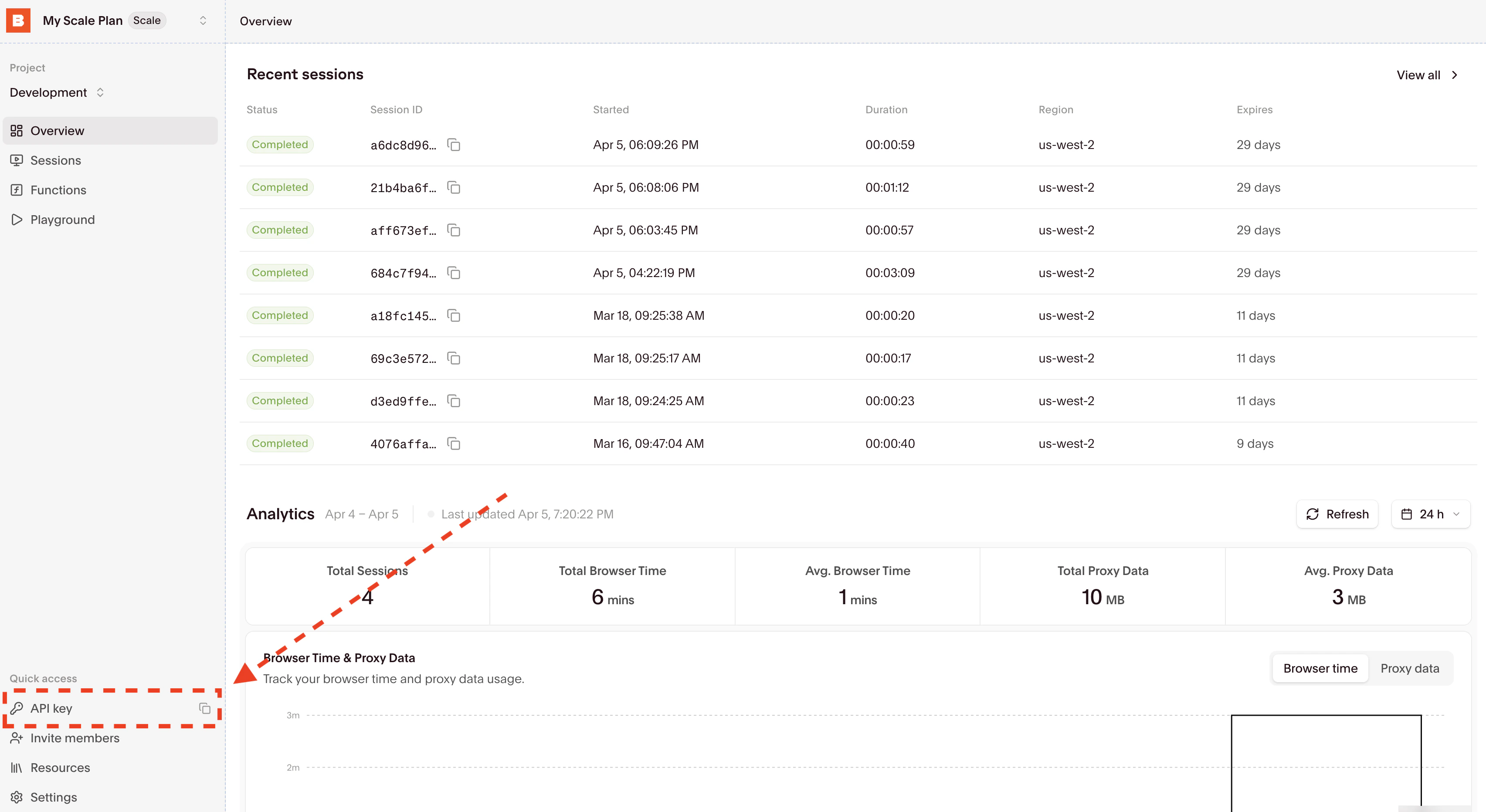 Copy your API key and update your `.env` by adding the `BROWSERBASE_API_KEY` entry.
Alternatively, you can temporarily set the environment variable for a single bash command by prefixing it with `BROWSERBASE_API_KEY=` in your terminal.
```bash theme={null}
npm i playwright-core @browserbasehq/sdk
```
Bun doesn't currently support Playwright.
```bash theme={null}
pip install playwright browserbase
```
Running your existing code with Browserbase only requires a few line changes:
```typescript theme={null}
import { chromium } from "playwright-core";
import Browserbase from "@browserbasehq/sdk";
const bb = new Browserbase({
apiKey: process.env.BROWSERBASE_API_KEY,
});
(async () => {
const session = await bb.sessions.create();
console.log(`Session created, id: ${session.id}`);
const browser = await chromium.connectOverCDP(session.connectUrl);
const defaultContext = browser.contexts()[0];
const page = defaultContext.pages()[0];
await page.goto("https://www.browserbase.com/", {
waitUntil: "domcontentloaded",
});
const debugUrls = await bb.sessions.debug(session.id);
console.log(
`Session started, live debug accessible here: ${debugUrls.debuggerUrl}.`,
);
console.log("Taking a screenshot!");
await page.screenshot({ fullPage: true });
console.log("Shutting down...");
await page.close();
await browser.close();
console.log(
`Session complete! View recording at https://browserbase.com/sessions/${session.id}`,
);
})();
```
Set your `BROWSERBASE_API_KEY` in the environment variables.
```python theme={null}
from playwright.sync_api import Playwright, sync_playwright
from browserbase import Browserbase
import os
bb = Browserbase(api_key=os.environ["BROWSERBASE_API_KEY"])
def run(playwright: Playwright) -> None:
session = bb.sessions.create()
print("Session recording URL:", f"https://browserbase.com/sessions/{session.id}")
chromium = playwright.chromium
browser = chromium.connect_over_cdp(session.connect_url)
context = browser.contexts[0]
page = context.pages[0]
page.goto("https://browserbase.com/")
page_title = page.title()
print(page_title)
page.close()
browser.close()
print("Done!")
if __name__ == "__main__":
with sync_playwright() as playwright:
run(playwright)
```
Set your `BROWSERBASE_API_KEY` in the environment variables.
Copy your API key and update your `.env` by adding the `BROWSERBASE_API_KEY` entry.
Alternatively, you can temporarily set the environment variable for a single bash command by prefixing it with `BROWSERBASE_API_KEY=` in your terminal.
```bash theme={null}
npm i playwright-core @browserbasehq/sdk
```
Bun doesn't currently support Playwright.
```bash theme={null}
pip install playwright browserbase
```
Running your existing code with Browserbase only requires a few line changes:
```typescript theme={null}
import { chromium } from "playwright-core";
import Browserbase from "@browserbasehq/sdk";
const bb = new Browserbase({
apiKey: process.env.BROWSERBASE_API_KEY,
});
(async () => {
const session = await bb.sessions.create();
console.log(`Session created, id: ${session.id}`);
const browser = await chromium.connectOverCDP(session.connectUrl);
const defaultContext = browser.contexts()[0];
const page = defaultContext.pages()[0];
await page.goto("https://www.browserbase.com/", {
waitUntil: "domcontentloaded",
});
const debugUrls = await bb.sessions.debug(session.id);
console.log(
`Session started, live debug accessible here: ${debugUrls.debuggerUrl}.`,
);
console.log("Taking a screenshot!");
await page.screenshot({ fullPage: true });
console.log("Shutting down...");
await page.close();
await browser.close();
console.log(
`Session complete! View recording at https://browserbase.com/sessions/${session.id}`,
);
})();
```
Set your `BROWSERBASE_API_KEY` in the environment variables.
```python theme={null}
from playwright.sync_api import Playwright, sync_playwright
from browserbase import Browserbase
import os
bb = Browserbase(api_key=os.environ["BROWSERBASE_API_KEY"])
def run(playwright: Playwright) -> None:
session = bb.sessions.create()
print("Session recording URL:", f"https://browserbase.com/sessions/{session.id}")
chromium = playwright.chromium
browser = chromium.connect_over_cdp(session.connect_url)
context = browser.contexts[0]
page = context.pages[0]
page.goto("https://browserbase.com/")
page_title = page.title()
print(page_title)
page.close()
browser.close()
print("Done!")
if __name__ == "__main__":
with sync_playwright() as playwright:
run(playwright)
```
Set your `BROWSERBASE_API_KEY` in the environment variables.
Find your recent sessions on the overview dashboard:
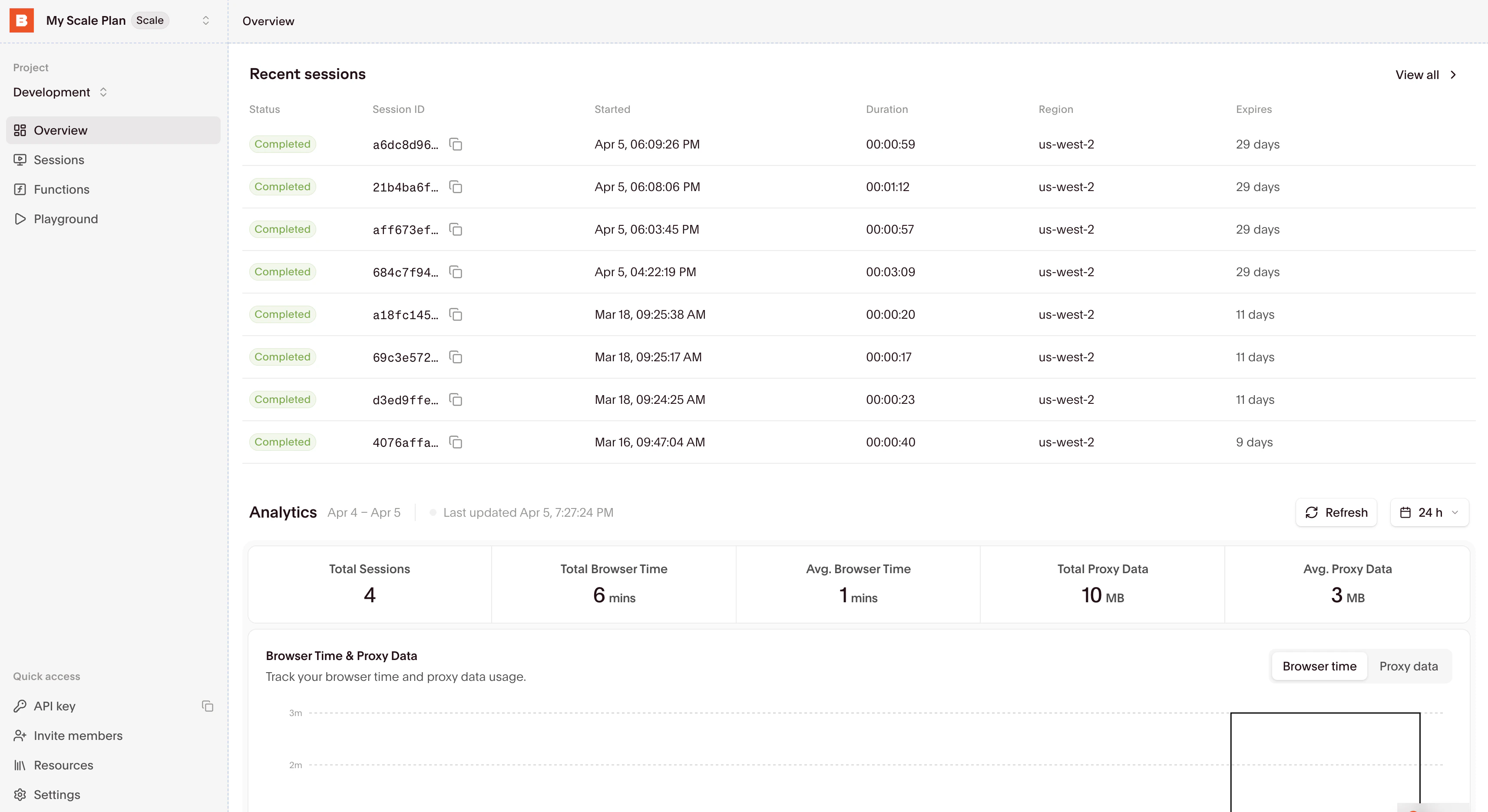 Select a session to inspect it with the [Session Inspector](/platform/browser/observability/observability).
## Start building
Learn how to connect to and interact with browser sessions effectively.
Understand how to properly end sessions and manage their lifecycle.
Select a session to inspect it with the [Session Inspector](/platform/browser/observability/observability).
## Start building
Learn how to connect to and interact with browser sessions effectively.
Understand how to properly end sessions and manage their lifecycle.