> ## Documentation Index
> Fetch the complete documentation index at: https://docs.browserbase.com/llms.txt
> Use this file to discover all available pages before exploring further.
# Example
> A complete webhook receiver for Function invocations, from registering the endpoint to handling the event.
The example below is a complete starting point: the call that **registers the endpoint**, a **receiver** that verifies and handles deliveries, and the way to **trigger** an event so you can watch it arrive. Swap the event types and the handler body to cover a different surface.
Browserbase returns the signing secret only when you create the webhook and when you rotate it. Store it before you discard the response; no endpoint reads it back.
## React to Function invocations
A Function invocation runs on its own schedule, so the alternative is polling `GET /v1/functions/invocations/{id}` until it leaves `RUNNING`. Subscribing instead means Browserbase calls you once the invocation reaches a terminal state, and the receiver below handles both the success and the failure case.
Browserbase delivers over the public internet, so a receiver on `localhost` needs a tunnel while you develop. Use the `https://` forwarding URL it prints.
```bash theme={null}
ngrok http 3000
```
```typescript Node.js theme={null}
import { Browserbase } from "@browserbasehq/sdk";
const bb = new Browserbase({ apiKey: process.env.BROWSERBASE_API_KEY! });
const webhook = await bb.webhooks.create({
endpoint: "https://your-tunnel.ngrok.app/browserbase/events",
eventTypes: [
"functions.invocations.completed",
"functions.invocations.failed",
],
});
console.log(webhook.secret);
```
```python Python theme={null}
import os
from browserbase import Browserbase
bb = Browserbase(api_key=os.environ["BROWSERBASE_API_KEY"])
webhook = bb.webhooks.create(
endpoint="https://your-tunnel.ngrok.app/browserbase/events",
event_types=[
"functions.invocations.completed",
"functions.invocations.failed",
],
)
print(webhook.secret)
```
```bash theme={null}
curl -X POST https://api.browserbase.com/v1/webhooks \
--header "x-bb-api-key: $BROWSERBASE_API_KEY" \
--header "Content-Type: application/json" \
--data '{
"endpoint": "https://your-tunnel.ngrok.app/browserbase/events",
"eventTypes": ["functions.invocations.completed", "functions.invocations.failed"]
}'
```
Put the returned secret in your environment as `BROWSERBASE_WEBHOOK_SECRET`.
A complete server. It verifies the signature, acknowledges inside the 15 second budget, then does the work.
```typescript Node.js theme={null}
import { Webhook, WebhookVerificationError } from "standardwebhooks";
import express from "express";
const app = express();
const wh = new Webhook(process.env.BROWSERBASE_WEBHOOK_SECRET!);
const seen = new Set();
app.post(
"/browserbase/events",
// Verification runs over the raw bytes, so do not parse the body first.
express.raw({ type: "application/json" }),
(req, res) => {
let event;
try {
event = wh.verify(req.body, {
"webhook-id": req.header("webhook-id")!,
"webhook-timestamp": req.header("webhook-timestamp")!,
"webhook-signature": req.header("webhook-signature")!,
}) as { id: string; type: string; resourceId: string };
} catch (error) {
if (error instanceof WebhookVerificationError) {
return res.sendStatus(400);
}
throw error;
}
// Answer first, work after.
res.sendStatus(204);
// The same event can arrive more than once, so dedupe on the envelope id.
if (seen.has(event.id)) return;
seen.add(event.id);
void handle(event);
},
);
async function handle(event: { type: string; resourceId: string }) {
switch (event.type) {
case "functions.invocations.completed":
console.log("invocation finished", event.resourceId);
break;
case "functions.invocations.failed":
console.log("invocation failed", event.resourceId);
break;
default:
// Browserbase adds types over time; ignore what you do not recognize.
break;
}
}
app.listen(3000);
```
```python Python theme={null}
import os
from fastapi import FastAPI, Request, Response
from standardwebhooks.webhooks import Webhook, WebhookVerificationError
app = FastAPI()
wh = Webhook(os.environ["BROWSERBASE_WEBHOOK_SECRET"])
seen: set[str] = set()
@app.post("/browserbase/events")
async def receive(request: Request) -> Response:
# Verification runs over the raw bytes, so read the body unparsed.
body = await request.body()
try:
event = wh.verify(body, dict(request.headers))
except WebhookVerificationError:
return Response(status_code=400)
# The same event can arrive more than once, so dedupe on the envelope id.
if event["id"] in seen:
return Response(status_code=204)
seen.add(event["id"])
handle(event)
return Response(status_code=204)
def handle(event: dict) -> None:
if event["type"] == "functions.invocations.completed":
print("invocation finished", event["resourceId"])
elif event["type"] == "functions.invocations.failed":
print("invocation failed", event["resourceId"])
```
`seen` is an in-memory set, so it empties on restart and does not work across replicas. Key the deduplication on a database or a cache in production.
Invoke a Function and let it finish. Your receiver logs the event once the invocation reaches a terminal state.
```bash theme={null}
curl -X POST https://api.browserbase.com/v1/functions/FUNCTION_ID/invoke \
--header "x-bb-api-key: $BROWSERBASE_API_KEY" \
--header "Content-Type: application/json" \
--data '{"params": {}}'
```
### If nothing arrives
Work down this list, ordered by how often each one is the cause.
* **Your endpoint returned a non-2xx.** Check the response code on the delivery in [Settings](https://www.browserbase.com/settings). A redirect counts as a failure.
* **Verification rejected it.** Almost always a parsed body. Confirm the raw bytes reach `verify`.
* **You did not subscribe to that type.** An endpoint receives only the types it subscribes to.
* **Browserbase disabled the endpoint.** An endpoint that fails continuously for five days stops receiving deliveries.
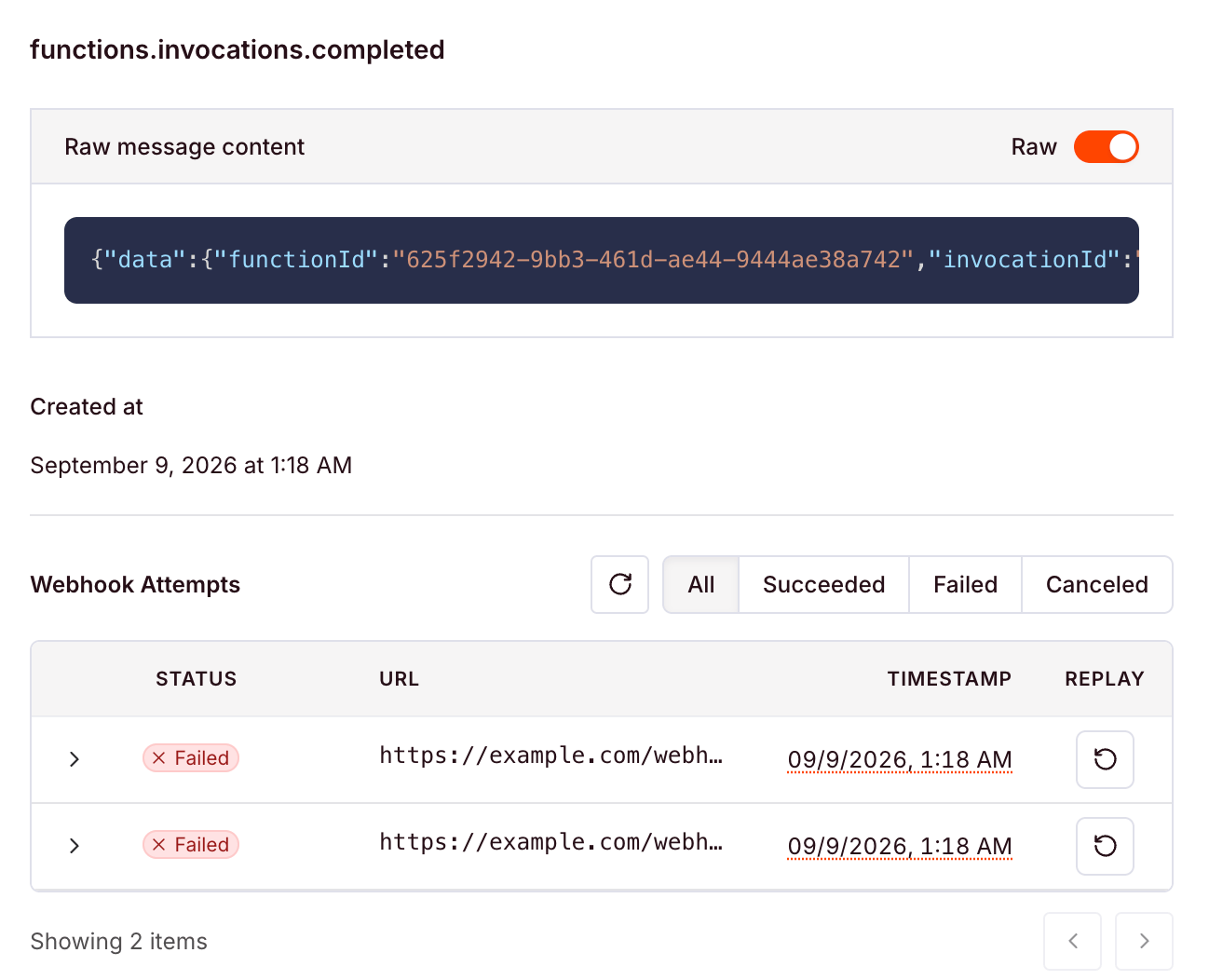
Open a delivery to see the payload that was sent and every attempt against it, with the status each one returned.
 ## Next steps
Signature checking, retries, and idempotency in more detail.
Create, list, update, rotate, and delete endpoints.
The invocations these events report on.
Full request and response shapes.
## Next steps
Signature checking, retries, and idempotency in more detail.
Create, list, update, rotate, and delete endpoints.
The invocations these events report on.
Full request and response shapes.