> ## Documentation Index
> Fetch the complete documentation index at: https://docs.browserbase.com/llms.txt
> Use this file to discover all available pages before exploring further.
# Session recording (rrweb)
> Every session is automatically recorded so you can inspect actions and debug issues
**rrweb is being deprecated.** The rrweb-based DOM replay API and related tooling are being deprecated. Video recordings in the Dashboard remain fully supported. If you need to continue using rrweb, please contact [support@browserbase.com](mailto:support@browserbase.com).
Video recordings in the Dashboard capture up to 10 tabs as separate video streams. To embed playback in your own application, stream session replays as HLS through the [Session Replay API](/platform/browser/observability/session-replay).
Browserbase automatically records every session as a video. You can replay these video recordings to inspect the actions performed, review network requests, and debug issues page by page.
Video recordings are available in the [Dashboard](https://www.browserbase.com/sessions). To stream session replays into your own application via HLS, use the [Session Replay API](/platform/browser/observability/session-replay).
## Quickstart
### Install the SDK
```bash npm theme={null}
npm install @browserbasehq/sdk playwright-core
```
```bash pnpm theme={null}
pnpm install @browserbasehq/sdk playwright-core
```
```bash yarn theme={null}
yarn add @browserbasehq/sdk playwright-core
```
```bash theme={null}
pip install browserbase playwright
```
### Run a session
```typescript theme={null}
import { Browserbase } from "@browserbasehq/sdk";
import { chromium } from "playwright-core";
const bb = new Browserbase({ apiKey: process.env.BROWSERBASE_API_KEY! });
const session = await bb.sessions.create();
const browser = await chromium.connectOverCDP(session.connectUrl);
const context = browser.contexts()[0];
const page = context.pages()[0];
await page.goto("https://news.ycombinator.com");
await page.waitForTimeout(3000);
await page.close();
await browser.close();
console.log(`View recording: https://browserbase.com/sessions/${session.id}`);
```
```python theme={null}
from browserbase import Browserbase
from playwright.sync_api import sync_playwright
import os
bb = Browserbase(api_key=os.environ["BROWSERBASE_API_KEY"])
session = bb.sessions.create()
with sync_playwright() as p:
browser = p.chromium.connect_over_cdp(session.connect_url)
context = browser.contexts[0]
page = context.pages[0]
page.goto("https://news.ycombinator.com")
page.wait_for_timeout(3000)
page.close()
browser.close()
print(f"View recording: https://browserbase.com/sessions/{session.id}")
```
After the session completes, the recording is available at `https://browserbase.com/sessions/{session.id}`.
## Viewing video recordings
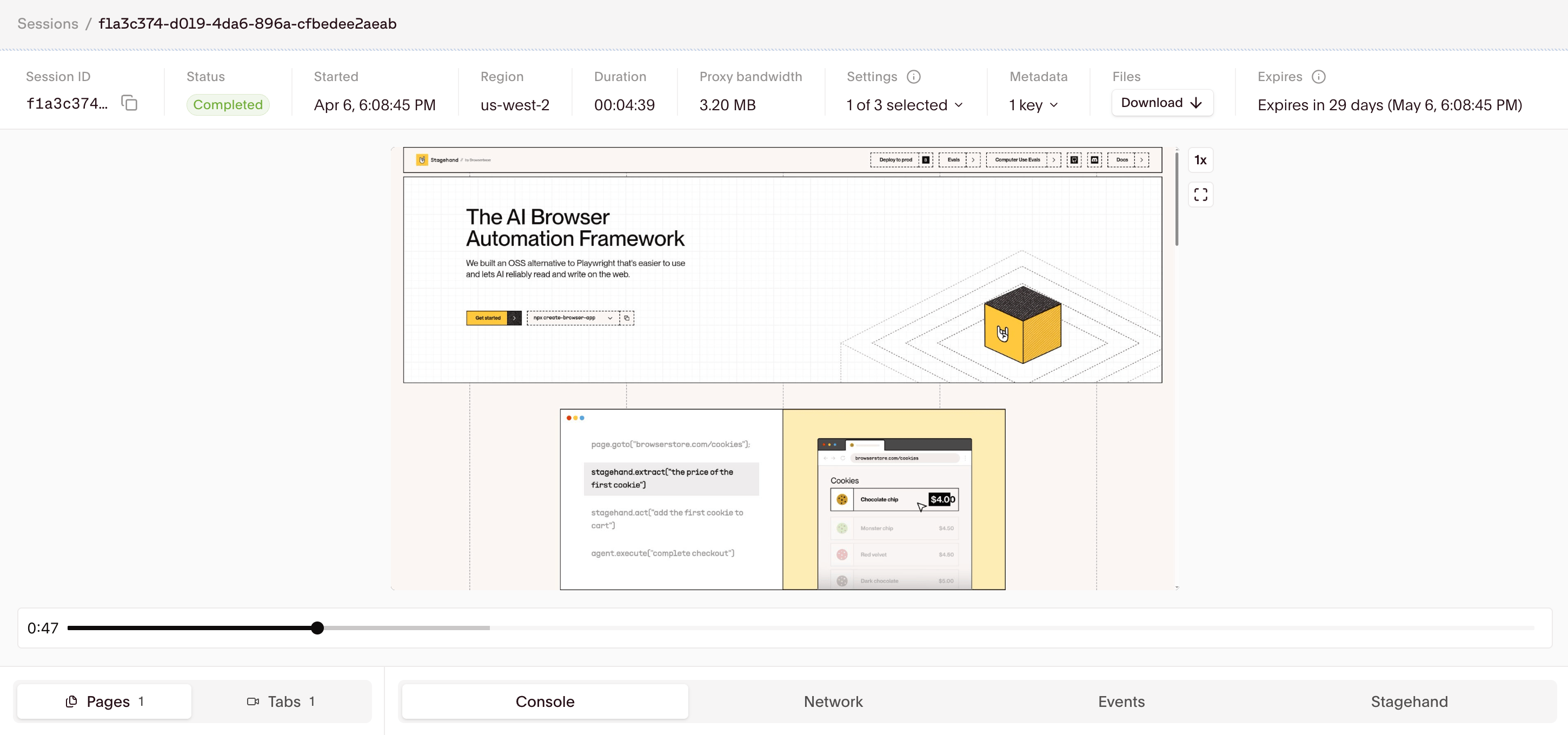 The video recording player supports:
* Playback speed control (0.5x, 1x, 2x, 4x)
* Timeline navigation
* Pause/resume at any point
## Multitab support
Video recordings capture up to 10 tabs as separate video streams. Each tab can be viewed individually in the Session Inspector.
The rrweb DOM replay API (`recording.retrieve()`) only captures the primary tab. For multitab sessions, use the video recordings in the Dashboard.
## Retrieving rrweb DOM replays
**Deprecated.** The rrweb DOM replay API is being deprecated. If you need to continue using rrweb, please contact [support@browserbase.com](mailto:support@browserbase.com).
For programmatic access to the same video that plays in the Dashboard, see [Session Replay](/platform/browser/observability/session-replay); it returns an HLS stream you can embed using [hls.js](https://github.com/video-dev/hls.js) or any HLS-capable player.
### Via SDK
Retrieve rrweb DOM replay events programmatically for custom playback:
```typescript theme={null}
const bb = new Browserbase({ apiKey: process.env.BROWSERBASE_API_KEY! });
const recording = await bb.sessions.recording.retrieve(sessionId);
console.log(recording);
```
```python theme={null}
bb = Browserbase(api_key=os.environ["BROWSERBASE_API_KEY"])
recording = bb.sessions.recording.retrieve(session_id)
print(recording)
```
The `recording.retrieve()` method returns rrweb DOM replay events. This is separate from video recordings, which are only available in the Dashboard.
### Embedding the rrweb player
**Deprecated.** The rrweb player integration is being deprecated. If you need to continue using rrweb, please contact [support@browserbase.com](mailto:support@browserbase.com).
To embed rrweb DOM replays in your application, use the rrweb player:
```typescript theme={null}
import rrwebPlayer from "rrweb-player";
import "rrweb-player/dist/style.css";
const player = new rrwebPlayer({
target: document.body,
props: {
events: recording.events,
width: 1024,
height: 576,
skipInactive: true,
showController: true,
autoPlay: false,
},
});
// Control playback
player.addEventListener("play", () => console.log("Started"));
player.addEventListener("pause", () => console.log("Paused"));
player.addEventListener("finish", () => console.log("Finished"));
// Clean up when done
player.destroy();
```
## Disabling video recordings
To disable video recording for a session, set `recordSession` to `false` in your browser settings:
```typescript theme={null}
const session = await bb.sessions.create({
browserSettings: {
recordSession: false,
},
});
```
```python theme={null}
session = bb.sessions.create(
browser_settings={"recordSession": False},
)
```
Disabling recording also disables rrweb DOM replay data. [Live View](/platform/browser/observability/session-live-view) remains available for real-time debugging.
## Troubleshooting
**rrweb DOM replay doesn't match session:**
* rrweb DOM replays are DOM reconstructions and may not always be fully accurate
* Video recordings in the Dashboard provide the most authentic representation
* Recording starts when the first page loads, not when the browser launches
* Use [Live View](/platform/browser/observability/session-live-view) for real-time debugging
**rrweb DOM replay not available:**
* Some sites may block rrweb DOM replays (e.g., Opentable, Salesforce family). Video recordings in the Dashboard should be unaffected.
Questions? Email [support@browserbase.com](mailto:support@browserbase.com)
The video recording player supports:
* Playback speed control (0.5x, 1x, 2x, 4x)
* Timeline navigation
* Pause/resume at any point
## Multitab support
Video recordings capture up to 10 tabs as separate video streams. Each tab can be viewed individually in the Session Inspector.
The rrweb DOM replay API (`recording.retrieve()`) only captures the primary tab. For multitab sessions, use the video recordings in the Dashboard.
## Retrieving rrweb DOM replays
**Deprecated.** The rrweb DOM replay API is being deprecated. If you need to continue using rrweb, please contact [support@browserbase.com](mailto:support@browserbase.com).
For programmatic access to the same video that plays in the Dashboard, see [Session Replay](/platform/browser/observability/session-replay); it returns an HLS stream you can embed using [hls.js](https://github.com/video-dev/hls.js) or any HLS-capable player.
### Via SDK
Retrieve rrweb DOM replay events programmatically for custom playback:
```typescript theme={null}
const bb = new Browserbase({ apiKey: process.env.BROWSERBASE_API_KEY! });
const recording = await bb.sessions.recording.retrieve(sessionId);
console.log(recording);
```
```python theme={null}
bb = Browserbase(api_key=os.environ["BROWSERBASE_API_KEY"])
recording = bb.sessions.recording.retrieve(session_id)
print(recording)
```
The `recording.retrieve()` method returns rrweb DOM replay events. This is separate from video recordings, which are only available in the Dashboard.
### Embedding the rrweb player
**Deprecated.** The rrweb player integration is being deprecated. If you need to continue using rrweb, please contact [support@browserbase.com](mailto:support@browserbase.com).
To embed rrweb DOM replays in your application, use the rrweb player:
```typescript theme={null}
import rrwebPlayer from "rrweb-player";
import "rrweb-player/dist/style.css";
const player = new rrwebPlayer({
target: document.body,
props: {
events: recording.events,
width: 1024,
height: 576,
skipInactive: true,
showController: true,
autoPlay: false,
},
});
// Control playback
player.addEventListener("play", () => console.log("Started"));
player.addEventListener("pause", () => console.log("Paused"));
player.addEventListener("finish", () => console.log("Finished"));
// Clean up when done
player.destroy();
```
## Disabling video recordings
To disable video recording for a session, set `recordSession` to `false` in your browser settings:
```typescript theme={null}
const session = await bb.sessions.create({
browserSettings: {
recordSession: false,
},
});
```
```python theme={null}
session = bb.sessions.create(
browser_settings={"recordSession": False},
)
```
Disabling recording also disables rrweb DOM replay data. [Live View](/platform/browser/observability/session-live-view) remains available for real-time debugging.
## Troubleshooting
**rrweb DOM replay doesn't match session:**
* rrweb DOM replays are DOM reconstructions and may not always be fully accurate
* Video recordings in the Dashboard provide the most authentic representation
* Recording starts when the first page loads, not when the browser launches
* Use [Live View](/platform/browser/observability/session-live-view) for real-time debugging
**rrweb DOM replay not available:**
* Some sites may block rrweb DOM replays (e.g., Opentable, Salesforce family). Video recordings in the Dashboard should be unaffected.
Questions? Email [support@browserbase.com](mailto:support@browserbase.com)