> ## Documentation Index
> Fetch the complete documentation index at: https://docs.browserbase.com/llms.txt
> Use this file to discover all available pages before exploring further.
# Tutorial: Slack Scout
> Send a Slack notification every time your keywords are mentioned on Twitter, Hacker News, or Reddit.
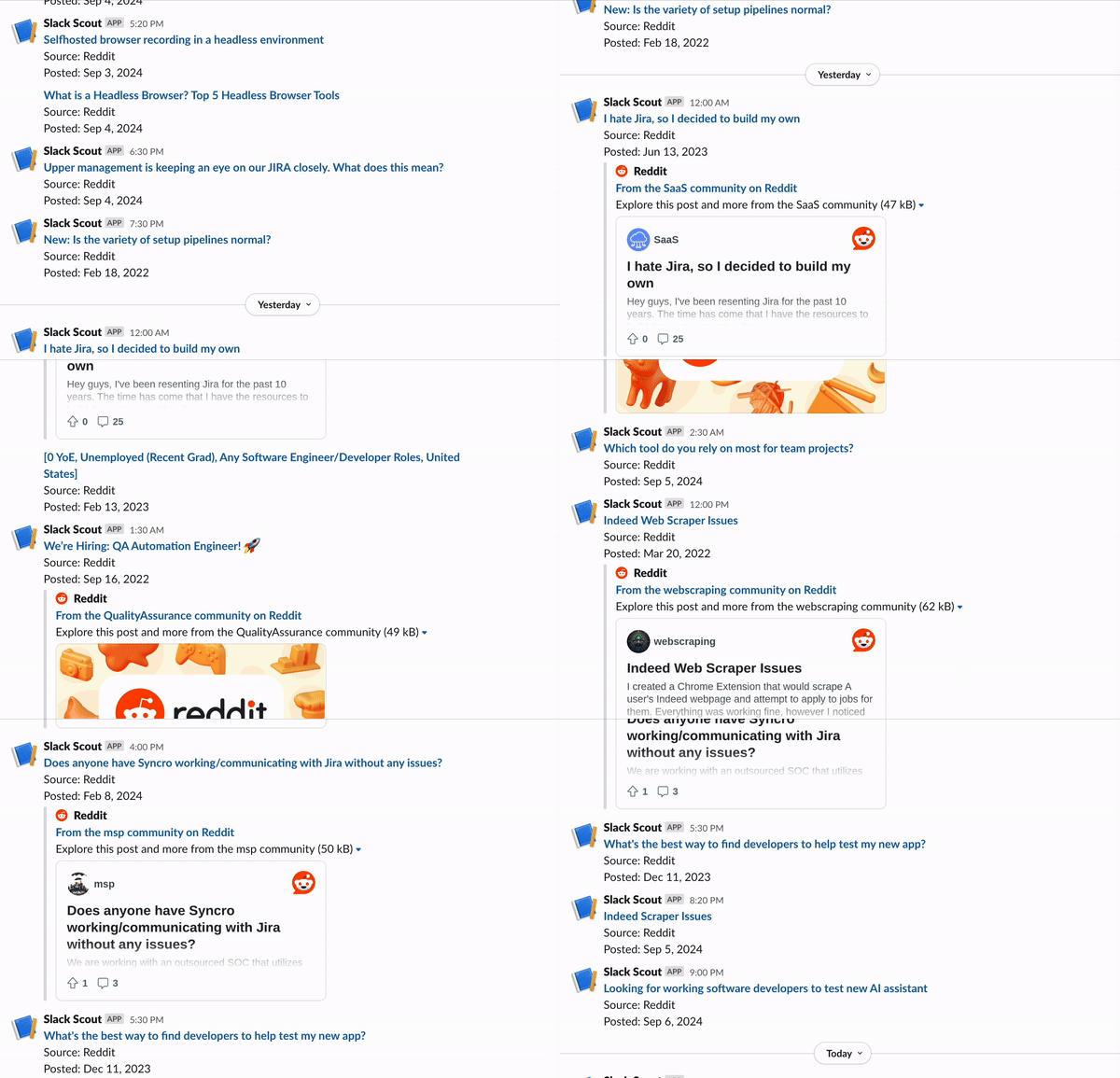
Slack scout sends a Slack notification every time your keywords are mentioned on Twitter, Hacker News, or Reddit. Get notified whenever you, your company, or topics of interest are mentioned online.
Built with [Browserbase](https://browserbase.com) and [Val Town](https://val.town). Inspired by [f5bot.com](https://f5bot.com).
 ## What this tutorial covers
* Access and extract website posts and contents using Browserbase
* Write scheduled functions and APIs with Val Town
* Send automated Slack messages via webhooks
## Getting started
In this tutorial, you’ll need a
* Browserbase [API key](https://www.browserbase.com/settings)
* Val Town account
* Slack Webhook URL: create it [here](https://docs.val.town/integrations/slack/send-messages-to-slack/)
### Browserbase
[Browserbase](https://www.browserbase.com) is a developer platform to run, manage, and monitor headless browsers at scale. This tutorial uses Browserbase to navigate and extract data from different news sources. It also uses [Browserbase’s Proxies](/platform/identity/proxies) to provide consistent network identity across multiple browser sessions.
[Sign up for free](https://www.browserbase.com/sign-up) to get started!
### Val Town
[Val Town](http://val.town/) is a platform to write and deploy JavaScript. You’ll use Val Town for three things.
1. Create [HTTP scripts](https://docs.val.town/types/http/) that run Browserbase sessions. These Browserbase sessions will execute web automation tasks, such as navigating Hacker News and Reddit.
2. Write [Cron Functions](https://docs.val.town/types/cron/) (like Cron Jobs, but more flexible) that periodically run the HTTP scripts.
3. Store persistent data in the Val Town provided [SQLite database](https://docs.val.town/std/sqlite/). This built-in database lets you track search results, so you only send Slack notifications for new, unrecorded keyword mentions.
[Sign up for free](https://www.val.town/auth/signup?next=%2F) to get started!
### Twitter (X)
For this tutorial, you’ll use the Twitter API to include Twitter post results.
You'll need to create a new Twitter account to use the API. It costs \$100 /
month to have a Basic Twitter Developer account.
Once you have the `SLACK_WEBHOOK_URL`, `BROWSERBASE_API_KEY`, and `TWITTER_BEARER_TOKEN`, input all of these as [Val Town Environment Variables](https://www.val.town/settings/environment-variables).
## Creating the APIs
The same method applies to create scripts that search and extract data from Reddit, Hacker News, and Twitter. First, start with Reddit.
To create a new script, go to [Val Town](http://val.town/) → New → HTTP Val. The script takes in a keyword and returns all Reddit posts from the last day that include that keyword.
For each Reddit post, the output should include the URL, date\_published, and post title.
For example:
```javascript theme={null}
{
source: 'Reddit', // or 'Hacker News' or 'Twitter'
url: 'https://www.reddit.com/r/browsers/comments/vdhge5/browserbase_launched/';
date_published: 'Aug 30, 2024';
title: 'Browserbase just launched';
}
```
In the `redditSearch` script, start by importing Puppeteer and creating a Browserbase session with proxies enabled. Be sure to get your `BROWSERBASE_API_KEY` from your [Browserbase settings](https://www.browserbase.com/settings).
```javascript theme={null}
import puppeteer from "https://deno.land/x/puppeteer@16.2.0/mod.ts";
const browser = await puppeteer.connect({
browserWSEndpoint: `wss://connect.browserbase.com?apiKey=${apiKey}&enableProxy=true`,
ignoreHTTPSErrors: true,
});
```
Next, you’ll want to:
1. Navigate to Reddit and do a keyword search
2. Extract each resulting post
To navigate to a Reddit URL that already has the keyword and search time frame encoded, write a helper function that encodes the query and sets search parameters for data collection.
```javascript theme={null}
function constructSearchUrl(query: string): string {
const encodedQuery = encodeURIComponent(query).replace(/%20/g, "+");
return `https://www.reddit.com/search/?q=${encodedQuery}&type=link&t=day`;
}
const url = constructSearchUrl(query);
await page.goto(url, { waitUntil: "networkidle0" });
```
Once you’ve navigated to the constructed URL, you can extract each search result. For each post, select the `title`, `date_published`, and `url`.
```javascript theme={null}
const posts = document.querySelectorAll("div[data-testid=\"search-post-unit\"]");
return Array.from(posts).map(post => {
const titleElement = post.querySelector("a[id^=\"search-post-title\"]");
const timeElement = post.querySelector("faceplate-timeago");
return {
source: "Reddit",
title: titleElement?.textContent?.trim() || "",
url: titleElement?.href || "",
date_published: timeElement?.textContent?.trim() || "",
};
});
// Example
{
source: 'Reddit', // or 'Hacker News' or 'Twitter'
url: 'https://www.reddit.com/r/browsers/comments/vdhge5/browserbase_launched/';
date_published: '1 day ago';
title: 'Browserbase just launched';
}
```
You’ll notice that Reddit posts return the date\_published in the format of ‘1 day ago’ instead of ‘Aug 29, 2024.’ To make date handling more consistent, create a reusable helper script, `convertRelativeDatetoString`, to convert dates to a uniform date format. Import this at the top of the redditSearch script.
```javascript theme={null}
import { convertRelativeDateToString } from "https://esm.town/v/sarahxc/convertRelativeDateToString";
const date_published = await convertRelativeDateToString({
relativeDate: post.date_published,
});
```
You can see the finished redditSearch code [here](https://www.val.town/v/sarahxc/redditSearch).
Follow a similar process to create `hackerNewsSearch`, and use the Twitter API to create `twitterSearch`.
**See all three scripts here:**
*Reddit* → [redditSearch](https://www.val.town/v/sarahxc/redditSearch)
*Hacker News* → [hackerNewsSearch](https://www.val.town/v/alexdphan/hackerNewsSearch)
*Twitter* → [twitterSearch](https://www.val.town/v/alexdphan/twitterSearch)
## Creating the Cron Function
For the last step, create a `slackScout` cron job that calls `redditSearch`, `hackerNewsSearch`, and `twitterSearch` that runs every hour. To create the cron file, go to [Val Town](http://val.town/) → New → Cron Val.
In the slackScout file, import the HTTP scripts.
```javascript theme={null}
import { hackerNewsSearch } from "https://esm.town/v/alexdphan/hackerNewsSearch";
import { twitterSearch } from "https://esm.town/v/alexdphan/twitterSearch";
import { redditSearch } from "https://esm.town/v/sarahxc/redditSearch";
```
Then create helper functions that call the Reddit, Hacker News, and Twitter HTTP scripts.
```javascript theme={null}
// Fetch Reddit, Hacker News, and Twitter results
async function fetchRedditResults(topic: string): Promise {
return redditSearch({ query: topic });
}
async function fetchHackerNewsResults(topic: string): Promise {
return hackerNewsSearch({
query: topic,
pages: 2,
apiKey: Deno.env.get("BROWSERBASE_API_KEY") ?? "",
});
}
async function fetchTwitterResults(topic: string): Promise {
return twitterSearch({
query: topic,
maxResults: 10,
daysBack: 1,
apiKey: Deno.env.get("TWITTER_BEARER_TOKEN") ?? "",
});
}
```
Next, to store the website results, set up Val Town’s SQLite database. Import SQLite and write three helper functions.
1. `createTable`: creates the new SQLite table
2. `isURLInTable`: for each new website returned, checks if the website is already in the table
3. `addWebsiteToTable`: if `isURLInTable` is `False`, adds the new website to the table
```javascript theme={null}
const { sqlite } = await import("https://esm.town/v/std/sqlite");
const TABLE_NAME = "slack_scout_browserbase";
// Create an SQLite table
async function createTable(): Promise {
await sqlite.execute(`
CREATE TABLE IF NOT EXISTS ${TABLE_NAME} (
source TEXT NOT NULL,
url TEXT PRIMARY KEY,
title TEXT NOT NULL,
date_published TEXT NOT NULL
)
`);
}
async function isURLInTable(url: string): Promise {
const result = await sqlite.execute({
sql: `SELECT 1 FROM ${TABLE_NAME} WHERE url = :url LIMIT 1`,
args: { url },
});
return result.rows.length > 0;
}
async function addWebsiteToTable(website: Website): Promise {
await sqlite.execute({
sql: `INSERT INTO ${TABLE_NAME} (source, url, title, date_published)
VALUES (:source, :url, :title, :date_published)`,
args: website,
});
}
```
Finally, write a function to send a Slack notification for each new website.
```javascript theme={null}
async function sendSlackMessage(message: string): Promise {
const slackWebhookUrl = Deno.env.get("SLACK_WEBHOOK_URL");
if (!slackWebhookUrl) {
throw new Error("SLACK_WEBHOOK_URL environment variable is not set");
}
const response = await fetch(slackWebhookUrl, {
method: "POST",
headers: { "Content-Type": "application/json" },
body: JSON.stringify({
blocks: [
{
type: "section",
text: { type: "mrkdwn", text: message },
},
],
}),
});
if (!response.ok) {
throw new Error(`Slack API error: ${response.status} ${response.statusText}`);
}
return response;
}
```
The main function initiates the workflow, calling helper functions to fetch and process data from multiple sources.
```javascript theme={null}
export default async function(interval: Interval): Promise {
try {
await createTable();
for (const topic of KEYWORDS) {
const results = await Promise.allSettled([
fetchHackerNewsResults(topic),
fetchTwitterResults(topic),
fetchRedditResults(topic),
]);
const validResults = results
.filter((result): result is PromiseFulfilledResult => result.status === "fulfilled")
.flatMap(result => result.value);
await processResults(validResults);
}
console.log("Cron job completed successfully.");
} catch (error) {
console.error("An error occurred during the cron job:", error);
}
}
```
Done! You can see the final `slackScout` [here](https://www.val.town/v/sarahxc/slackScout).
## And that’s it!
Optionally, you can use [Browserbase](https://www.browserbase.com) and [Val Town](http://val.town/) to create additional HTTP scripts to monitor additional websites like Substack, Medium, WSJ, etc. Browserbase has a [list of Vals](https://www.val.town/u/browserbase) you can get started with in your own projects. If you have any questions, concerns, or feedback, reach out to the team.
[support@browserbase.com](mailto:support@browserbase.com)
## What this tutorial covers
* Access and extract website posts and contents using Browserbase
* Write scheduled functions and APIs with Val Town
* Send automated Slack messages via webhooks
## Getting started
In this tutorial, you’ll need a
* Browserbase [API key](https://www.browserbase.com/settings)
* Val Town account
* Slack Webhook URL: create it [here](https://docs.val.town/integrations/slack/send-messages-to-slack/)
### Browserbase
[Browserbase](https://www.browserbase.com) is a developer platform to run, manage, and monitor headless browsers at scale. This tutorial uses Browserbase to navigate and extract data from different news sources. It also uses [Browserbase’s Proxies](/platform/identity/proxies) to provide consistent network identity across multiple browser sessions.
[Sign up for free](https://www.browserbase.com/sign-up) to get started!
### Val Town
[Val Town](http://val.town/) is a platform to write and deploy JavaScript. You’ll use Val Town for three things.
1. Create [HTTP scripts](https://docs.val.town/types/http/) that run Browserbase sessions. These Browserbase sessions will execute web automation tasks, such as navigating Hacker News and Reddit.
2. Write [Cron Functions](https://docs.val.town/types/cron/) (like Cron Jobs, but more flexible) that periodically run the HTTP scripts.
3. Store persistent data in the Val Town provided [SQLite database](https://docs.val.town/std/sqlite/). This built-in database lets you track search results, so you only send Slack notifications for new, unrecorded keyword mentions.
[Sign up for free](https://www.val.town/auth/signup?next=%2F) to get started!
### Twitter (X)
For this tutorial, you’ll use the Twitter API to include Twitter post results.
You'll need to create a new Twitter account to use the API. It costs \$100 /
month to have a Basic Twitter Developer account.
Once you have the `SLACK_WEBHOOK_URL`, `BROWSERBASE_API_KEY`, and `TWITTER_BEARER_TOKEN`, input all of these as [Val Town Environment Variables](https://www.val.town/settings/environment-variables).
## Creating the APIs
The same method applies to create scripts that search and extract data from Reddit, Hacker News, and Twitter. First, start with Reddit.
To create a new script, go to [Val Town](http://val.town/) → New → HTTP Val. The script takes in a keyword and returns all Reddit posts from the last day that include that keyword.
For each Reddit post, the output should include the URL, date\_published, and post title.
For example:
```javascript theme={null}
{
source: 'Reddit', // or 'Hacker News' or 'Twitter'
url: 'https://www.reddit.com/r/browsers/comments/vdhge5/browserbase_launched/';
date_published: 'Aug 30, 2024';
title: 'Browserbase just launched';
}
```
In the `redditSearch` script, start by importing Puppeteer and creating a Browserbase session with proxies enabled. Be sure to get your `BROWSERBASE_API_KEY` from your [Browserbase settings](https://www.browserbase.com/settings).
```javascript theme={null}
import puppeteer from "https://deno.land/x/puppeteer@16.2.0/mod.ts";
const browser = await puppeteer.connect({
browserWSEndpoint: `wss://connect.browserbase.com?apiKey=${apiKey}&enableProxy=true`,
ignoreHTTPSErrors: true,
});
```
Next, you’ll want to:
1. Navigate to Reddit and do a keyword search
2. Extract each resulting post
To navigate to a Reddit URL that already has the keyword and search time frame encoded, write a helper function that encodes the query and sets search parameters for data collection.
```javascript theme={null}
function constructSearchUrl(query: string): string {
const encodedQuery = encodeURIComponent(query).replace(/%20/g, "+");
return `https://www.reddit.com/search/?q=${encodedQuery}&type=link&t=day`;
}
const url = constructSearchUrl(query);
await page.goto(url, { waitUntil: "networkidle0" });
```
Once you’ve navigated to the constructed URL, you can extract each search result. For each post, select the `title`, `date_published`, and `url`.
```javascript theme={null}
const posts = document.querySelectorAll("div[data-testid=\"search-post-unit\"]");
return Array.from(posts).map(post => {
const titleElement = post.querySelector("a[id^=\"search-post-title\"]");
const timeElement = post.querySelector("faceplate-timeago");
return {
source: "Reddit",
title: titleElement?.textContent?.trim() || "",
url: titleElement?.href || "",
date_published: timeElement?.textContent?.trim() || "",
};
});
// Example
{
source: 'Reddit', // or 'Hacker News' or 'Twitter'
url: 'https://www.reddit.com/r/browsers/comments/vdhge5/browserbase_launched/';
date_published: '1 day ago';
title: 'Browserbase just launched';
}
```
You’ll notice that Reddit posts return the date\_published in the format of ‘1 day ago’ instead of ‘Aug 29, 2024.’ To make date handling more consistent, create a reusable helper script, `convertRelativeDatetoString`, to convert dates to a uniform date format. Import this at the top of the redditSearch script.
```javascript theme={null}
import { convertRelativeDateToString } from "https://esm.town/v/sarahxc/convertRelativeDateToString";
const date_published = await convertRelativeDateToString({
relativeDate: post.date_published,
});
```
You can see the finished redditSearch code [here](https://www.val.town/v/sarahxc/redditSearch).
Follow a similar process to create `hackerNewsSearch`, and use the Twitter API to create `twitterSearch`.
**See all three scripts here:**
*Reddit* → [redditSearch](https://www.val.town/v/sarahxc/redditSearch)
*Hacker News* → [hackerNewsSearch](https://www.val.town/v/alexdphan/hackerNewsSearch)
*Twitter* → [twitterSearch](https://www.val.town/v/alexdphan/twitterSearch)
## Creating the Cron Function
For the last step, create a `slackScout` cron job that calls `redditSearch`, `hackerNewsSearch`, and `twitterSearch` that runs every hour. To create the cron file, go to [Val Town](http://val.town/) → New → Cron Val.
In the slackScout file, import the HTTP scripts.
```javascript theme={null}
import { hackerNewsSearch } from "https://esm.town/v/alexdphan/hackerNewsSearch";
import { twitterSearch } from "https://esm.town/v/alexdphan/twitterSearch";
import { redditSearch } from "https://esm.town/v/sarahxc/redditSearch";
```
Then create helper functions that call the Reddit, Hacker News, and Twitter HTTP scripts.
```javascript theme={null}
// Fetch Reddit, Hacker News, and Twitter results
async function fetchRedditResults(topic: string): Promise {
return redditSearch({ query: topic });
}
async function fetchHackerNewsResults(topic: string): Promise {
return hackerNewsSearch({
query: topic,
pages: 2,
apiKey: Deno.env.get("BROWSERBASE_API_KEY") ?? "",
});
}
async function fetchTwitterResults(topic: string): Promise {
return twitterSearch({
query: topic,
maxResults: 10,
daysBack: 1,
apiKey: Deno.env.get("TWITTER_BEARER_TOKEN") ?? "",
});
}
```
Next, to store the website results, set up Val Town’s SQLite database. Import SQLite and write three helper functions.
1. `createTable`: creates the new SQLite table
2. `isURLInTable`: for each new website returned, checks if the website is already in the table
3. `addWebsiteToTable`: if `isURLInTable` is `False`, adds the new website to the table
```javascript theme={null}
const { sqlite } = await import("https://esm.town/v/std/sqlite");
const TABLE_NAME = "slack_scout_browserbase";
// Create an SQLite table
async function createTable(): Promise {
await sqlite.execute(`
CREATE TABLE IF NOT EXISTS ${TABLE_NAME} (
source TEXT NOT NULL,
url TEXT PRIMARY KEY,
title TEXT NOT NULL,
date_published TEXT NOT NULL
)
`);
}
async function isURLInTable(url: string): Promise {
const result = await sqlite.execute({
sql: `SELECT 1 FROM ${TABLE_NAME} WHERE url = :url LIMIT 1`,
args: { url },
});
return result.rows.length > 0;
}
async function addWebsiteToTable(website: Website): Promise {
await sqlite.execute({
sql: `INSERT INTO ${TABLE_NAME} (source, url, title, date_published)
VALUES (:source, :url, :title, :date_published)`,
args: website,
});
}
```
Finally, write a function to send a Slack notification for each new website.
```javascript theme={null}
async function sendSlackMessage(message: string): Promise {
const slackWebhookUrl = Deno.env.get("SLACK_WEBHOOK_URL");
if (!slackWebhookUrl) {
throw new Error("SLACK_WEBHOOK_URL environment variable is not set");
}
const response = await fetch(slackWebhookUrl, {
method: "POST",
headers: { "Content-Type": "application/json" },
body: JSON.stringify({
blocks: [
{
type: "section",
text: { type: "mrkdwn", text: message },
},
],
}),
});
if (!response.ok) {
throw new Error(`Slack API error: ${response.status} ${response.statusText}`);
}
return response;
}
```
The main function initiates the workflow, calling helper functions to fetch and process data from multiple sources.
```javascript theme={null}
export default async function(interval: Interval): Promise {
try {
await createTable();
for (const topic of KEYWORDS) {
const results = await Promise.allSettled([
fetchHackerNewsResults(topic),
fetchTwitterResults(topic),
fetchRedditResults(topic),
]);
const validResults = results
.filter((result): result is PromiseFulfilledResult => result.status === "fulfilled")
.flatMap(result => result.value);
await processResults(validResults);
}
console.log("Cron job completed successfully.");
} catch (error) {
console.error("An error occurred during the cron job:", error);
}
}
```
Done! You can see the final `slackScout` [here](https://www.val.town/v/sarahxc/slackScout).
## And that’s it!
Optionally, you can use [Browserbase](https://www.browserbase.com) and [Val Town](http://val.town/) to create additional HTTP scripts to monitor additional websites like Substack, Medium, WSJ, etc. Browserbase has a [list of Vals](https://www.val.town/u/browserbase) you can get started with in your own projects. If you have any questions, concerns, or feedback, reach out to the team.
[support@browserbase.com](mailto:support@browserbase.com)