> ## Documentation Index
> Fetch the complete documentation index at: https://docs.browserbase.com/llms.txt
> Use this file to discover all available pages before exploring further.
# Training browser agents with Prime Intellect
> Wire BrowserEnv into Prime Intellect's RL training workflows for browser-capable models.
Once you've validated your browser environment with [evaluations](/integrations/prime-intellect/evals), you can use `BrowserEnv` in Prime Intellect's reinforcement learning pipelines. This guide covers how to wire Browserbase-backed environments into Hosted Training and self-managed `prime-rl` setups.
This guide focuses on connecting `BrowserEnv` to Prime's training workflows. For RL concepts, reward shaping, and training configuration details, see [Prime's training documentation](https://docs.primeintellect.ai/hosted-training/getting-started).
## Before you train
1. **Validate with evals first.** Run `prime eval run` against your environment and verify that reward signals are meaningful. Invest time in understanding and perfecting your judge rubric; your model will only learn if it has a good judge producing accurate reward signals. Training on a broken reward function wastes compute.
2. **Check reward distribution.** Ensure your environment produces a useful range of rewards, not all zeros or all ones.
3. **Test at small scale.** Start with a short training run to confirm the environment, credentials, and networking all work before committing to a full run.
## Setup
### Install and configure the Prime CLI
```bash theme={null}
uv add prime
prime login
```
You'll also need to install the correct dependencies:
```bash theme={null}
uv pip install -e ".[browser]"
```
### Install your BrowserEnv environment
```bash theme={null}
prime lab setup
prime env install browser-dom-example
```
### Set Browserbase credentials
The training workers need access to Browserbase. Export your credentials:
```bash theme={null}
export BROWSERBASE_API_KEY=your_browserbase_api_key
```
## Hosted training
With Prime's Hosted Training, you define your environment in a TOML config and Prime handles orchestration.
### Minimal config
```toml theme={null}
model = "Qwen/Qwen3-4B-Instruct-2507"
max_steps = 50
batch_size = 128
rollouts_per_example = 8
[sampling]
max_tokens = 512
[[env]]
id = "browserbase/webvoyager"
```
The `[[env]]` section references a published Browserbase environment from the Prime hub. Environment-specific args can be passed via `[env.args]`, the same args you'd pass via `-a` in `prime eval run`.
### Launch training
```bash theme={null}
prime rl run training_config.toml
```
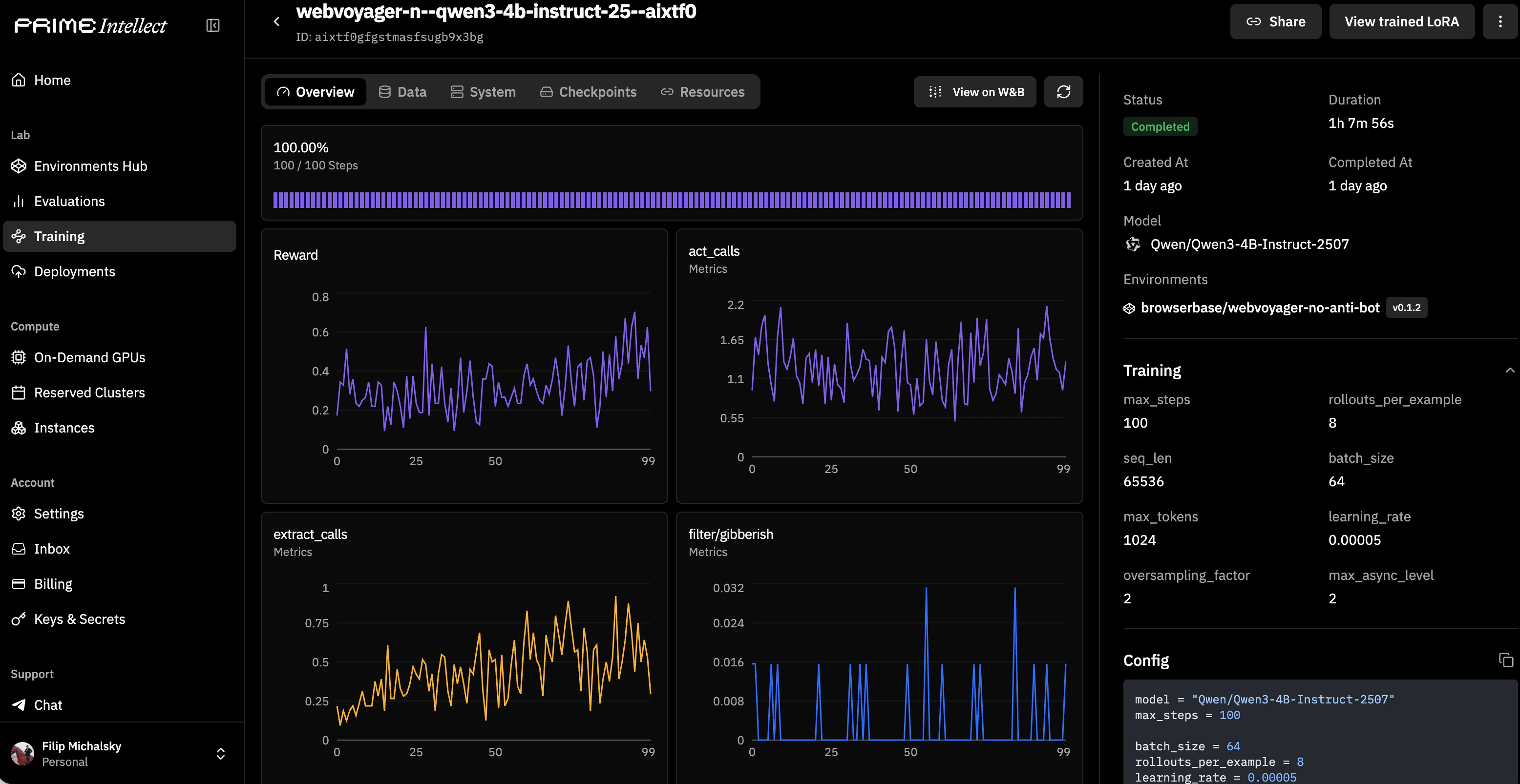 Once training completes, you can deploy post-trained models on Prime infrastructure with the selected checkpoint.
Browserbase credentials (`BROWSERBASE_API_KEY`) are read from environment variables by the training workers. Set them in your training environment configuration or pass them as secrets through Prime's secret management. Don't put them in the TOML config file.
## Self-managed prime-rl
For full control over the training loop, use `prime-rl` directly.
### Setup
```bash theme={null}
prime lab setup --prime-rl
uv add verifiers[browser]
```
### Run training
```bash theme={null}
prime rl run rl_config.toml
```
Refer to the [prime-rl documentation](https://docs.primeintellect.ai/training/prime-rl) for full configuration options.
## Choosing DOM vs CUA for training
| | DOM Mode | CUA Mode |
| -------------------- | --------------------------------------------------------- | ------------------------------------------------------------ |
| **Observation** | Structured DOM / accessibility tree | Screenshots |
| **Action space** | Text-based instructions (navigate, act, observe, extract) | Coordinate-based (click, type, scroll, screenshot) |
| **Best for** | Instruction-following tasks, form filling, navigation | Visual/pixel-grounded tasks, complex UIs |
| **Compute cost** | Lower: text observations are compact | Higher: screenshot rendering and transfer |
| **Recommended when** | Your model processes text and you want faster rollouts | Your model is vision-based or you need pixel-level grounding |
## Performance and cost considerations
Each training step involves creating or reusing a browser session, loading a page, and exchanging observations/actions. This adds latency compared to text-only environments. Budget for slower rollouts in your training timeline.
Every rollout step consumes Browserbase session time. Monitor your usage on the [Browserbase dashboard](https://www.browserbase.com/overview) and factor session costs into your training budget. See [Measuring Usage](/optimizations/cost/measuring-usage) for tracking details.
CUA mode is heavier than DOM mode. Screenshots must be rendered, tokenized, and consumed by the model. If your task doesn't require visual grounding, DOM mode will give you faster and cheaper training runs.
## Related resources
Getting started with Prime's Hosted Training
Environment configuration for training workflows
Validate your environment before training
Reduce session costs in production workloads
Once training completes, you can deploy post-trained models on Prime infrastructure with the selected checkpoint.
Browserbase credentials (`BROWSERBASE_API_KEY`) are read from environment variables by the training workers. Set them in your training environment configuration or pass them as secrets through Prime's secret management. Don't put them in the TOML config file.
## Self-managed prime-rl
For full control over the training loop, use `prime-rl` directly.
### Setup
```bash theme={null}
prime lab setup --prime-rl
uv add verifiers[browser]
```
### Run training
```bash theme={null}
prime rl run rl_config.toml
```
Refer to the [prime-rl documentation](https://docs.primeintellect.ai/training/prime-rl) for full configuration options.
## Choosing DOM vs CUA for training
| | DOM Mode | CUA Mode |
| -------------------- | --------------------------------------------------------- | ------------------------------------------------------------ |
| **Observation** | Structured DOM / accessibility tree | Screenshots |
| **Action space** | Text-based instructions (navigate, act, observe, extract) | Coordinate-based (click, type, scroll, screenshot) |
| **Best for** | Instruction-following tasks, form filling, navigation | Visual/pixel-grounded tasks, complex UIs |
| **Compute cost** | Lower: text observations are compact | Higher: screenshot rendering and transfer |
| **Recommended when** | Your model processes text and you want faster rollouts | Your model is vision-based or you need pixel-level grounding |
## Performance and cost considerations
Each training step involves creating or reusing a browser session, loading a page, and exchanging observations/actions. This adds latency compared to text-only environments. Budget for slower rollouts in your training timeline.
Every rollout step consumes Browserbase session time. Monitor your usage on the [Browserbase dashboard](https://www.browserbase.com/overview) and factor session costs into your training budget. See [Measuring Usage](/optimizations/cost/measuring-usage) for tracking details.
CUA mode is heavier than DOM mode. Screenshots must be rendered, tokenized, and consumed by the model. If your task doesn't require visual grounding, DOM mode will give you faster and cheaper training runs.
## Related resources
Getting started with Prime's Hosted Training
Environment configuration for training workflows
Validate your environment before training
Reduce session costs in production workloads