> ## Documentation Index
> Fetch the complete documentation index at: https://docs.browserbase.com/llms.txt
> Use this file to discover all available pages before exploring further.
# Mastra agent quickstart
> Build AI-powered browser agents with Mastra and Stagehand
Go over the [Dashboard's Settings tab](https://www.browserbase.com/settings):
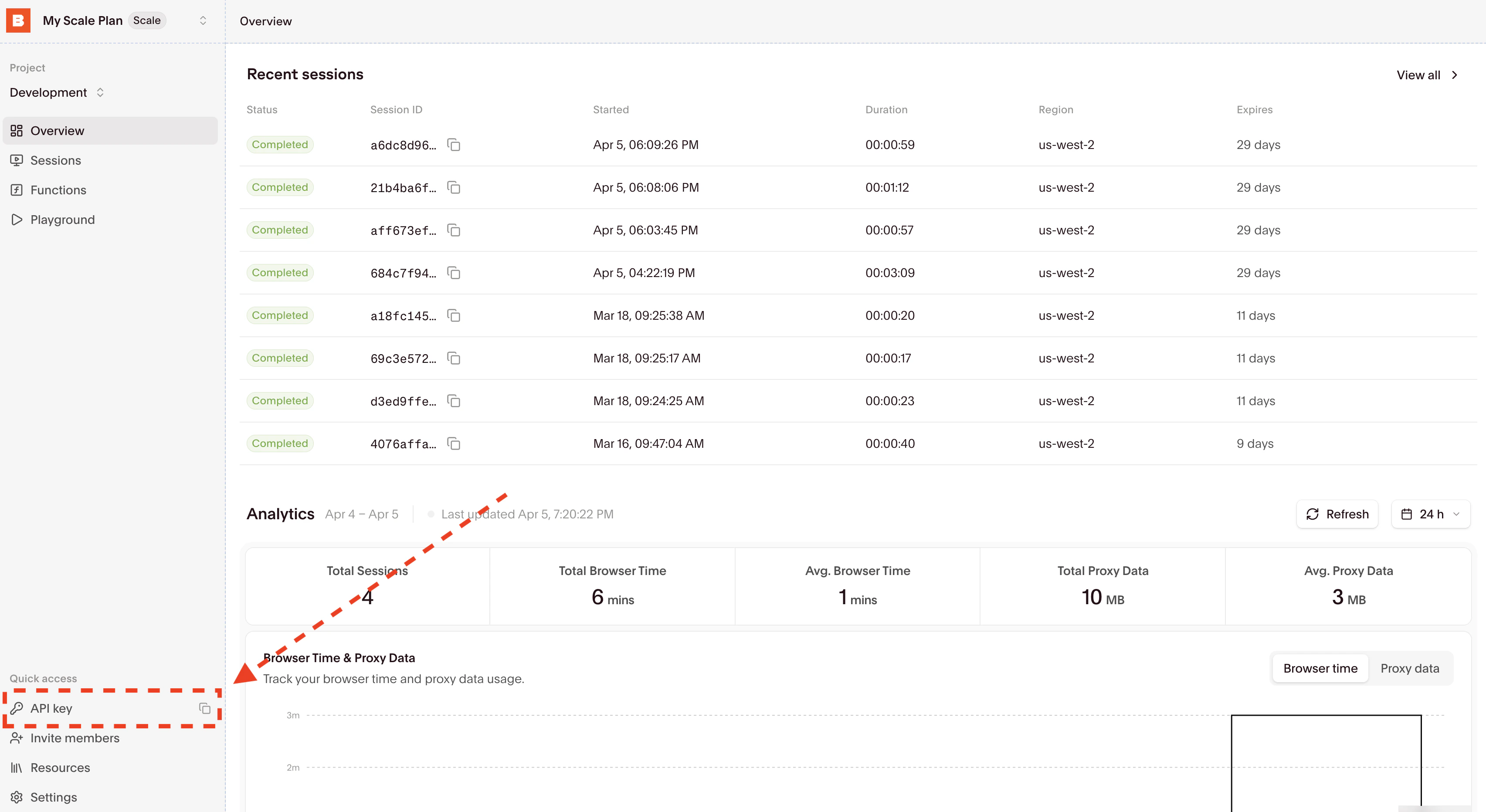 Then copy your API Key directly from the input and set the `BROWSERBASE_API_KEY` environment variable.
Create an OpenAI account and get your API key from the [OpenAI platform](https://platform.openai.com/api-keys).
Set the environment variable:
```bash theme={null}
export OPENAI_API_KEY=your_openai_api_key
```
Initialize a new Node.js project:
```bash theme={null}
mkdir mastra-web-agent
cd mastra-web-agent
npm init -y
```
Install the required packages:
```bash theme={null}
npm install @mastra/core @mastra/memory @mastra/libsql mastra @ai-sdk/openai @browserbasehq/stagehand zod
npm install -D @types/node tsx typescript
```
Create `src/mastra/tools/index.ts` with the web automation tools:
```typescript src/mastra/tools/index.ts theme={null}
import { createTool } from '@mastra/core/tools';
import { z } from 'zod';
import { Stagehand } from "@browserbasehq/stagehand";
export const stagehandActTool = createTool({
id: 'web-act',
description: 'Take an action on a webpage using Stagehand',
inputSchema: z.object({
url: z.string().optional().describe('URL to navigate to (optional if already on a page)'),
action: z.string().describe('Action to perform (e.g., "click sign in button", "type hello in search field")'),
}),
outputSchema: z.object({
success: z.boolean(),
message: z.string(),
}),
execute: async ({ context }) => {
const stagehand = await sessionManager.ensureStagehand();
const page = stagehand.context.pages()[0];
try {
if (context.url) {
await page.goto(context.url);
}
if (context.action) {
await stagehand.act(context.action);
}
return {
success: true,
message: `Successfully performed: ${context.action}`
};
} catch (error: any) {
throw new Error(`Stagehand action failed: ${error.message}`);
}
},
});
export const stagehandObserveTool = createTool({
id: 'web-observe',
description: 'Observe elements on a webpage using Stagehand to plan actions',
inputSchema: z.object({
url: z.string().optional().describe('URL to navigate to (optional if already on a page)'),
instruction: z.string().describe('What to observe (e.g., "find the sign in button")'),
}),
outputSchema: z.array(z.any()).describe('Array of observable actions'),
execute: async ({ context }) => {
const stagehand = await sessionManager.ensureStagehand();
const page = stagehand.context.pages()[0];
try {
if (context.url) {
await page.goto(context.url);
}
return await stagehand.observe(context.instruction);
} catch (error: any) {
throw new Error(`Stagehand observation failed: ${error.message}`);
}
},
});
export const stagehandExtractTool = createTool({
id: 'web-extract',
description: 'Extract data from a webpage using Stagehand',
inputSchema: z.object({
url: z.string().optional().describe('URL to navigate to (optional if already on a page)'),
instruction: z.string().describe('What to extract (e.g., "extract all product prices")'),
schema: z.record(z.any()).optional().describe('Zod schema definition for data extraction'),
}),
outputSchema: z.any().describe('Extracted data according to schema'),
execute: async ({ context }) => {
const stagehand = await sessionManager.ensureStagehand();
const page = stagehand.context.pages()[0];
try {
if (context.url) {
await page.goto(context.url);
}
const defaultSchema = z.object({
content: z.string()
});
return await stagehand.extract(
context.instruction,
context.schema ? z.object(context.schema) : defaultSchema
);
} catch (error: any) {
throw new Error(`Stagehand extraction failed: ${error.message}`);
}
},
});
```
Create `src/mastra/agents/index.ts`:
```typescript src/mastra/agents/index.ts theme={null}
import { openai } from '@ai-sdk/openai';
import { Agent } from '@mastra/core/agent';
import { stagehandActTool, stagehandObserveTool, stagehandExtractTool } from '../tools';
import { Memory } from '@mastra/memory';
import { LibSQLStore } from '@mastra/libsql';
const memory = new Memory({
storage: new LibSQLStore({
url: "file:./mastra.db",
}),
});
export const webAgent = new Agent({
name: 'Web Assistant',
instructions: `
You are a helpful web assistant that can navigate websites and extract information.
Use the stagehandActTool to perform actions on webpages.
Use the stagehandObserveTool to find elements on webpages.
Use the stagehandExtractTool to extract data from webpages.
`,
model: openai('gpt-4o'),
tools: { stagehandActTool, stagehandObserveTool, stagehandExtractTool },
memory: memory
});
```
Create `src/mastra/index.ts`:
```typescript src/mastra/index.ts theme={null}
import { Mastra } from '@mastra/core/mastra';
import { createLogger } from '@mastra/core/logger';
import { webAgent } from './agents';
export const mastra = new Mastra({
agents: { webAgent },
logger: createLogger({
name: 'Mastra',
level: 'info',
}),
});
```
Create a `.env` file in the project root:
```bash .env theme={null}
BROWSERBASE_API_KEY=your_browserbase_api_key
OPENAI_API_KEY=your_openai_api_key
```
Add to your `package.json`:
```json package.json theme={null}
{
"scripts": {
"dev": "mastra dev"
}
}
```
Run the development server:
```bash theme={null}
npm run dev
```
This starts the Mastra interface where you can interact with your web automation agent.
## How it works
The integration provides three main tools for your AI agent:
* **Act**: Perform actions like clicking buttons or filling forms
* **Observe**: Find and identify elements on web pages
* **Extract**: Pull structured data from websites
## Try these commands
Once your agent is running, try these natural language instructions:
```
"Go to example.com and find the contact button"
```
```
"Navigate to a news website and extract the main headlines"
```
```
"Search for 'AI automation' on Google"
```
```
"Extract product prices from an e-commerce site"
```
The agent will automatically choose the right tools and execute the web automation tasks.
Find the sample project for this integration
## Next steps
* **Custom instructions**: Modify the agent's behavior in `src/mastra/agents/index.ts`
* **Add tools**: Create additional tools for specific automation needs
* **Production setup**: Add proper error handling and logging for production use
You now have a fully functional AI agent that can automate web tasks through natural language! Learn more about advanced features in the [Mastra documentation](https://mastra.ai/docs).
Then copy your API Key directly from the input and set the `BROWSERBASE_API_KEY` environment variable.
Create an OpenAI account and get your API key from the [OpenAI platform](https://platform.openai.com/api-keys).
Set the environment variable:
```bash theme={null}
export OPENAI_API_KEY=your_openai_api_key
```
Initialize a new Node.js project:
```bash theme={null}
mkdir mastra-web-agent
cd mastra-web-agent
npm init -y
```
Install the required packages:
```bash theme={null}
npm install @mastra/core @mastra/memory @mastra/libsql mastra @ai-sdk/openai @browserbasehq/stagehand zod
npm install -D @types/node tsx typescript
```
Create `src/mastra/tools/index.ts` with the web automation tools:
```typescript src/mastra/tools/index.ts theme={null}
import { createTool } from '@mastra/core/tools';
import { z } from 'zod';
import { Stagehand } from "@browserbasehq/stagehand";
export const stagehandActTool = createTool({
id: 'web-act',
description: 'Take an action on a webpage using Stagehand',
inputSchema: z.object({
url: z.string().optional().describe('URL to navigate to (optional if already on a page)'),
action: z.string().describe('Action to perform (e.g., "click sign in button", "type hello in search field")'),
}),
outputSchema: z.object({
success: z.boolean(),
message: z.string(),
}),
execute: async ({ context }) => {
const stagehand = await sessionManager.ensureStagehand();
const page = stagehand.context.pages()[0];
try {
if (context.url) {
await page.goto(context.url);
}
if (context.action) {
await stagehand.act(context.action);
}
return {
success: true,
message: `Successfully performed: ${context.action}`
};
} catch (error: any) {
throw new Error(`Stagehand action failed: ${error.message}`);
}
},
});
export const stagehandObserveTool = createTool({
id: 'web-observe',
description: 'Observe elements on a webpage using Stagehand to plan actions',
inputSchema: z.object({
url: z.string().optional().describe('URL to navigate to (optional if already on a page)'),
instruction: z.string().describe('What to observe (e.g., "find the sign in button")'),
}),
outputSchema: z.array(z.any()).describe('Array of observable actions'),
execute: async ({ context }) => {
const stagehand = await sessionManager.ensureStagehand();
const page = stagehand.context.pages()[0];
try {
if (context.url) {
await page.goto(context.url);
}
return await stagehand.observe(context.instruction);
} catch (error: any) {
throw new Error(`Stagehand observation failed: ${error.message}`);
}
},
});
export const stagehandExtractTool = createTool({
id: 'web-extract',
description: 'Extract data from a webpage using Stagehand',
inputSchema: z.object({
url: z.string().optional().describe('URL to navigate to (optional if already on a page)'),
instruction: z.string().describe('What to extract (e.g., "extract all product prices")'),
schema: z.record(z.any()).optional().describe('Zod schema definition for data extraction'),
}),
outputSchema: z.any().describe('Extracted data according to schema'),
execute: async ({ context }) => {
const stagehand = await sessionManager.ensureStagehand();
const page = stagehand.context.pages()[0];
try {
if (context.url) {
await page.goto(context.url);
}
const defaultSchema = z.object({
content: z.string()
});
return await stagehand.extract(
context.instruction,
context.schema ? z.object(context.schema) : defaultSchema
);
} catch (error: any) {
throw new Error(`Stagehand extraction failed: ${error.message}`);
}
},
});
```
Create `src/mastra/agents/index.ts`:
```typescript src/mastra/agents/index.ts theme={null}
import { openai } from '@ai-sdk/openai';
import { Agent } from '@mastra/core/agent';
import { stagehandActTool, stagehandObserveTool, stagehandExtractTool } from '../tools';
import { Memory } from '@mastra/memory';
import { LibSQLStore } from '@mastra/libsql';
const memory = new Memory({
storage: new LibSQLStore({
url: "file:./mastra.db",
}),
});
export const webAgent = new Agent({
name: 'Web Assistant',
instructions: `
You are a helpful web assistant that can navigate websites and extract information.
Use the stagehandActTool to perform actions on webpages.
Use the stagehandObserveTool to find elements on webpages.
Use the stagehandExtractTool to extract data from webpages.
`,
model: openai('gpt-4o'),
tools: { stagehandActTool, stagehandObserveTool, stagehandExtractTool },
memory: memory
});
```
Create `src/mastra/index.ts`:
```typescript src/mastra/index.ts theme={null}
import { Mastra } from '@mastra/core/mastra';
import { createLogger } from '@mastra/core/logger';
import { webAgent } from './agents';
export const mastra = new Mastra({
agents: { webAgent },
logger: createLogger({
name: 'Mastra',
level: 'info',
}),
});
```
Create a `.env` file in the project root:
```bash .env theme={null}
BROWSERBASE_API_KEY=your_browserbase_api_key
OPENAI_API_KEY=your_openai_api_key
```
Add to your `package.json`:
```json package.json theme={null}
{
"scripts": {
"dev": "mastra dev"
}
}
```
Run the development server:
```bash theme={null}
npm run dev
```
This starts the Mastra interface where you can interact with your web automation agent.
## How it works
The integration provides three main tools for your AI agent:
* **Act**: Perform actions like clicking buttons or filling forms
* **Observe**: Find and identify elements on web pages
* **Extract**: Pull structured data from websites
## Try these commands
Once your agent is running, try these natural language instructions:
```
"Go to example.com and find the contact button"
```
```
"Navigate to a news website and extract the main headlines"
```
```
"Search for 'AI automation' on Google"
```
```
"Extract product prices from an e-commerce site"
```
The agent will automatically choose the right tools and execute the web automation tasks.
Find the sample project for this integration
## Next steps
* **Custom instructions**: Modify the agent's behavior in `src/mastra/agents/index.ts`
* **Add tools**: Create additional tools for specific automation needs
* **Production setup**: Add proper error handling and logging for production use
You now have a fully functional AI agent that can automate web tasks through natural language! Learn more about advanced features in the [Mastra documentation](https://mastra.ai/docs).