> ## Documentation Index
> Fetch the complete documentation index at: https://docs.browserbase.com/llms.txt
> Use this file to discover all available pages before exploring further.
# LangChain integration
> Add Browserbase to your LangChain application (Python).
[LangChain](https://www.langchain.com/) is a Python framework to build applications on top of large-language models (OpenAI, Llama, Gemini).
Building on top of LLMs comes with many challenges:
* Gathering and preparing the data (context) and providing memory to models
* Orchestrating tasks to match LLM API requirements (ex, rate limiting, chunking)
* Parse the different LLM result format
Langchain comes with a set of high-level concepts and tools to cope with those challenges:
* [Retrieval modules](https://js.langchain.com/v0.1/docs/modules/data_connection/retrievers/) such as [Document Loaders](https://js.langchain.com/docs/modules/data_connection/document_loaders/) or [Text splitter](https://js.langchain.com/docs/modules/data_connection/document_transformers/) help with gathering and preparing the data provided to the models
* [Model I/O](https://js.langchain.com/docs/modules/model_io/) is a set of tools that help to normalize the APIs across multiple models (*ex: Prompt Templates*)
* [Agents](https://js.langchain.com/docs/modules/agents/) and Tools help to build reasoning (*ex: how to answer based on provided context, what actions to take*)
* [Chains](https://js.langchain.com/docs/modules/chains/) help in orchestrating all the above
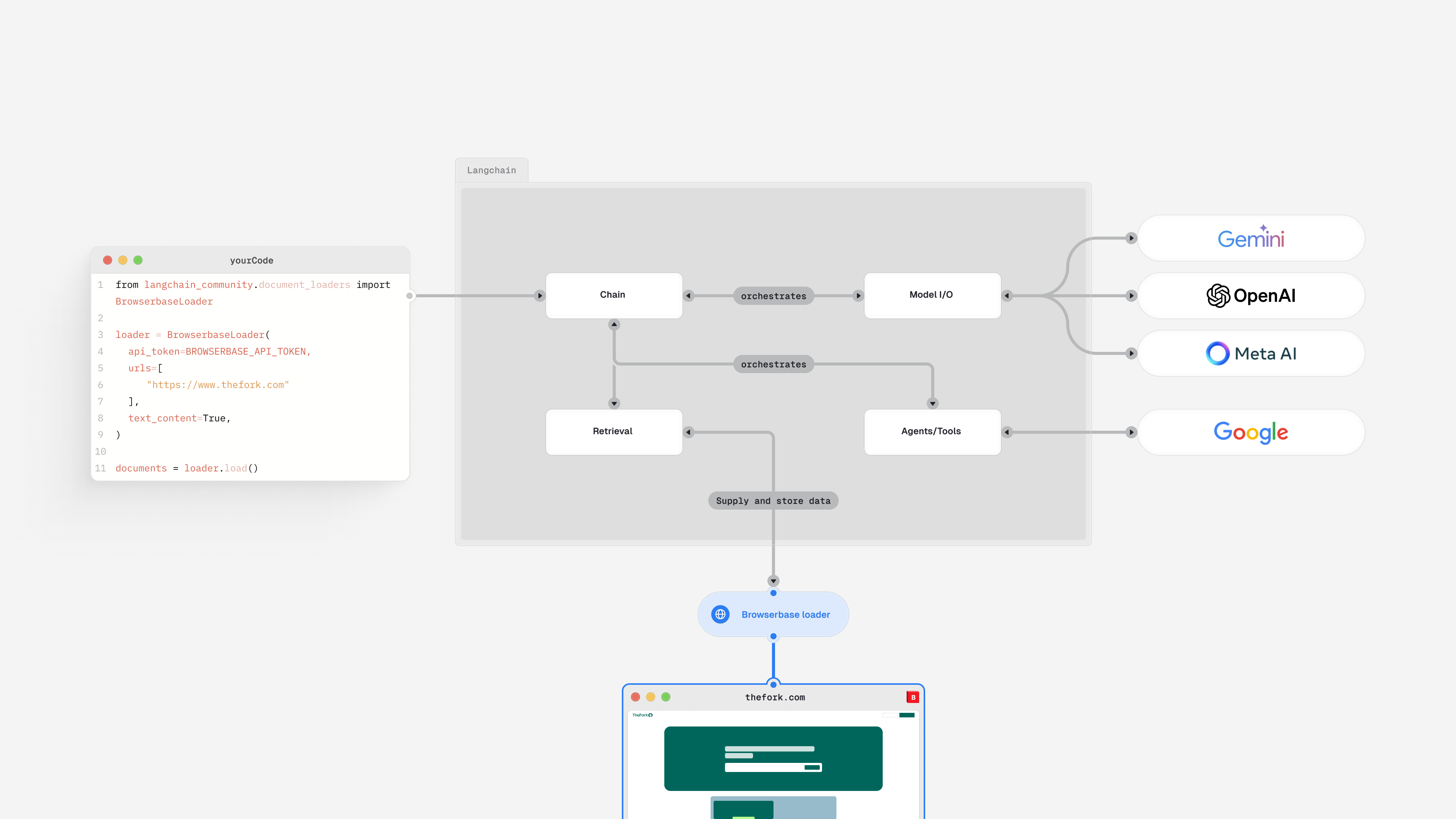 Browserbase provides a `Document Loader` to enable your LangChain application to browse the web to:
* Extract text or raw HTML, including from web pages using JavaScript or dynamically rendered text
* Load images via screenshots
## Add Browserbase to your LangChain application
Pick the guide that matches what you're building.
Add the Browserbase `Document Loader` to your LangChain Python application.
Build a Deep Agent that browses with Browserbase Search, Fetch, and Stagehand.
Browserbase provides a `Document Loader` to enable your LangChain application to browse the web to:
* Extract text or raw HTML, including from web pages using JavaScript or dynamically rendered text
* Load images via screenshots
## Add Browserbase to your LangChain application
Pick the guide that matches what you're building.
Add the Browserbase `Document Loader` to your LangChain Python application.
Build a Deep Agent that browses with Browserbase Search, Fetch, and Stagehand.