> ## Documentation Index
> Fetch the complete documentation index at: https://docs.browserbase.com/llms.txt
> Use this file to discover all available pages before exploring further.
# LangChain Deep Agents with Browserbase
> Build a Deep Agent that browses the web with Browserbase Search, Fetch, and Stagehand.
[LangChain Deep Agents](https://github.com/langchain-ai/deepagents) is a framework for building planner-style agents that delegate work to subagents and pause for human approval at sensitive steps. Pair it with Browserbase to give the agent cheap web context, rendered extraction, and full interactive browser sessions.
## Architecture
This integration exposes Browserbase to the Deep Agent as four Python tools:
* `browserbase_search`: fast discovery with the Browserbase Search API.
* `browserbase_fetch`: quick retrieval of static pages with the Browserbase Fetch API.
* `browserbase_rendered_extract`: Stagehand-backed extraction for JavaScript-heavy pages.
* `browserbase_interactive_task`: a Stagehand agent that handles clicks, typing, logins, and form submissions.
The first two run on the main agent for cheap context. The last two live on a `browser-specialist` subagent that isolates browser-heavy work from the planner. Stateful actions go through Deep Agents `interrupt_on`, so you approve each interactive task at the tool boundary.
The full source is on [GitHub](https://github.com/browserbase/integrations/tree/main/examples/integrations/langchain/deepagents-browserbase).
## Quickstart
Go to the [Dashboard's Settings tab](https://www.browserbase.com/settings):
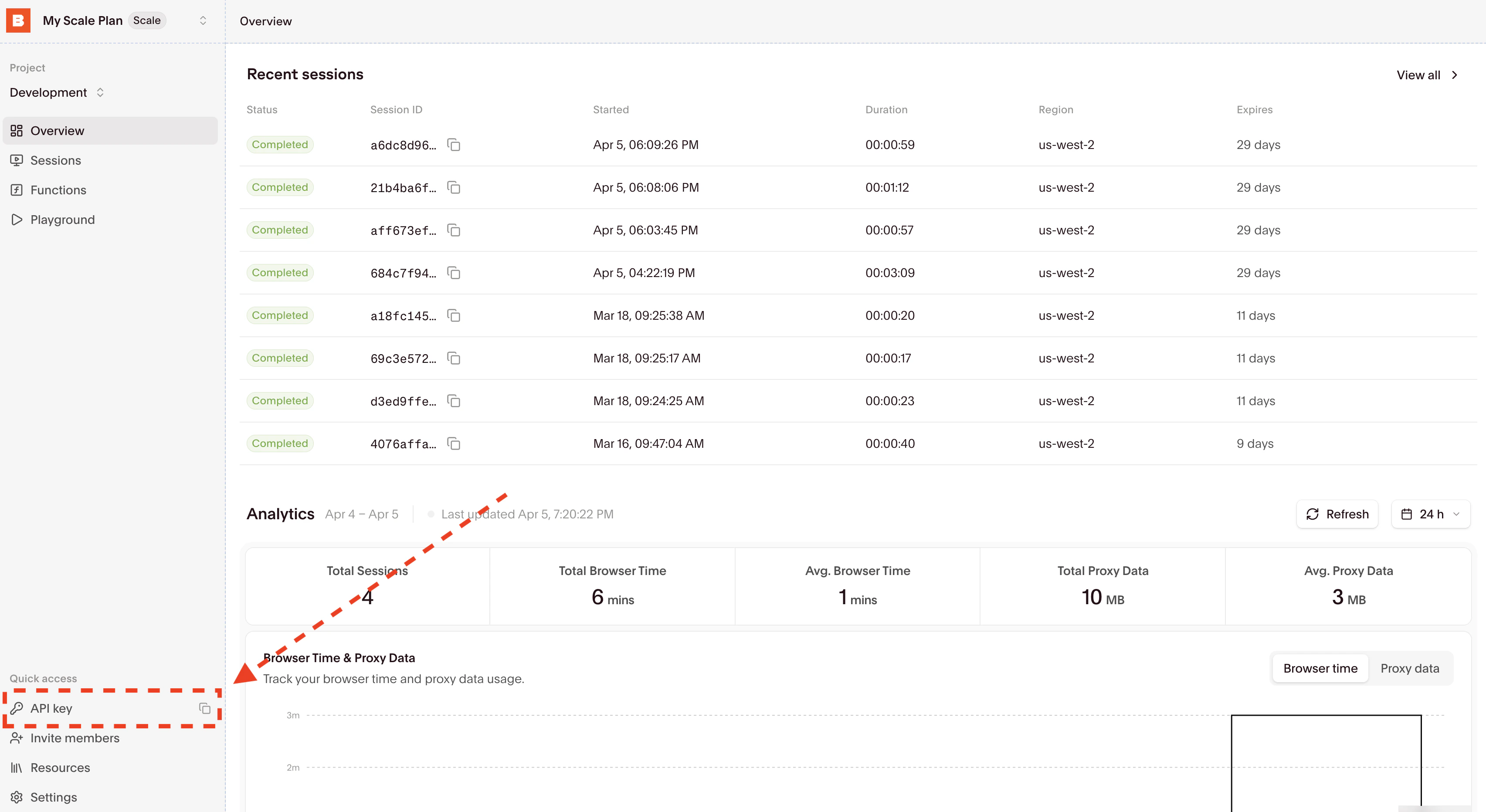 Copy your API key and set the `BROWSERBASE_API_KEY` environment variable.
```bash theme={null}
pip install browserbase stagehand deepagents langchain-openai beautifulsoup4 python-dotenv
```
The Deep Agent model client and the Browserbase tools both read from environment variables.
```bash theme={null}
export BROWSERBASE_API_KEY="bb_..."
# Optional overrides
export DEEPAGENT_MODEL="gpt-5.4"
export DEEPAGENT_BASE_URL="https://"
export STAGEHAND_MODEL="google/gemini-3-flash-preview"
export STAGEHAND_AGENT_MODEL="anthropic/claude-sonnet-4-6"
```
Point `DEEPAGENT_BASE_URL` at any OpenAI-compatible endpoint. With the [Browserbase Model Gateway](/platform/model-gateway/overview), you can run the entire sample with a single Browserbase API key.
Wrap the Browserbase SDK and Stagehand in `@tool`-decorated functions. The main agent gets `browserbase_search` and `browserbase_fetch`; the subagent gets the rendered and interactive variants.
```python theme={null}
from browserbase import Browserbase
from langchain.tools import tool
from stagehand import AsyncStagehand
@tool
def browserbase_search(query: str, num_results: int = 5) -> str:
"""Search the web with Browserbase. Use this first for discovery."""
bb = Browserbase(api_key=os.environ["BROWSERBASE_API_KEY"])
response = bb.search.web(query=query, num_results=num_results)
# ... serialize results to JSON
@tool
def browserbase_fetch(url: str, use_proxy: bool = False) -> str:
"""Fetch page content without a browser session. Best for static pages."""
bb = Browserbase(api_key=os.environ["BROWSERBASE_API_KEY"])
response = bb.fetch_api.create(url=url, proxies=use_proxy)
# ... extract title and text from HTML
```
See the [full `browser_tools.py`](https://github.com/browserbase/integrations/blob/main/examples/integrations/langchain/deepagents-browserbase/browser_tools.py) for the Stagehand-backed `browserbase_rendered_extract` and `browserbase_interactive_task` tools.
Give the planner the cheap tools, register the browser subagent, and gate `browserbase_interactive_task` behind `interrupt_on`.
```python theme={null}
from deepagents import create_deep_agent
from langchain_openai import ChatOpenAI
from langgraph.checkpoint.memory import MemorySaver
BROWSER_SUBAGENT = {
"name": "browser-specialist",
"description": "Handles JS-heavy browsing and interactive tasks via Browserbase.",
"system_prompt": "Use rendered extraction for read-only work. Use interactive tasks only for clicks, typing, login, or form submission.",
"tools": [browserbase_rendered_extract, browserbase_interactive_task],
}
agent = create_deep_agent(
model=ChatOpenAI(model="gpt-5.4", base_url=os.getenv("DEEPAGENT_BASE_URL")),
tools=[browserbase_search, browserbase_fetch],
subagents=[BROWSER_SUBAGENT],
system_prompt="Start with browserbase_search for discovery. Prefer browserbase_fetch for static reads. Delegate rendered or multi-step work to the browser-specialist.",
interrupt_on={
"browserbase_interactive_task": {
"allowed_decisions": ["approve", "edit", "reject"]
}
},
checkpointer=MemorySaver(),
)
```
When the agent calls `browserbase_interactive_task`, the run pauses. Approve, edit the arguments, or reject before the browser session executes.
```python theme={null}
from langgraph.types import Command
result = agent.invoke(
{"messages": [{"role": "user", "content": "Research the Browserbase Fetch API and cite the docs."}]},
config={"configurable": {"thread_id": "demo"}},
version="v2",
)
while result.interrupts:
# Show pending tool call to a human, collect decisions, then resume:
decisions = [{"type": "approve"}]
result = agent.invoke(
Command(resume={"decisions": decisions}),
config={"configurable": {"thread_id": "demo"}},
version="v2",
)
print(result.value["messages"][-1].content)
```
## When to use which tool
| Tool | Use when | Cost |
| ------------------------------ | -------------------------------------------------------------- | -------------------------------------------------- |
| `browserbase_search` | You need to discover URLs from a query. | Cheap, no browser session. |
| `browserbase_fetch` | You have a URL and the page renders without JavaScript. | Cheap, no browser session. |
| `browserbase_rendered_extract` | The page needs JavaScript to render content you want to read. | Full browser session. |
| `browserbase_interactive_task` | The task requires clicking, typing, login, or form submission. | Full browser session, gated behind `interrupt_on`. |
Front-load the cheap tools. Escalate to a browser session only when the page or task demands it.
## Why approve at the tool boundary
Deep Agents `interrupt_on` pauses the run when the agent picks a guarded tool. Putting human approval on `browserbase_interactive_task` means the human sees the exact `start_url` and `task` arguments before any clicks, typing, or form submission run in the browser. Browserbase records the resulting session, so you get a replay of every approved action.
## Further reading
The Deep Agents framework (planners, subagents, and human-in-the-loop interrupts).
Cheap, token-efficient web context for agents. Use these before opening a browser.
The SDK for browser agents. Powers rendered extraction and interactive tasks.
Frontier models behind a single Browserbase API key with unified billing.
Copy your API key and set the `BROWSERBASE_API_KEY` environment variable.
```bash theme={null}
pip install browserbase stagehand deepagents langchain-openai beautifulsoup4 python-dotenv
```
The Deep Agent model client and the Browserbase tools both read from environment variables.
```bash theme={null}
export BROWSERBASE_API_KEY="bb_..."
# Optional overrides
export DEEPAGENT_MODEL="gpt-5.4"
export DEEPAGENT_BASE_URL="https://"
export STAGEHAND_MODEL="google/gemini-3-flash-preview"
export STAGEHAND_AGENT_MODEL="anthropic/claude-sonnet-4-6"
```
Point `DEEPAGENT_BASE_URL` at any OpenAI-compatible endpoint. With the [Browserbase Model Gateway](/platform/model-gateway/overview), you can run the entire sample with a single Browserbase API key.
Wrap the Browserbase SDK and Stagehand in `@tool`-decorated functions. The main agent gets `browserbase_search` and `browserbase_fetch`; the subagent gets the rendered and interactive variants.
```python theme={null}
from browserbase import Browserbase
from langchain.tools import tool
from stagehand import AsyncStagehand
@tool
def browserbase_search(query: str, num_results: int = 5) -> str:
"""Search the web with Browserbase. Use this first for discovery."""
bb = Browserbase(api_key=os.environ["BROWSERBASE_API_KEY"])
response = bb.search.web(query=query, num_results=num_results)
# ... serialize results to JSON
@tool
def browserbase_fetch(url: str, use_proxy: bool = False) -> str:
"""Fetch page content without a browser session. Best for static pages."""
bb = Browserbase(api_key=os.environ["BROWSERBASE_API_KEY"])
response = bb.fetch_api.create(url=url, proxies=use_proxy)
# ... extract title and text from HTML
```
See the [full `browser_tools.py`](https://github.com/browserbase/integrations/blob/main/examples/integrations/langchain/deepagents-browserbase/browser_tools.py) for the Stagehand-backed `browserbase_rendered_extract` and `browserbase_interactive_task` tools.
Give the planner the cheap tools, register the browser subagent, and gate `browserbase_interactive_task` behind `interrupt_on`.
```python theme={null}
from deepagents import create_deep_agent
from langchain_openai import ChatOpenAI
from langgraph.checkpoint.memory import MemorySaver
BROWSER_SUBAGENT = {
"name": "browser-specialist",
"description": "Handles JS-heavy browsing and interactive tasks via Browserbase.",
"system_prompt": "Use rendered extraction for read-only work. Use interactive tasks only for clicks, typing, login, or form submission.",
"tools": [browserbase_rendered_extract, browserbase_interactive_task],
}
agent = create_deep_agent(
model=ChatOpenAI(model="gpt-5.4", base_url=os.getenv("DEEPAGENT_BASE_URL")),
tools=[browserbase_search, browserbase_fetch],
subagents=[BROWSER_SUBAGENT],
system_prompt="Start with browserbase_search for discovery. Prefer browserbase_fetch for static reads. Delegate rendered or multi-step work to the browser-specialist.",
interrupt_on={
"browserbase_interactive_task": {
"allowed_decisions": ["approve", "edit", "reject"]
}
},
checkpointer=MemorySaver(),
)
```
When the agent calls `browserbase_interactive_task`, the run pauses. Approve, edit the arguments, or reject before the browser session executes.
```python theme={null}
from langgraph.types import Command
result = agent.invoke(
{"messages": [{"role": "user", "content": "Research the Browserbase Fetch API and cite the docs."}]},
config={"configurable": {"thread_id": "demo"}},
version="v2",
)
while result.interrupts:
# Show pending tool call to a human, collect decisions, then resume:
decisions = [{"type": "approve"}]
result = agent.invoke(
Command(resume={"decisions": decisions}),
config={"configurable": {"thread_id": "demo"}},
version="v2",
)
print(result.value["messages"][-1].content)
```
## When to use which tool
| Tool | Use when | Cost |
| ------------------------------ | -------------------------------------------------------------- | -------------------------------------------------- |
| `browserbase_search` | You need to discover URLs from a query. | Cheap, no browser session. |
| `browserbase_fetch` | You have a URL and the page renders without JavaScript. | Cheap, no browser session. |
| `browserbase_rendered_extract` | The page needs JavaScript to render content you want to read. | Full browser session. |
| `browserbase_interactive_task` | The task requires clicking, typing, login, or form submission. | Full browser session, gated behind `interrupt_on`. |
Front-load the cheap tools. Escalate to a browser session only when the page or task demands it.
## Why approve at the tool boundary
Deep Agents `interrupt_on` pauses the run when the agent picks a guarded tool. Putting human approval on `browserbase_interactive_task` means the human sees the exact `start_url` and `task` arguments before any clicks, typing, or form submission run in the browser. Browserbase records the resulting session, so you get a replay of every approved action.
## Further reading
The Deep Agents framework (planners, subagents, and human-in-the-loop interrupts).
Cheap, token-efficient web context for agents. Use these before opening a browser.
The SDK for browser agents. Powers rendered extraction and interactive tasks.
Frontier models behind a single Browserbase API key with unified billing.