> ## Documentation Index
> Fetch the complete documentation index at: https://docs.browserbase.com/llms.txt
> Use this file to discover all available pages before exploring further.
# Google ADK setup
> Configure Browserbase MCP Server for Google Agent Development Kit
The Browserbase MCP Server can be integrated with Google ADK agents to provide browser automation capabilities. Browserbase supports both local STDIO and hosted [Streamable HTTP](https://modelcontextprotocol.io/specification/2025-03-26/basic/transports#streamable-http) (SHTTP) transport methods.
[Streamable HTTP](https://modelcontextprotocol.io/specification/2025-03-26/basic/transports#streamable-http)
with Browserbase's remote hosted URL is recommended to take advantage of the server at full capacity
and avoid managing local processes.
## Prerequisites
Get your Browserbase API key from the [Browserbase Dashboard](https://www.browserbase.com/overview).
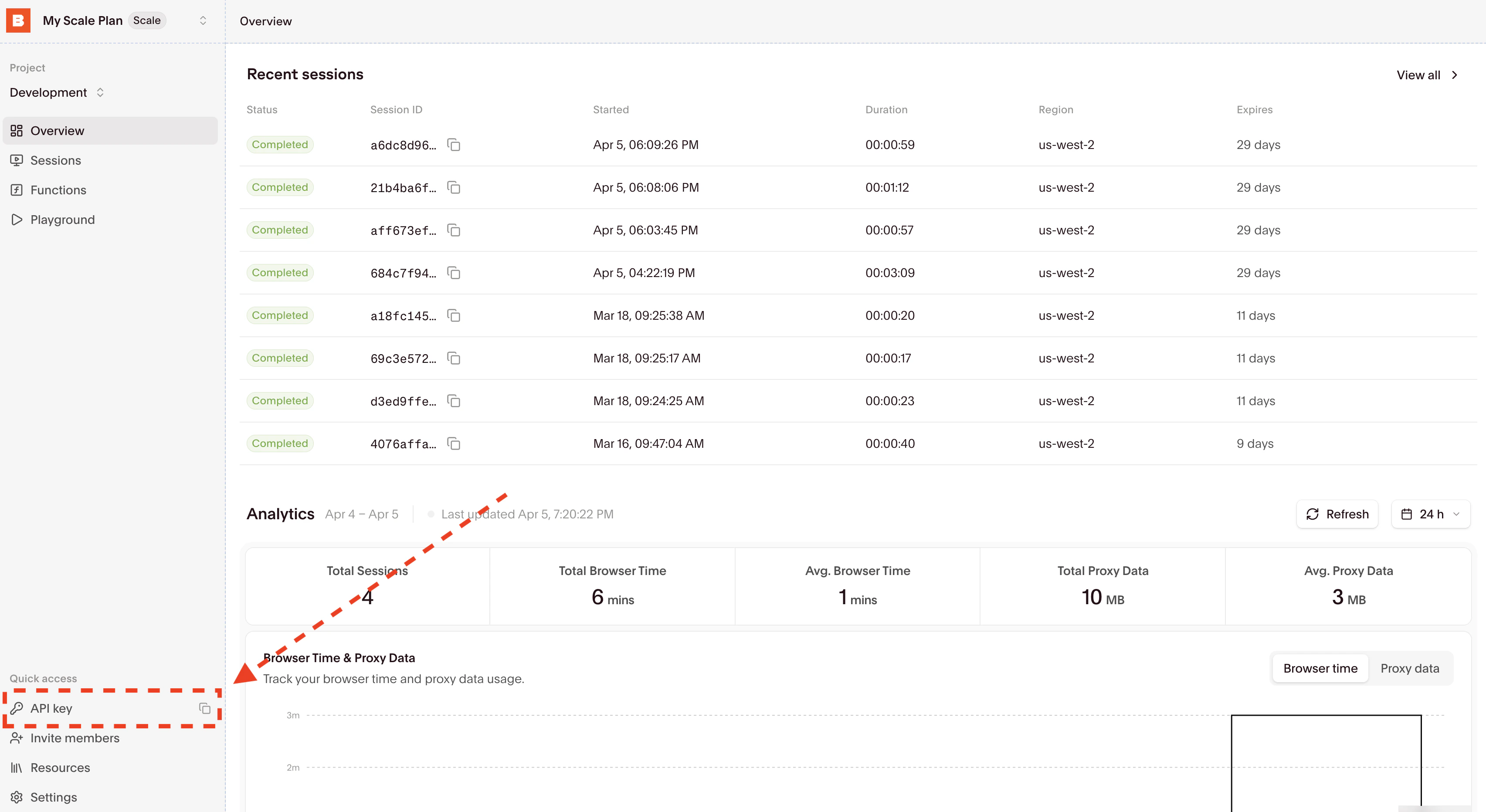 Then copy your API Key directly from the input.
Get your Gemini API key from [Google AI Studio](https://aistudio.google.com/apikey) for AI-powered browser automation with Stagehand. Only required if you're using the local MCP server.
## Setup methods
**Recommended**: When using the remote hosted server, Browserbase covers the LLM costs for Gemini, the [best performing model](https://www.stagehand.dev/evals) in [Stagehand](https://www.stagehand.dev).
```python theme={null}
from google.adk.agents import Agent
from google.adk.tools.mcp_tool.mcp_session_manager import SseConnectionParams
from google.adk.tools.mcp_tool.mcp_toolset import McpToolset
root_agent = Agent(
model="gemini-2.5-pro",
name="browserbase_agent",
instruction="Help users get information from web pages using Browserbase",
tools=[
McpToolset(
connection_params=SseConnectionParams(
url=(
"https://mcp.browserbase.com/mcp"
"?browserbaseApiKey=YOUR_BROWSERBASE_API_KEY"
),
timeout=300,
),
)
],
)
```
For local development or when you need more control over the server configuration, use the STDIO transport method.
```python theme={null}
from google.adk.agents import Agent
from google.adk.tools.mcp_tool.mcp_session_manager import StdioConnectionParams
from google.adk.tools.mcp_tool.mcp_toolset import McpToolset
from mcp import StdioServerParameters
BROWSERBASE_API_KEY = "YOUR_BROWSERBASE_API_KEY"
GEMINI_API_KEY = "YOUR_GEMINI_API_KEY"
root_agent = Agent(
model="gemini-2.5-pro",
name="browserbase_agent",
instruction="Help users get information from web pages using Browserbase",
tools=[
McpToolset(
connection_params=StdioConnectionParams(
server_params=StdioServerParameters(
command="npx",
args=[
"-y",
"@browserbasehq/mcp",
],
env={
"BROWSERBASE_API_KEY": BROWSERBASE_API_KEY,
"GEMINI_API_KEY": GEMINI_API_KEY,
}
),
timeout=300,
),
)
],
)
```
When using STDIO, you'll need to provide your own Gemini API key and will incur LLM costs for Stagehand operations.
## Optional runtime query params
You can append these query parameters to the MCP URL:
* `keepAlive=true|false`
* `proxies=true|false`
* `verified=true|false`
## Verify installation
Test your integration by running your agent:
```python theme={null}
# Run your agent
result = root_agent.run("Navigate to google.com and take a screenshot")
print(result)
```
Monitor your browser sessions in real-time on the [Browserbase
Dashboard](https://www.browserbase.com/sessions).
## Available tools
Once configured, your Google ADK agent will have access to these Browserbase tools:
* **start**: Create or reuse a Browserbase session
* **end**: Close the current Browserbase session
* **navigate**: Navigate to a URL
* **act**: Perform actions using natural language
* **observe**: Find actionable elements on a page
* **extract**: Extract data from a page
See [MCP Setup](/integrations/mcp/setup) for tool details.
## Configuration reference
For full query parameter behavior (required/optional fields, model behavior, and validation), see [MCP Setup](/integrations/mcp/setup).
## Additional resources
* [Google ADK Documentation](https://google.github.io/adk-docs/)
* [ADK Quickstart Guide](https://google.github.io/adk-docs/get-started/)
* [Stagehand](https://stagehand.dev)
Then copy your API Key directly from the input.
Get your Gemini API key from [Google AI Studio](https://aistudio.google.com/apikey) for AI-powered browser automation with Stagehand. Only required if you're using the local MCP server.
## Setup methods
**Recommended**: When using the remote hosted server, Browserbase covers the LLM costs for Gemini, the [best performing model](https://www.stagehand.dev/evals) in [Stagehand](https://www.stagehand.dev).
```python theme={null}
from google.adk.agents import Agent
from google.adk.tools.mcp_tool.mcp_session_manager import SseConnectionParams
from google.adk.tools.mcp_tool.mcp_toolset import McpToolset
root_agent = Agent(
model="gemini-2.5-pro",
name="browserbase_agent",
instruction="Help users get information from web pages using Browserbase",
tools=[
McpToolset(
connection_params=SseConnectionParams(
url=(
"https://mcp.browserbase.com/mcp"
"?browserbaseApiKey=YOUR_BROWSERBASE_API_KEY"
),
timeout=300,
),
)
],
)
```
For local development or when you need more control over the server configuration, use the STDIO transport method.
```python theme={null}
from google.adk.agents import Agent
from google.adk.tools.mcp_tool.mcp_session_manager import StdioConnectionParams
from google.adk.tools.mcp_tool.mcp_toolset import McpToolset
from mcp import StdioServerParameters
BROWSERBASE_API_KEY = "YOUR_BROWSERBASE_API_KEY"
GEMINI_API_KEY = "YOUR_GEMINI_API_KEY"
root_agent = Agent(
model="gemini-2.5-pro",
name="browserbase_agent",
instruction="Help users get information from web pages using Browserbase",
tools=[
McpToolset(
connection_params=StdioConnectionParams(
server_params=StdioServerParameters(
command="npx",
args=[
"-y",
"@browserbasehq/mcp",
],
env={
"BROWSERBASE_API_KEY": BROWSERBASE_API_KEY,
"GEMINI_API_KEY": GEMINI_API_KEY,
}
),
timeout=300,
),
)
],
)
```
When using STDIO, you'll need to provide your own Gemini API key and will incur LLM costs for Stagehand operations.
## Optional runtime query params
You can append these query parameters to the MCP URL:
* `keepAlive=true|false`
* `proxies=true|false`
* `verified=true|false`
## Verify installation
Test your integration by running your agent:
```python theme={null}
# Run your agent
result = root_agent.run("Navigate to google.com and take a screenshot")
print(result)
```
Monitor your browser sessions in real-time on the [Browserbase
Dashboard](https://www.browserbase.com/sessions).
## Available tools
Once configured, your Google ADK agent will have access to these Browserbase tools:
* **start**: Create or reuse a Browserbase session
* **end**: Close the current Browserbase session
* **navigate**: Navigate to a URL
* **act**: Perform actions using natural language
* **observe**: Find actionable elements on a page
* **extract**: Extract data from a page
See [MCP Setup](/integrations/mcp/setup) for tool details.
## Configuration reference
For full query parameter behavior (required/optional fields, model behavior, and validation), see [MCP Setup](/integrations/mcp/setup).
## Additional resources
* [Google ADK Documentation](https://google.github.io/adk-docs/)
* [ADK Quickstart Guide](https://google.github.io/adk-docs/get-started/)
* [Stagehand](https://stagehand.dev)