> ## Documentation Index
> Fetch the complete documentation index at: https://docs.browserbase.com/llms.txt
> Use this file to discover all available pages before exploring further.
# Evervault
> Use Evervault to keep card data and credentials out of Browserbase browser sessions.
Use [Evervault Browser Tokens](https://docs.evervault.com/browser-tokens) with Browserbase when an agent needs to enter a card, password, or other sensitive value into a third-party website.
With Evervault-hosted Card Collection, PAN and CVC are encrypted inside the iframe before reaching your parent page or backend. Your automation code, agent, and Browserbase session receive only Browser Tokens, not the original values. Evervault's browser proxy reveals the originals over the network only to the hostnames your policy allows. Other collection methods, such as direct SDK encryption, require a separate review of where plaintext exists before encryption.
## How the integration works
The integration has four boundaries:
1. **Collect.** Use Evervault's [Card component](https://docs.evervault.com/cards/card-collection) or another Evervault collection method. Store an encrypted PAN only under your reviewed retention policy; treat CVC as transaction-specific and do not retain it after authorization, even encrypted.
2. **Tokenize.** Immediately before a browser task, call Evervault's Browser Tokens API with the encrypted values, a short time-to-live (TTL), and the exact destination hostnames that may receive plaintext.
3. **Launch.** Create a Browserbase session with the proxy configuration returned by Evervault. If the proxy intercepts TLS, add the Evervault CA certificate to the Browserbase project and reference it when creating the session.
4. **Automate.** Give the agent or automation only the token values. Evervault replaces those values with plaintext when an allowed request leaves the browser through its proxy.
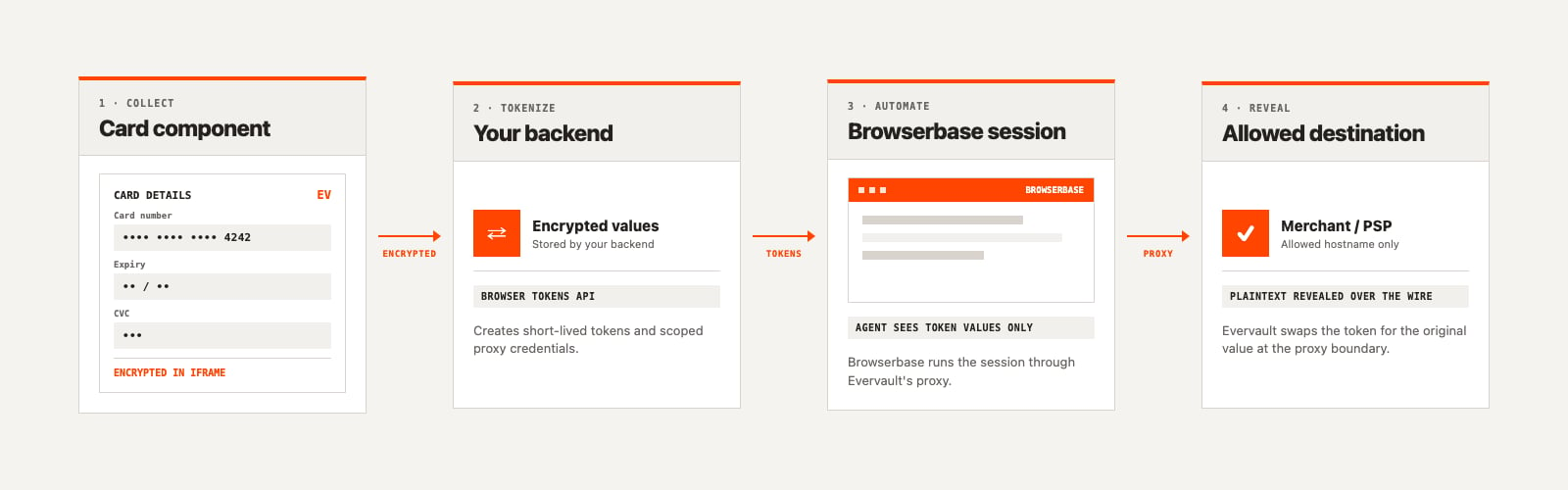 Evervault does not drive or inspect the browser session. Browserbase remains responsible for browser lifecycle, automation, and session observability.
## When to use this integration
Use Browserbase and Evervault when:
* an agent must complete an existing website checkout or login flow;
* the workflow needs a payment card, password, API key, recovery code, or another secret;
* your browser provider should not receive plaintext sensitive data; or
* you need to preserve the format expected by a merchant form, such as a Luhn-valid card number.
For payment workflows, Browser Tokens are not a replacement for issuer authorization, fraud controls, or 3D Secure. They only control where and when Evervault reveals a value.
## PCI DSS considerations
Browserbase and Evervault split the browser workflow so that the systems driving the browser can work with tokens instead of plaintext cardholder data:
* **Evervault** hosts the Card component, encrypts the card fields, and reveals the underlying values only through its proxy to an allowed merchant or payment-provider hostname.
* **Your backend** creates short-lived Browser Tokens from encrypted PAN and transaction-specific encrypted CVC. It should not decrypt or log these values, and must not retain CVC after authorization, even encrypted. Any encrypted PAN storage must follow your reviewed retention policy.
* **Your agent, automation code, and Browserbase** receive format-preserving tokens and proxy credentials, not the original card number or security code.
* **The merchant or payment service provider** receives the original values over the network when the browser submits the checkout request.
This boundary can reduce the cardholder-data environment around your agent, browser scripts, Browserbase sessions, and application infrastructure. It does not automatically make an integration PCI DSS compliant or remove your responsibilities. Your final scope depends on the complete implementation, including collection, backend access, proxy configuration, logs, screenshots, session recordings, support workflows, and the systems that receive the payment request.
Have your QSA or compliance team review the full data flow and confirm the applicable PCI DSS scope and controls.
For high-scale workloads or specific compliance needs, [book a demo ↗](https://www.browserbase.com/contact) with the Browserbase team. The team will help tailor a plan that fits your technical and business requirements. You can also reach us at [sales@browserbase.com](mailto:sales@browserbase.com).
## Next steps
Collect a card, create short-lived tokens, and launch Browserbase with the
Evervault proxy.
Collect encrypted card data inside an Evervault-hosted iframe.
This documentation is built and hosted on [Mintlify](https://mintlify.com), a developer documentation platform.
Evervault does not drive or inspect the browser session. Browserbase remains responsible for browser lifecycle, automation, and session observability.
## When to use this integration
Use Browserbase and Evervault when:
* an agent must complete an existing website checkout or login flow;
* the workflow needs a payment card, password, API key, recovery code, or another secret;
* your browser provider should not receive plaintext sensitive data; or
* you need to preserve the format expected by a merchant form, such as a Luhn-valid card number.
For payment workflows, Browser Tokens are not a replacement for issuer authorization, fraud controls, or 3D Secure. They only control where and when Evervault reveals a value.
## PCI DSS considerations
Browserbase and Evervault split the browser workflow so that the systems driving the browser can work with tokens instead of plaintext cardholder data:
* **Evervault** hosts the Card component, encrypts the card fields, and reveals the underlying values only through its proxy to an allowed merchant or payment-provider hostname.
* **Your backend** creates short-lived Browser Tokens from encrypted PAN and transaction-specific encrypted CVC. It should not decrypt or log these values, and must not retain CVC after authorization, even encrypted. Any encrypted PAN storage must follow your reviewed retention policy.
* **Your agent, automation code, and Browserbase** receive format-preserving tokens and proxy credentials, not the original card number or security code.
* **The merchant or payment service provider** receives the original values over the network when the browser submits the checkout request.
This boundary can reduce the cardholder-data environment around your agent, browser scripts, Browserbase sessions, and application infrastructure. It does not automatically make an integration PCI DSS compliant or remove your responsibilities. Your final scope depends on the complete implementation, including collection, backend access, proxy configuration, logs, screenshots, session recordings, support workflows, and the systems that receive the payment request.
Have your QSA or compliance team review the full data flow and confirm the applicable PCI DSS scope and controls.
For high-scale workloads or specific compliance needs, [book a demo ↗](https://www.browserbase.com/contact) with the Browserbase team. The team will help tailor a plan that fits your technical and business requirements. You can also reach us at [sales@browserbase.com](mailto:sales@browserbase.com).
## Next steps
Collect a card, create short-lived tokens, and launch Browserbase with the
Evervault proxy.
Collect encrypted card data inside an Evervault-hosted iframe.
This documentation is built and hosted on [Mintlify](https://mintlify.com), a developer documentation platform.