> ## Documentation Index
> Fetch the complete documentation index at: https://docs.browserbase.com/llms.txt
> Use this file to discover all available pages before exploring further.
# Tutorial: build a flight booking Crew
> Build a Crew that finds the best roundtrip flights on the given dates.
Flight booking is tricky because most airlines don't offer public APIs. You usually need to simulate human interactions with web interfaces.
With [CrewAI](https://www.crewai.com/) and [Browserbase](https://www.browserbase.com/), you can automate this in a few dozen lines of code.
By following this tutorial, you'll learn how to build a CrewAI program that searches for a roundtrip flight from a simple human input:
```text theme={null}
> python3 main.py "San Francisco to NYC one-way on September 21st"
Here are our top 5 flights from San Francisco (SFO) to Newark (EWR) on September 21, 2024:
1. **Alaska Airlines**:
- Departure: 8:50 am
- Arrival: 5:24 pm
- Duration: 5 hours 34 minutes
- Layovers: Nonstop
- Price: $125
- Booking: [Alaska Airlines Saver](https://www.kayak.com/book/flight?code=noAiOYx8xU.4fFBlTtfVpoDzQq2dWkU9A.12411.28f6c8a3257adb48c2f7d8207660b2a0&h=41a638bca25d&_kw_pbranded=true&sub=F-1450586051791345216E0040d85ce85&pageOrigin=F..RP.FE.M4)
...
```
## Introduction: Crews, Agents, Tasks, and Tools
[CrewAI](https://www.crewai.com/) helps developers build AI Agents with 4 core concepts:
[Crews](https://docs.crewai.com/core-concepts/Crews/), [Agents](https://docs.crewai.com/core-concepts/Agents/),
[Tasks](https://docs.crewai.com/core-concepts/Tasks/), and [Tools](https://docs.crewai.com/core-concepts/Tools/):
* A `Crew` is a team of `Agents` working together to accomplish some tasks.
* A `Task`, such as *"Search flights according to criteria"*, is a goal assigned to a specialized `Agent` (e.g., *a Flight Booking Agent*).
* An `Agent` can be seen as a specialized text-only GPT that receives a set of `Tools` to perform actions (e.g., *search on Google*, *navigate to this URL*).
### Example
Here is an example of a Crew assembled to research a given topic and write an article.
**The Agents: A Researcher and a Writer**
First, define 2 Agents, one specialized in researching a topic and another in writing articles:
```py theme={null}
researcher = Agent(
role='Senior Researcher',
goal='Uncover groundbreaking technologies in {topic}',
backstory=(
"Driven by curiosity, you're at the forefront of"
"innovation, eager to explore and share knowledge that could change"
"the world."
),
tools=[search_tool],
)
writer = Agent(
role='Writer',
goal='Narrate compelling tech stories about {topic}',
backstory=(
"With a flair for simplifying complex topics, you craft"
"engaging narratives that captivate and educate, bringing new"
"discoveries to light in an accessible manner."
),
tools=[search_tool]
)
```
Each Agent gets:
* a `role` that helps the `Crew` select the best Agent for a given `Task`.
* a `goal` that frames the `Agent` decision-making process when iterating on a `Task`.
* a `backstory` providing context to the `Agent`'s `role` and `goal`.
Both Agents get access to a `search_tool` ([`SerperDevTool` instance](https://docs.crewai.com/tools/SerperDevTool/)) to perform searches with Google Search.
**The Tasks: writing and researching**
Now define 2 tasks: researching a topic and writing an article.
```py theme={null}
research_task = Task(
description=(
"Identify the next big trend in {topic}."
"Focus on identifying pros and cons and the overall narrative."
"Your final report should clearly articulate the key points,"
"its market opportunities, and potential risks."
),
expected_output='A comprehensive 3 paragraphs long report on the latest AI trends.',
agent=researcher,
)
write_task = Task(
description=(
"Compose an insightful article on {topic}."
"Focus on the latest trends and how it's impacting the industry."
"This article should be easy to understand, engaging, and positive."
),
expected_output='A 4 paragraph article on {topic} advancements formatted as markdown.',
agent=writer,
output_file='new-blog-post.md' # Example of output customization
)
```
A Task's `description` can be compared to a prompt, while the `expected_output` helps format the result of the `Task`.
As expected, the `write_task` gets assigned to the `writer` Agent and the `research_task` to the `researcher` Agent.
**Agents and Tasks look very similar: do I need both?**
Indeed, in a simple example as this one, the `Agent` and `Task` look alike. In real-world applications, an `Agent` gets to
perform multiple tasks. Then, an `Agent` represents the expertise (`goal`, `backstory`) with a set of skills (`tools`), while a `Task` is a goal to accomplish.
**Assembling the Crew**
As covered earlier, a `Crew` defines a set of `Task` to be performed sequentially by a team of `Agents`.
Note that `Tasks` share a context, explaining why the research task comes before the writing task.
```py theme={null}
crew = Crew(
agents=[researcher, writer],
tasks=[research_task, write_task],
memory=True,
cache=True,
max_rpm=100,
)
result = crew.kickoff(inputs={'topic': 'AI in healthcare'})
print(result)
```
Build the Flight Booking Crew with these concepts!
***
## 1. The Flight Booking Crew
Before jumping into the setup and code, step back and look at how to assemble a Crew that helps book flights.
From a user input like *"San Francisco to New York one-way on 21st September"*, the Flight Booking Crew should print the top 5 flights as follows:
```bash theme={null}
Here are our top 5 picks from San Francisco to New York on 21st September 2024:
1. **Delta Airlines**
- Departure: 21:35
- Arrival: 03:50
- Duration: 6 hours 15 minutes
- Layovers: Direct
- Price: $125
- Booking: [Delta Airlines](https://www.kayak.com/flights/sfo/jfk/2024-09-21/12:45/13:55/2:10/delta/airlines/economy/1)
...
```
To achieve this goal, the Crew will navigate to [https://www.kayak.com](https://www.kayak.com), perform a search, and extract each flight detail, which translates to the following steps:
1. Parse the user request (*"San Francisco to New York one-way on 21st September"*) to build a valid *Kayak search URL*
2. Navigate to the *Kayak search URL* and extract the top 5 flights
3. For each flight, navigate to the *flight details URL* to extract the available *providers* (airlines)
4. Summarize the flights' information
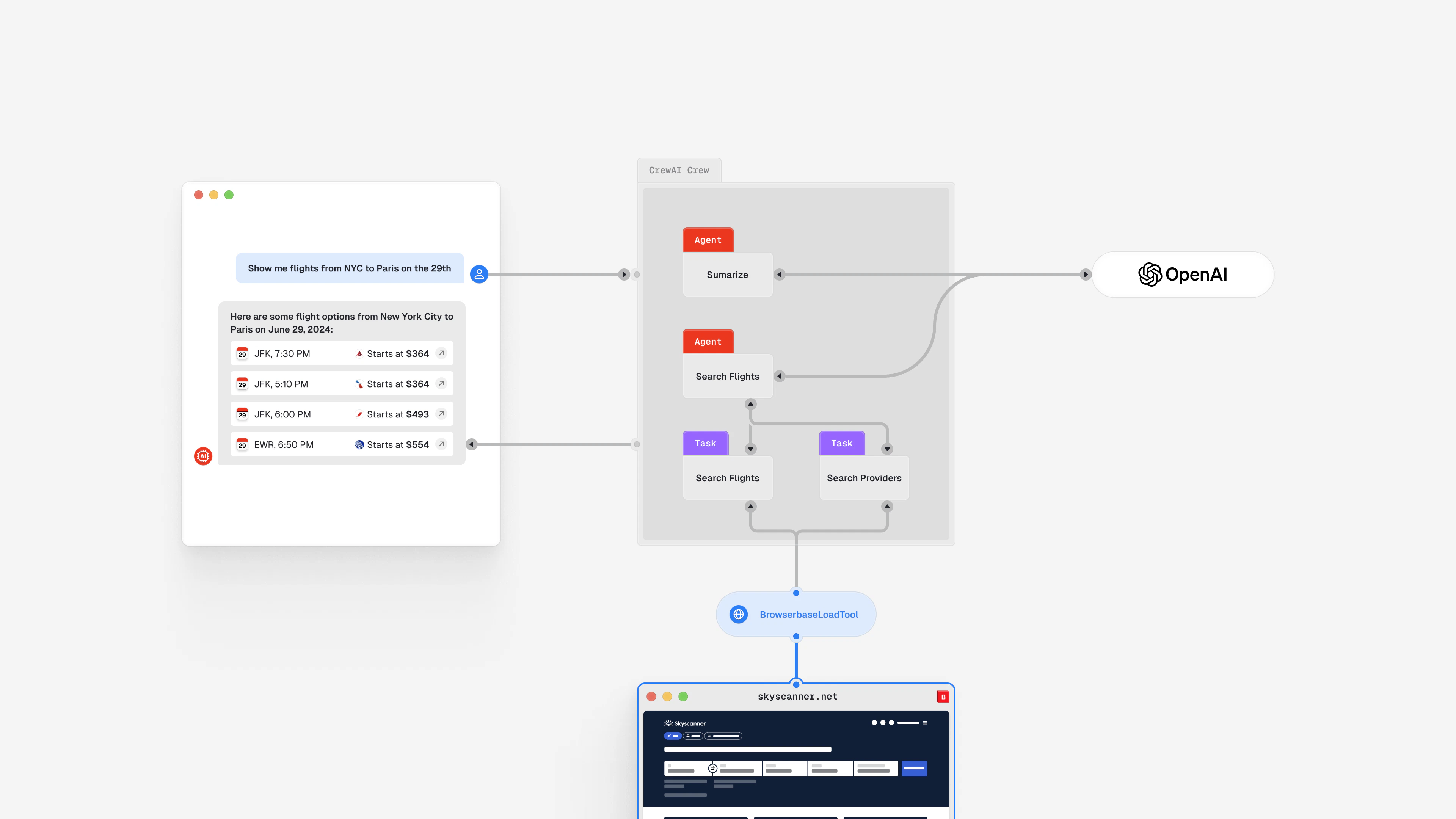
To perform those steps, you'll create 2 Agents:
* The "Flights" Agent, responsible for looking for flights
* The "Summarize" Agent, responsible for summarizing the available flights as a comprehensive list
The "Search Flights" Agent will need:
* A custom `Kayak` tool to translate the user input into a valid *Kayak search URL*
* A Browserbase tool to navigate on Kayak and interact with the web page
Finally, you'll define 2 tasks: *"Search Flights"* and *"Search Booking Providers"*.
You can visualize the Flight Booking Crew as follows:
 Implement the Crew!
## 2. Installation
Set up the project by installing the required dependencies:
```bash theme={null}
pip install crewai 'crewai[tools]' html2text playwright python-dotenv
```
Create a `.env` file with the following variables and their respective values:
```bash .env theme={null}
OPENAI_API_KEY=
BROWSERBASE_API_KEY=
# our Flight Booking's "Search Flights" Agent will have to load a lot of context (heavy webpages as text),
# let's configure a specific OpenAI model to avoid token size limits:
OPENAI_MODEL_NAME=gpt-4.1
```
**Where can I find my OpenAI and Browserbase API Keys?**
* Get your Browserbase API Key from your [Settings page](https://www.browserbase.com/settings).
* Get your OpenAI API Key from the [OpenAI Platform](https://platform.openai.com/api-keys).
## 3. Create the tools
While CrewAI provides [a wide range of tools](https://docs.crewai.com/core-concepts/Tools/#available-crewai-tools) (e.g., *the [SerperDevTool](https://docs.crewai.com/tools/SerperDevTool/) to perform searches with Google Search*), the *"Search Flights"* Agent needs 2 custom tools:
* a custom `Kayak` tool to assemble a valid *Kayak search URL*
* a Browserbase loader to navigate and interact with the web pages
### The Browserbase tool
The Kayak website relies heavily on JavaScript and performs a live flight search, making it hard to interact with:
Implement the Crew!
## 2. Installation
Set up the project by installing the required dependencies:
```bash theme={null}
pip install crewai 'crewai[tools]' html2text playwright python-dotenv
```
Create a `.env` file with the following variables and their respective values:
```bash .env theme={null}
OPENAI_API_KEY=
BROWSERBASE_API_KEY=
# our Flight Booking's "Search Flights" Agent will have to load a lot of context (heavy webpages as text),
# let's configure a specific OpenAI model to avoid token size limits:
OPENAI_MODEL_NAME=gpt-4.1
```
**Where can I find my OpenAI and Browserbase API Keys?**
* Get your Browserbase API Key from your [Settings page](https://www.browserbase.com/settings).
* Get your OpenAI API Key from the [OpenAI Platform](https://platform.openai.com/api-keys).
## 3. Create the tools
While CrewAI provides [a wide range of tools](https://docs.crewai.com/core-concepts/Tools/#available-crewai-tools) (e.g., *the [SerperDevTool](https://docs.crewai.com/tools/SerperDevTool/) to perform searches with Google Search*), the *"Search Flights"* Agent needs 2 custom tools:
* a custom `Kayak` tool to assemble a valid *Kayak search URL*
* a Browserbase loader to navigate and interact with the web pages
### The Browserbase tool
The Kayak website relies heavily on JavaScript and performs a live flight search, making it hard to interact with:
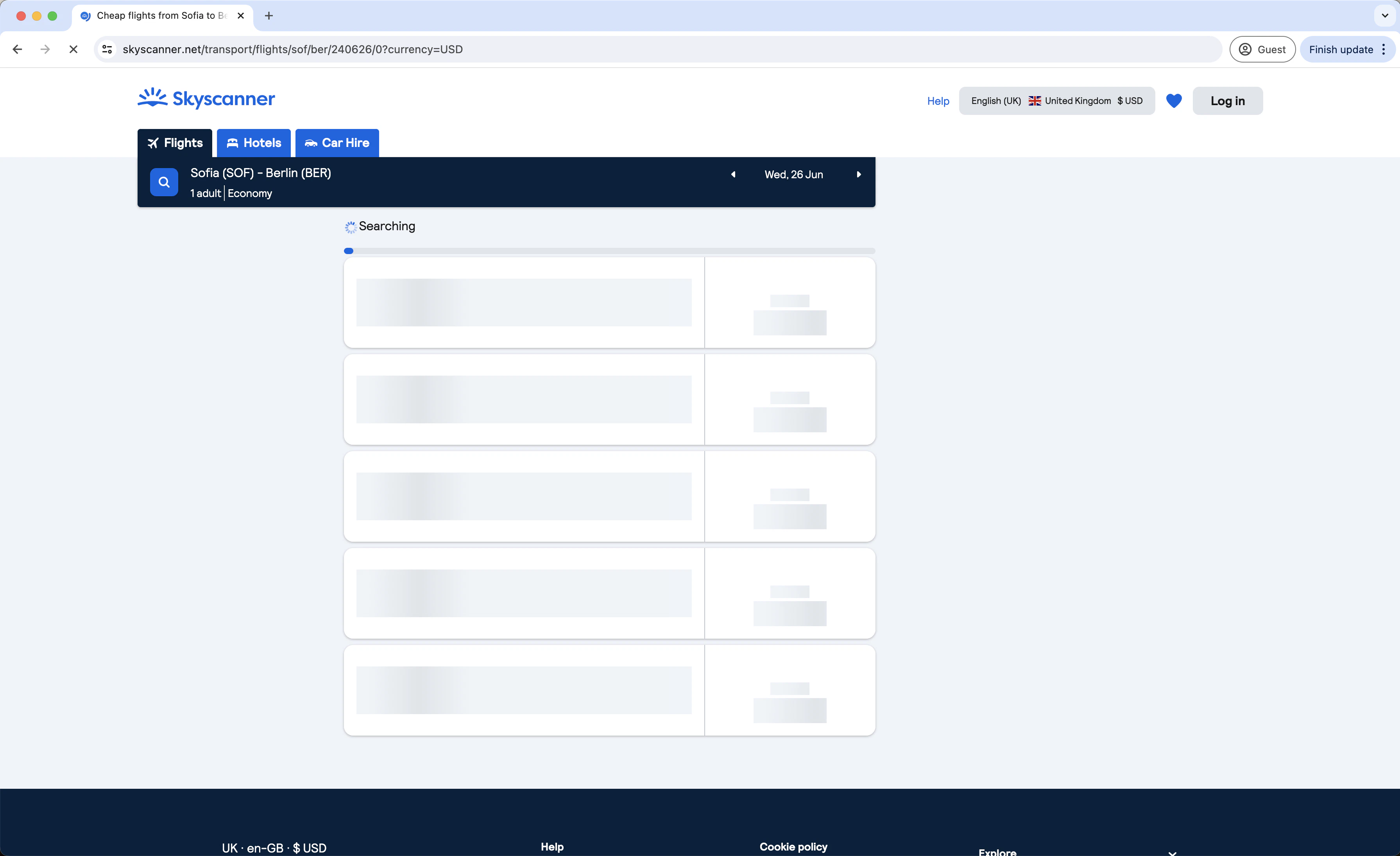 Fortunately, leveraging Browserbase's headless browsers makes loading and interacting with such websites easier while benefiting from its [Verified](/platform/identity/overview).
Look at the custom Browserbase Tool implementation:
```py browserbase.py theme={null}
import os
from crewai_tools import tool
from playwright.sync_api import sync_playwright
from html2text import html2text
from time import sleep
@tool("Browserbase tool")
def browserbase(url: str):
"""
Loads a URL using a headless webbrowser
:param url: The URL to load
:return: The text content of the page
"""
with sync_playwright() as playwright:
browser = playwright.chromium.connect_over_cdp(
"wss://connect.browserbase.com?apiKey="
+ os.environ["BROWSERBASE_API_KEY"]
)
context = browser.contexts[0]
page = context.pages[0]
page.goto(url)
# Wait for the flight search to finish
sleep(25)
content = html2text(page.content())
browser.close()
return content
```
**Custom Tool definition**
A custom `Tool` is composed of 3 elements:
* a name, via the `@tool("name")` decorator
* a description defining the purpose of the tool along with its parameters
* a function that contains the tool's logic
The description, provided as a multi-line comment, is used by the Agents to evaluate the best-fitted `Tool` to help complete a given `Task`.
A description can also provide instructions on the parameters. Here, the unique `url` parameter is instructed to be a URL.
**Browserbase Tool Logic**
The Browserbase tool utilizes the `playwright` library along with the Browserbase Connect API to initiate a headless browser session. This setup allows interaction with web pages as follows:
```py theme={null}
browser = playwright.chromium.connect_over_cdp(
"wss://connect.browserbase.com?apiKey="
+ os.environ["BROWSERBASE_API_KEY"]
)
```
Then, it leverages the `html2text` library to convert the webpage's content to text and return it to the Agent for processing.
### The Kayak tool
Agents are capable of reasoning but cannot build a valid *Kayak search URL* from the ground up.
To help the *"Flights"* Agent, here's a simple *Kayak Tool*:
```py kayak.py theme={null}
from crewai_tools import tool
from typing import Optional
@tool("Kayak tool")
def kayak(
departure: str, destination: str, date: str, return_date: Optional[str] = None
) -> str:
"""
Generates a Kayak URL for flights between departure and destination on the specified date.
:param departure: The IATA code for the departure airport (e.g., 'SOF' for Sofia)
:param destination: The IATA code for the destination airport (e.g., 'BER' for Berlin)
:param date: The date of the flight in the format 'YYYY-MM-DD'
:return_date: Only for two-way tickets. The date of return flight in the format 'YYYY-MM-DD'
:return: The Kayak URL for the flight search
"""
print(f"Generating Kayak URL for {departure} to {destination} on {date}")
URL = f"https://www.kayak.com/flights/{departure}-{destination}/{date}"
if return_date:
URL += f"/{return_date}"
URL += "?currency=USD"
return URL
```
The Kayak tool describes multiple parameters with specific format instructions.
For example: `date: The date of the flight in the format 'YYYY-MM-DD'`
This illustrates the flexibility of Tools that can rely on the `Agents` powerful reasoning capabilities to solve formatting challenges that generally require some preprocessing.
## 4. Set up the agents
The *Flights* Agent now has the tools to navigate the Kayak website from a high-level user input (*"San Francisco to New York one-way on 21st September"*).
Set up the 2 Agents:
```py main.py theme={null}
from crewai import Agent
# import our tools
from browserbase import browserbase
from kayak import kayak
flights_agent = Agent(
role="Flights",
goal="Search flights",
backstory="I am an agent that can search for flights.",
tools=[kayak, browserbase],
allow_delegation=False,
)
summarize_agent = Agent(
role="Summarize",
goal="Summarize content",
backstory="I am an agent that can summarize text.",
allow_delegation=False,
)
```
As outlined in the introduction, an `Agent` needs 3 properties: a `role`, a `goal`, and a `backstory`.
The role of these two Agents is to orchestrate the tools (build the URL, then navigate to it) and
extract the information from the webpages' text. For this reason, their definition is straightforward.
**What is the role of the *Summarize* Agent?**
Through iterations building this Flight Booker, the Crew with a single *Flights* Agent
was struggling to distinguish flights from flight providers (booking links).
The Summarize Agent, as the next section covers, isn't assigned to any task.
It is created and assigned to the Crew to help digest the text extracted from the web pages and distinguish the flights from the providers (booking links).
## 4. Define the tasks
Define the core part of the Flight Booking Crew, the `Tasks`.
From a given flight criteria, the Crew should print the 5 first available flights with their associated booking link.
To achieve this, the Crew needs to:
1. Navigate to the *Kayak search URL* and extract the top 5 flights
2. For each flight, navigate to the *flight details URL* to extract the available *providers* and booking links
### The "Search flights" Task
The *Search flights* Task is bound to the *Flights* Agent, getting access to the custom tools:
```py main.py theme={null}
from crewai import Task
# Agents definitions...
output_search_example = """
Here are our top 5 flights from San Francisco to New York on 21st September 2024:
1. Delta Airlines: Departure: 21:35, Arrival: 03:50, Duration: 6 hours 15 minutes, Price: $125, Details: https://www.kayak.com/flights/sfo/jfk/2024-09-21/12:45/13:55/2:10/delta/airlines/economy/1
"""
search_task = Task(
description=(
"Search flights according to criteria {request}. Current year: {current_year}"
),
expected_output=output_search_example,
agent=flights_agent,
)
```
The `description` will be provided to the *Flights* Agent who will call:
1. The Kayak Tool to build a valid *Kayak search URL*
2. Then, leverage the Browserbase Tool to get the flight results as text
3. Finally, using the `output_search_example` and with the help of the *Summarize* Agent, it will return a list of 5 flights
**Why provide the `current_year`?**
Most users will prompt a relative date, for example: *"San Francisco to New York one-way on 21st September"*.
An Agent's reasoning relies on OpenAI, which lacks some intuition on relative dates ([OpenAI will always think it's 2022](https://community.openai.com/t/api-doesnt-know-date-thinks-its-2022/569125)).
For this reason, you need to specify the current year in the prompt (Task's `description`).
### The "Search Booking Providers" Task
The *Search Booking Providers* Task relies heavily on the `Agent` reasoning capabilities:
```py main.py theme={null}
from crewai import Task
# Agents definitions...
output_providers_example = """
Here are our top 5 picks from San Francisco to New York on 21st September 2024:
1. Delta Airlines:
- Departure: 21:35
- Arrival: 03:50
- Duration: 6 hours 15 minutes
- Price: $125
- Booking: [Delta Airlines](https://www.kayak.com/flights/sfo/jfk/2024-09-21/12:45/13:55/2:10/delta/airlines/economy/1)
...
"""
search_booking_providers_task = Task(
description="Load every flight individually and find available booking providers",
expected_output=output_providers_example,
agent=flights_agent,
)
```
By asking to *"Load every flight individually"*, the *Flights* Agent will understand that it needs
to locate a URL to navigate to for each flight result.
The *Search Booking Providers* will indirectly rely on the *Summarize* Agent to consolidate the flights result and individual flight providers' results as showcased in `output_providers_example`.
## 4. Assemble the Flight Booking Crew
It's time to assemble the Crew by arranging the `Task` in the correct order (*search flights, then gather providers and booking links*):
```py main.py theme={null}
import sys
import datetime
from crewai import Crew, Process, Task, Agent
from browserbase import browserbase
from kayak import kayak
from dotenv import load_dotenv
load_dotenv() # take environment variables from .env.
# Tasks and Agents definitions...
crew = Crew(
agents=[flights_agent, summarize_agent],
tasks=[search_task, search_booking_providers_task],
# let's cap the number of OpenAI requests as the Agents
# may have to do multiple costly calls with large context
max_rpm=100,
# let's also set verbose=True and planning=True
# to see the progress of the Agents
# and the Task execution. Remove these lines
# if you want to run the script without
# seeing the progress (like in production).
verbose=True,
planning=True,
)
result = crew.kickoff(
inputs={
"request": sys.argv[1],
"current_year": datetime.date.today().year,
}
)
print(result)
```
The Crew must complete the *Search Flight* task followed by the *Search Booking Providers* task.
As covered earlier, the *Summarize* Agent gets assigned to the `Crew` - *not to a `Task`* - to help consolidate the flights and providers into a simple list.
**Let the Crew *kick off!***
A `Crew` process starts by calling the `kickoff()` method.
The Crew needs 2 inputs: the user input (*"San Francisco to New York one-way on 21st September"*) and the current year.
## 5. Running a flight booking search
The CrewAI program is now complete!
Try it: Look at its execution steps in detail.
### Running the program
**OpenAI cost**
Expect each run of the program to cost around \$0.50 OpenAI credits.
The Agent reasoning relies heavily on OpenAI and sends large chunks of text (the webpages), resulting in significant contexts (\~50k context tokens per run).
Search for a one-way flight from New York to San Francisco by running:
```bash theme={null}
python3 main.py "San Francisco to New York one-way on 21st September"
```
As the program starts running in verbose mode, you should see some logs stream in your terminal; take a closer look at the steps.
### A close look at the Crew steps
Looking at the debugging logs streamed to the terminal helps you understand how the Crew works.
Explore the logs in the following steps:
```
[DEBUG]: == Working Agent: Flights
[INFO]: == Starting Task: Search flights according to criteria San Francisco to New York one-way on 21st September. Current year: 2024
> Entering new CrewAgentExecutor chain...
Thought: I need to generate a URL using the Kayak tool for the flight search from San Francisco (SFO) to New York (JFK) on 21st September 2024.
```
You can already see the magic of the *Flights* Agent reasoning in action.
Given the Task definition and the 2 tools available, the *Flights* Agent concludes *"I need to generate a URL using the Kayak tool for the flight search"*.
```
Action: Kayak tool
Action Input: {"departure": "SFO", "destination": "JFK", "date": "2024-09-21"}
https://www.kayak.com/flights/SFO-JFK/2024-09-21
Thought: Now that I have the URL, I need to load it using the Browserbase tool to retrieve the flight information.
```
The *Action Input* shows that the *Flights* Agent successfully parsed the user input as valid parameters.
Once the URL is generated, the Agent immediately reaches the next step: fetching the flight list using the URL.
```
Action: Browserbase tool
Action Input: {"url": "https://www.kayak.com/flights/SFO-JFK/2024-09-21"}
[Kayak](/)
......
Thought: I now know the final answer
Final Answer: Here are our top 5 flights from San Francisco (SFO) to Newark (EWR) on September 21, 2024:
Here are our top 5 flights from San Francisco (SFO) to Newark (EWR) on September 21, 2024:
1. **Alaska Airlines**:
- Departure: 8:50 am
- Arrival: 5:24 pm
- Duration: 5 hours 34 minutes
- Layovers: Nonstop
- Price: $125
- Booking: [Alaska Airlines Saver](https://www.kayak.com/book/flight?code=noAiOYx8xU.4fFBlTtfVpoDzQq2dWkU9A.12411.28f6c8a3257adb48c2f7d8207660b2a0&h=41a638bca25d&_kw_pbranded=true&sub=F-1450586051791345216E0040d85ce85&pageOrigin=F..RP.FE.M4)
2. **United Airlines**:
- Departure: 1:30 pm
- Arrival: 9:50 pm
- Duration: 5 hours 20 minutes
- Layovers: Nonstop
- Price: $125
- Booking: [United Airlines Basic Economy](https://www.kayak.com/book/flight?code=noAiOYx8xU.UYIuDTZHiSY.12448.df899b8e44c813d2f8c5501a1648fc15&h=3e1b76440249&sub=F-5023348394153941183E0bc6c2fafa5&pageOrigin=F..RP.FE.M1)
3. **United Airlines**:
- Departure: 4:40 pm
- Arrival: 1:13 am+1
- Duration: 5 hours 33 minutes
- Layovers: Nonstop
- Price: $125
- Booking: [United Airlines Basic Economy](https://www.kayak.com/book/flight?code=noAiOYx8xU.UYIuDTZHiSY.12448.5ec6fd14128fd0c540fd0f53d711947a&h=f6ae82999387&sub=F-5023348393135040028E0bc6c2fafa5&pageOrigin=F..RP.FE.M6)
4. **United Airlines**:
- Departure: 11:59 pm
- Arrival: 8:27 am+1
- Duration: 5 hours 28 minutes
- Layovers: Nonstop
- Price: $144
- Booking: [United Airlines Basic Economy](https://www.kayak.com/book/flight?code=noAiOYx8xU.UYIuDTZHiSY.14383.65a16596bc682cce98ddcd39666710a3&h=e34e775c0ed7&sub=F-5023348391216069073E0bc6c2fafa5&pageOrigin=F..RP.FE.M9)
5. **United Airlines**:
- Departure: 7:15 am
- Arrival: 3:30 pm
- Duration: 5 hours 15 minutes
- Layovers: Nonstop
- Price: $159
- Booking: [United Airlines Basic Economy](https://www.kayak.com/book/flight?code=noAiOYx8xU.UYIuDTZHiSY.15888.f2fb6ff5bafca7eed4751036a9b91597&h=7ce06a5da162&sub=F-5023348394219198114E0bc6c2fafa5&pageOrigin=F..RP.FE.M10)
> Finished chain.
```
In this step, *Flights* Agent retrieves the Kayak webpage as text and leverages OpenAI to extract a flight list.
This is the program's slowest and most costly action, as OpenAI takes up to multiple minutes to process the request.
Once the flight list is generated, the Crew marks the first `Task` ("Search for flights") as completed (*"Finished chain."*) and moves to the next one.
The second `Task` is impressive as the `Agent` realizes that it needs to loop over the 5 flights to retrieve the booking provider:
```
[DEBUG]: == Working Agent: Flights
[INFO]: == Starting Task: Load every flight individually and find available booking providers
> Entering new CrewAgentExecutor chain...
I need to load each of the provided flight detail URLs using the Browserbase tool to gather the detailed information necessary to present the top 5 picks from San Francisco to New York on 21st September 2024.
Action: Browserbase tool
Action Input: {"url": "https://www.kayak.com/flights/SFO-JFK/2024-09-21"}
[Kayak](/)
......
Thought:
Now that I have gathered the necessary details from the Delta Airlines flight URL, I need to process the same for the remaining four flights from San Francisco to New York on 21st September 2024.
```
Once the booking links of each flight has been retrieved, the Agent completes a final step by summarizing the list:
```
Thought: Here are our top 5 flights from San Francisco (SFO) to Newark (EWR) on September 21, 2024:
1. **Alaska Airlines**:
- Departure: 8:50 am
- Arrival: 5:24 pm
- Duration: 5 hours 34 minutes
- Layovers: Nonstop
- Price: $125
- Booking: [Alaska Airlines Saver](https://www.kayak.com/book/flight?code=noAiOYx8xU.4fFBlTtfVpoDzQq2dWkU9A.12411.28f6c8a3257adb48c2f7d8207660b2a0&h=41a638bca25d&_kw_pbranded=true&sub=F-1450586051791345216E0040d85ce85&pageOrigin=F..RP.FE.M4)
2. **United Airlines**:
- Departure: 1:30 pm
- Arrival: 9:50 pm
- Duration: 5 hours 20 minutes
- Layovers: Nonstop
- Price: $125
- Booking: [United Airlines Basic Economy](https://www.kayak.com/book/flight?code=noAiOYx8xU.UYIuDTZHiSY.12448.df899b8e44c813d2f8c5501a1648fc15&h=3e1b76440249&sub=F-5023348394153941183E0bc6c2fafa5&pageOrigin=F..RP.FE.M1)
3. **United Airlines**:
- Departure: 4:40 pm
- Arrival: 1:13 am+1
- Duration: 5 hours 33 minutes
- Layovers: Nonstop
- Price: $125
- Booking: [United Airlines Basic Economy](https://www.kayak.com/book/flight?code=noAiOYx8xU.UYIuDTZHiSY.12448.5ec6fd14128fd0c540fd0f53d711947a&h=f6ae82999387&sub=F-5023348393135040028E0bc6c2fafa5&pageOrigin=F..RP.FE.M6)
4. **United Airlines**:
- Departure: 11:59 pm
- Arrival: 8:27 am+1
- Duration: 5 hours 28 minutes
- Layovers: Nonstop
- Price: $144
- Booking: [United Airlines Basic Economy](https://www.kayak.com/book/flight?code=noAiOYx8xU.UYIuDTZHiSY.14383.65a16596bc682cce98ddcd39666710a3&h=e34e775c0ed7&sub=F-5023348391216069073E0bc6c2fafa5&pageOrigin=F..RP.FE.M9)
5. **United Airlines**:
- Departure: 7:15 am
- Arrival: 3:30 pm
- Duration: 5 hours 15 minutes
- Layovers: Nonstop
- Price: $159
- Booking: [United Airlines Basic Economy](https://www.kayak.com/book/flight?code=noAiOYx8xU.UYIuDTZHiSY.15888.f2fb6ff5bafca7eed4751036a9b91597&h=7ce06a5da162&sub=F-5023348394219198114E0bc6c2fafa5&pageOrigin=F..RP.FE.M10)
> Finished chain.
```
Once finished, the program prints the final answer returned by the `Crew`:
```
Here are our top 5 flights from San Francisco (SFO) to Newark (EWR) on September 21, 2024:
1. **Alaska Airlines**:
- Departure: 8:50 am
- Arrival: 5:24 pm
- Duration: 5 hours 34 minutes
- Layovers: Nonstop
- Price: $125
- Booking: [Alaska Airlines Saver](https://www.kayak.com/book/flight?code=noAiOYx8xU.4fFBlTtfVpoDzQq2dWkU9A.12411.28f6c8a3257adb48c2f7d8207660b2a0&h=41a638bca25d&_kw_pbranded=true&sub=F-1450586051791345216E0040d85ce85&pageOrigin=F..RP.FE.M4)
2. **United Airlines**:
- Departure: 1:30 pm
- Arrival: 9:50 pm
- Duration: 5 hours 20 minutes
- Layovers: Nonstop
- Price: $125
- Booking: [United Airlines Basic Economy](https://www.kayak.com/book/flight?code=noAiOYx8xU.UYIuDTZHiSY.12448.df899b8e44c813d2f8c5501a1648fc15&h=3e1b76440249&sub=F-5023348394153941183E0bc6c2fafa5&pageOrigin=F..RP.FE.M1)
3. **United Airlines**:
- Departure: 4:40 pm
- Arrival: 1:13 am+1
- Duration: 5 hours 33 minutes
- Layovers: Nonstop
- Price: $125
- Booking: [United Airlines Basic Economy](https://www.kayak.com/book/flight?code=noAiOYx8xU.UYIuDTZHiSY.12448.5ec6fd14128fd0c540fd0f53d711947a&h=f6ae82999387&sub=F-5023348393135040028E0bc6c2fafa5&pageOrigin=F..RP.FE.M6)
4. **United Airlines**:
- Departure: 11:59 pm
- Arrival: 8:27 am+1
- Duration: 5 hours 28 minutes
- Layovers: Nonstop
- Price: $144
- Booking: [United Airlines Basic Economy](https://www.kayak.com/book/flight?code=noAiOYx8xU.UYIuDTZHiSY.14383.65a16596bc682cce98ddcd39666710a3&h=e34e775c0ed7&sub=F-5023348391216069073E0bc6c2fafa5&pageOrigin=F..RP.FE.M9)
5. **United Airlines**:
- Departure: 7:15 am
- Arrival: 3:30 pm
- Duration: 5 hours 15 minutes
- Layovers: Nonstop
- Price: $159
- Booking: [United Airlines Basic Economy](https://www.kayak.com/book/flight?code=noAiOYx8xU.UYIuDTZHiSY.15888.f2fb6ff5bafca7eed4751036a9b91597&h=7ce06a5da162&sub=F-5023348394219198114E0bc6c2fafa5&pageOrigin=F..RP.FE.M10)
```
## Wrapping up
CrewAI provides a powerful way to develop AI Agents. The traditional approach of Prompt Engineering is replaced by instructions that leverage the `Agent`'s reasoning capabilities.
As this example shows, Agents can complete `Tasks` defined with high-level instructions (ex: *"Load every flight individually and find available booking providers"*)
Combined with Browserbase headless browsers, crewAI helps create powerful AI Agents that automate human tasks or access data not available through public APIs.
Check out the repo!
Fortunately, leveraging Browserbase's headless browsers makes loading and interacting with such websites easier while benefiting from its [Verified](/platform/identity/overview).
Look at the custom Browserbase Tool implementation:
```py browserbase.py theme={null}
import os
from crewai_tools import tool
from playwright.sync_api import sync_playwright
from html2text import html2text
from time import sleep
@tool("Browserbase tool")
def browserbase(url: str):
"""
Loads a URL using a headless webbrowser
:param url: The URL to load
:return: The text content of the page
"""
with sync_playwright() as playwright:
browser = playwright.chromium.connect_over_cdp(
"wss://connect.browserbase.com?apiKey="
+ os.environ["BROWSERBASE_API_KEY"]
)
context = browser.contexts[0]
page = context.pages[0]
page.goto(url)
# Wait for the flight search to finish
sleep(25)
content = html2text(page.content())
browser.close()
return content
```
**Custom Tool definition**
A custom `Tool` is composed of 3 elements:
* a name, via the `@tool("name")` decorator
* a description defining the purpose of the tool along with its parameters
* a function that contains the tool's logic
The description, provided as a multi-line comment, is used by the Agents to evaluate the best-fitted `Tool` to help complete a given `Task`.
A description can also provide instructions on the parameters. Here, the unique `url` parameter is instructed to be a URL.
**Browserbase Tool Logic**
The Browserbase tool utilizes the `playwright` library along with the Browserbase Connect API to initiate a headless browser session. This setup allows interaction with web pages as follows:
```py theme={null}
browser = playwright.chromium.connect_over_cdp(
"wss://connect.browserbase.com?apiKey="
+ os.environ["BROWSERBASE_API_KEY"]
)
```
Then, it leverages the `html2text` library to convert the webpage's content to text and return it to the Agent for processing.
### The Kayak tool
Agents are capable of reasoning but cannot build a valid *Kayak search URL* from the ground up.
To help the *"Flights"* Agent, here's a simple *Kayak Tool*:
```py kayak.py theme={null}
from crewai_tools import tool
from typing import Optional
@tool("Kayak tool")
def kayak(
departure: str, destination: str, date: str, return_date: Optional[str] = None
) -> str:
"""
Generates a Kayak URL for flights between departure and destination on the specified date.
:param departure: The IATA code for the departure airport (e.g., 'SOF' for Sofia)
:param destination: The IATA code for the destination airport (e.g., 'BER' for Berlin)
:param date: The date of the flight in the format 'YYYY-MM-DD'
:return_date: Only for two-way tickets. The date of return flight in the format 'YYYY-MM-DD'
:return: The Kayak URL for the flight search
"""
print(f"Generating Kayak URL for {departure} to {destination} on {date}")
URL = f"https://www.kayak.com/flights/{departure}-{destination}/{date}"
if return_date:
URL += f"/{return_date}"
URL += "?currency=USD"
return URL
```
The Kayak tool describes multiple parameters with specific format instructions.
For example: `date: The date of the flight in the format 'YYYY-MM-DD'`
This illustrates the flexibility of Tools that can rely on the `Agents` powerful reasoning capabilities to solve formatting challenges that generally require some preprocessing.
## 4. Set up the agents
The *Flights* Agent now has the tools to navigate the Kayak website from a high-level user input (*"San Francisco to New York one-way on 21st September"*).
Set up the 2 Agents:
```py main.py theme={null}
from crewai import Agent
# import our tools
from browserbase import browserbase
from kayak import kayak
flights_agent = Agent(
role="Flights",
goal="Search flights",
backstory="I am an agent that can search for flights.",
tools=[kayak, browserbase],
allow_delegation=False,
)
summarize_agent = Agent(
role="Summarize",
goal="Summarize content",
backstory="I am an agent that can summarize text.",
allow_delegation=False,
)
```
As outlined in the introduction, an `Agent` needs 3 properties: a `role`, a `goal`, and a `backstory`.
The role of these two Agents is to orchestrate the tools (build the URL, then navigate to it) and
extract the information from the webpages' text. For this reason, their definition is straightforward.
**What is the role of the *Summarize* Agent?**
Through iterations building this Flight Booker, the Crew with a single *Flights* Agent
was struggling to distinguish flights from flight providers (booking links).
The Summarize Agent, as the next section covers, isn't assigned to any task.
It is created and assigned to the Crew to help digest the text extracted from the web pages and distinguish the flights from the providers (booking links).
## 4. Define the tasks
Define the core part of the Flight Booking Crew, the `Tasks`.
From a given flight criteria, the Crew should print the 5 first available flights with their associated booking link.
To achieve this, the Crew needs to:
1. Navigate to the *Kayak search URL* and extract the top 5 flights
2. For each flight, navigate to the *flight details URL* to extract the available *providers* and booking links
### The "Search flights" Task
The *Search flights* Task is bound to the *Flights* Agent, getting access to the custom tools:
```py main.py theme={null}
from crewai import Task
# Agents definitions...
output_search_example = """
Here are our top 5 flights from San Francisco to New York on 21st September 2024:
1. Delta Airlines: Departure: 21:35, Arrival: 03:50, Duration: 6 hours 15 minutes, Price: $125, Details: https://www.kayak.com/flights/sfo/jfk/2024-09-21/12:45/13:55/2:10/delta/airlines/economy/1
"""
search_task = Task(
description=(
"Search flights according to criteria {request}. Current year: {current_year}"
),
expected_output=output_search_example,
agent=flights_agent,
)
```
The `description` will be provided to the *Flights* Agent who will call:
1. The Kayak Tool to build a valid *Kayak search URL*
2. Then, leverage the Browserbase Tool to get the flight results as text
3. Finally, using the `output_search_example` and with the help of the *Summarize* Agent, it will return a list of 5 flights
**Why provide the `current_year`?**
Most users will prompt a relative date, for example: *"San Francisco to New York one-way on 21st September"*.
An Agent's reasoning relies on OpenAI, which lacks some intuition on relative dates ([OpenAI will always think it's 2022](https://community.openai.com/t/api-doesnt-know-date-thinks-its-2022/569125)).
For this reason, you need to specify the current year in the prompt (Task's `description`).
### The "Search Booking Providers" Task
The *Search Booking Providers* Task relies heavily on the `Agent` reasoning capabilities:
```py main.py theme={null}
from crewai import Task
# Agents definitions...
output_providers_example = """
Here are our top 5 picks from San Francisco to New York on 21st September 2024:
1. Delta Airlines:
- Departure: 21:35
- Arrival: 03:50
- Duration: 6 hours 15 minutes
- Price: $125
- Booking: [Delta Airlines](https://www.kayak.com/flights/sfo/jfk/2024-09-21/12:45/13:55/2:10/delta/airlines/economy/1)
...
"""
search_booking_providers_task = Task(
description="Load every flight individually and find available booking providers",
expected_output=output_providers_example,
agent=flights_agent,
)
```
By asking to *"Load every flight individually"*, the *Flights* Agent will understand that it needs
to locate a URL to navigate to for each flight result.
The *Search Booking Providers* will indirectly rely on the *Summarize* Agent to consolidate the flights result and individual flight providers' results as showcased in `output_providers_example`.
## 4. Assemble the Flight Booking Crew
It's time to assemble the Crew by arranging the `Task` in the correct order (*search flights, then gather providers and booking links*):
```py main.py theme={null}
import sys
import datetime
from crewai import Crew, Process, Task, Agent
from browserbase import browserbase
from kayak import kayak
from dotenv import load_dotenv
load_dotenv() # take environment variables from .env.
# Tasks and Agents definitions...
crew = Crew(
agents=[flights_agent, summarize_agent],
tasks=[search_task, search_booking_providers_task],
# let's cap the number of OpenAI requests as the Agents
# may have to do multiple costly calls with large context
max_rpm=100,
# let's also set verbose=True and planning=True
# to see the progress of the Agents
# and the Task execution. Remove these lines
# if you want to run the script without
# seeing the progress (like in production).
verbose=True,
planning=True,
)
result = crew.kickoff(
inputs={
"request": sys.argv[1],
"current_year": datetime.date.today().year,
}
)
print(result)
```
The Crew must complete the *Search Flight* task followed by the *Search Booking Providers* task.
As covered earlier, the *Summarize* Agent gets assigned to the `Crew` - *not to a `Task`* - to help consolidate the flights and providers into a simple list.
**Let the Crew *kick off!***
A `Crew` process starts by calling the `kickoff()` method.
The Crew needs 2 inputs: the user input (*"San Francisco to New York one-way on 21st September"*) and the current year.
## 5. Running a flight booking search
The CrewAI program is now complete!
Try it: Look at its execution steps in detail.
### Running the program
**OpenAI cost**
Expect each run of the program to cost around \$0.50 OpenAI credits.
The Agent reasoning relies heavily on OpenAI and sends large chunks of text (the webpages), resulting in significant contexts (\~50k context tokens per run).
Search for a one-way flight from New York to San Francisco by running:
```bash theme={null}
python3 main.py "San Francisco to New York one-way on 21st September"
```
As the program starts running in verbose mode, you should see some logs stream in your terminal; take a closer look at the steps.
### A close look at the Crew steps
Looking at the debugging logs streamed to the terminal helps you understand how the Crew works.
Explore the logs in the following steps:
```
[DEBUG]: == Working Agent: Flights
[INFO]: == Starting Task: Search flights according to criteria San Francisco to New York one-way on 21st September. Current year: 2024
> Entering new CrewAgentExecutor chain...
Thought: I need to generate a URL using the Kayak tool for the flight search from San Francisco (SFO) to New York (JFK) on 21st September 2024.
```
You can already see the magic of the *Flights* Agent reasoning in action.
Given the Task definition and the 2 tools available, the *Flights* Agent concludes *"I need to generate a URL using the Kayak tool for the flight search"*.
```
Action: Kayak tool
Action Input: {"departure": "SFO", "destination": "JFK", "date": "2024-09-21"}
https://www.kayak.com/flights/SFO-JFK/2024-09-21
Thought: Now that I have the URL, I need to load it using the Browserbase tool to retrieve the flight information.
```
The *Action Input* shows that the *Flights* Agent successfully parsed the user input as valid parameters.
Once the URL is generated, the Agent immediately reaches the next step: fetching the flight list using the URL.
```
Action: Browserbase tool
Action Input: {"url": "https://www.kayak.com/flights/SFO-JFK/2024-09-21"}
[Kayak](/)
......
Thought: I now know the final answer
Final Answer: Here are our top 5 flights from San Francisco (SFO) to Newark (EWR) on September 21, 2024:
Here are our top 5 flights from San Francisco (SFO) to Newark (EWR) on September 21, 2024:
1. **Alaska Airlines**:
- Departure: 8:50 am
- Arrival: 5:24 pm
- Duration: 5 hours 34 minutes
- Layovers: Nonstop
- Price: $125
- Booking: [Alaska Airlines Saver](https://www.kayak.com/book/flight?code=noAiOYx8xU.4fFBlTtfVpoDzQq2dWkU9A.12411.28f6c8a3257adb48c2f7d8207660b2a0&h=41a638bca25d&_kw_pbranded=true&sub=F-1450586051791345216E0040d85ce85&pageOrigin=F..RP.FE.M4)
2. **United Airlines**:
- Departure: 1:30 pm
- Arrival: 9:50 pm
- Duration: 5 hours 20 minutes
- Layovers: Nonstop
- Price: $125
- Booking: [United Airlines Basic Economy](https://www.kayak.com/book/flight?code=noAiOYx8xU.UYIuDTZHiSY.12448.df899b8e44c813d2f8c5501a1648fc15&h=3e1b76440249&sub=F-5023348394153941183E0bc6c2fafa5&pageOrigin=F..RP.FE.M1)
3. **United Airlines**:
- Departure: 4:40 pm
- Arrival: 1:13 am+1
- Duration: 5 hours 33 minutes
- Layovers: Nonstop
- Price: $125
- Booking: [United Airlines Basic Economy](https://www.kayak.com/book/flight?code=noAiOYx8xU.UYIuDTZHiSY.12448.5ec6fd14128fd0c540fd0f53d711947a&h=f6ae82999387&sub=F-5023348393135040028E0bc6c2fafa5&pageOrigin=F..RP.FE.M6)
4. **United Airlines**:
- Departure: 11:59 pm
- Arrival: 8:27 am+1
- Duration: 5 hours 28 minutes
- Layovers: Nonstop
- Price: $144
- Booking: [United Airlines Basic Economy](https://www.kayak.com/book/flight?code=noAiOYx8xU.UYIuDTZHiSY.14383.65a16596bc682cce98ddcd39666710a3&h=e34e775c0ed7&sub=F-5023348391216069073E0bc6c2fafa5&pageOrigin=F..RP.FE.M9)
5. **United Airlines**:
- Departure: 7:15 am
- Arrival: 3:30 pm
- Duration: 5 hours 15 minutes
- Layovers: Nonstop
- Price: $159
- Booking: [United Airlines Basic Economy](https://www.kayak.com/book/flight?code=noAiOYx8xU.UYIuDTZHiSY.15888.f2fb6ff5bafca7eed4751036a9b91597&h=7ce06a5da162&sub=F-5023348394219198114E0bc6c2fafa5&pageOrigin=F..RP.FE.M10)
> Finished chain.
```
In this step, *Flights* Agent retrieves the Kayak webpage as text and leverages OpenAI to extract a flight list.
This is the program's slowest and most costly action, as OpenAI takes up to multiple minutes to process the request.
Once the flight list is generated, the Crew marks the first `Task` ("Search for flights") as completed (*"Finished chain."*) and moves to the next one.
The second `Task` is impressive as the `Agent` realizes that it needs to loop over the 5 flights to retrieve the booking provider:
```
[DEBUG]: == Working Agent: Flights
[INFO]: == Starting Task: Load every flight individually and find available booking providers
> Entering new CrewAgentExecutor chain...
I need to load each of the provided flight detail URLs using the Browserbase tool to gather the detailed information necessary to present the top 5 picks from San Francisco to New York on 21st September 2024.
Action: Browserbase tool
Action Input: {"url": "https://www.kayak.com/flights/SFO-JFK/2024-09-21"}
[Kayak](/)
......
Thought:
Now that I have gathered the necessary details from the Delta Airlines flight URL, I need to process the same for the remaining four flights from San Francisco to New York on 21st September 2024.
```
Once the booking links of each flight has been retrieved, the Agent completes a final step by summarizing the list:
```
Thought: Here are our top 5 flights from San Francisco (SFO) to Newark (EWR) on September 21, 2024:
1. **Alaska Airlines**:
- Departure: 8:50 am
- Arrival: 5:24 pm
- Duration: 5 hours 34 minutes
- Layovers: Nonstop
- Price: $125
- Booking: [Alaska Airlines Saver](https://www.kayak.com/book/flight?code=noAiOYx8xU.4fFBlTtfVpoDzQq2dWkU9A.12411.28f6c8a3257adb48c2f7d8207660b2a0&h=41a638bca25d&_kw_pbranded=true&sub=F-1450586051791345216E0040d85ce85&pageOrigin=F..RP.FE.M4)
2. **United Airlines**:
- Departure: 1:30 pm
- Arrival: 9:50 pm
- Duration: 5 hours 20 minutes
- Layovers: Nonstop
- Price: $125
- Booking: [United Airlines Basic Economy](https://www.kayak.com/book/flight?code=noAiOYx8xU.UYIuDTZHiSY.12448.df899b8e44c813d2f8c5501a1648fc15&h=3e1b76440249&sub=F-5023348394153941183E0bc6c2fafa5&pageOrigin=F..RP.FE.M1)
3. **United Airlines**:
- Departure: 4:40 pm
- Arrival: 1:13 am+1
- Duration: 5 hours 33 minutes
- Layovers: Nonstop
- Price: $125
- Booking: [United Airlines Basic Economy](https://www.kayak.com/book/flight?code=noAiOYx8xU.UYIuDTZHiSY.12448.5ec6fd14128fd0c540fd0f53d711947a&h=f6ae82999387&sub=F-5023348393135040028E0bc6c2fafa5&pageOrigin=F..RP.FE.M6)
4. **United Airlines**:
- Departure: 11:59 pm
- Arrival: 8:27 am+1
- Duration: 5 hours 28 minutes
- Layovers: Nonstop
- Price: $144
- Booking: [United Airlines Basic Economy](https://www.kayak.com/book/flight?code=noAiOYx8xU.UYIuDTZHiSY.14383.65a16596bc682cce98ddcd39666710a3&h=e34e775c0ed7&sub=F-5023348391216069073E0bc6c2fafa5&pageOrigin=F..RP.FE.M9)
5. **United Airlines**:
- Departure: 7:15 am
- Arrival: 3:30 pm
- Duration: 5 hours 15 minutes
- Layovers: Nonstop
- Price: $159
- Booking: [United Airlines Basic Economy](https://www.kayak.com/book/flight?code=noAiOYx8xU.UYIuDTZHiSY.15888.f2fb6ff5bafca7eed4751036a9b91597&h=7ce06a5da162&sub=F-5023348394219198114E0bc6c2fafa5&pageOrigin=F..RP.FE.M10)
> Finished chain.
```
Once finished, the program prints the final answer returned by the `Crew`:
```
Here are our top 5 flights from San Francisco (SFO) to Newark (EWR) on September 21, 2024:
1. **Alaska Airlines**:
- Departure: 8:50 am
- Arrival: 5:24 pm
- Duration: 5 hours 34 minutes
- Layovers: Nonstop
- Price: $125
- Booking: [Alaska Airlines Saver](https://www.kayak.com/book/flight?code=noAiOYx8xU.4fFBlTtfVpoDzQq2dWkU9A.12411.28f6c8a3257adb48c2f7d8207660b2a0&h=41a638bca25d&_kw_pbranded=true&sub=F-1450586051791345216E0040d85ce85&pageOrigin=F..RP.FE.M4)
2. **United Airlines**:
- Departure: 1:30 pm
- Arrival: 9:50 pm
- Duration: 5 hours 20 minutes
- Layovers: Nonstop
- Price: $125
- Booking: [United Airlines Basic Economy](https://www.kayak.com/book/flight?code=noAiOYx8xU.UYIuDTZHiSY.12448.df899b8e44c813d2f8c5501a1648fc15&h=3e1b76440249&sub=F-5023348394153941183E0bc6c2fafa5&pageOrigin=F..RP.FE.M1)
3. **United Airlines**:
- Departure: 4:40 pm
- Arrival: 1:13 am+1
- Duration: 5 hours 33 minutes
- Layovers: Nonstop
- Price: $125
- Booking: [United Airlines Basic Economy](https://www.kayak.com/book/flight?code=noAiOYx8xU.UYIuDTZHiSY.12448.5ec6fd14128fd0c540fd0f53d711947a&h=f6ae82999387&sub=F-5023348393135040028E0bc6c2fafa5&pageOrigin=F..RP.FE.M6)
4. **United Airlines**:
- Departure: 11:59 pm
- Arrival: 8:27 am+1
- Duration: 5 hours 28 minutes
- Layovers: Nonstop
- Price: $144
- Booking: [United Airlines Basic Economy](https://www.kayak.com/book/flight?code=noAiOYx8xU.UYIuDTZHiSY.14383.65a16596bc682cce98ddcd39666710a3&h=e34e775c0ed7&sub=F-5023348391216069073E0bc6c2fafa5&pageOrigin=F..RP.FE.M9)
5. **United Airlines**:
- Departure: 7:15 am
- Arrival: 3:30 pm
- Duration: 5 hours 15 minutes
- Layovers: Nonstop
- Price: $159
- Booking: [United Airlines Basic Economy](https://www.kayak.com/book/flight?code=noAiOYx8xU.UYIuDTZHiSY.15888.f2fb6ff5bafca7eed4751036a9b91597&h=7ce06a5da162&sub=F-5023348394219198114E0bc6c2fafa5&pageOrigin=F..RP.FE.M10)
```
## Wrapping up
CrewAI provides a powerful way to develop AI Agents. The traditional approach of Prompt Engineering is replaced by instructions that leverage the `Agent`'s reasoning capabilities.
As this example shows, Agents can complete `Tasks` defined with high-level instructions (ex: *"Load every flight individually and find available booking providers"*)
Combined with Browserbase headless browsers, crewAI helps create powerful AI Agents that automate human tasks or access data not available through public APIs.
Check out the repo!