> ## Documentation Index
> Fetch the complete documentation index at: https://docs.browserbase.com/llms.txt
> Use this file to discover all available pages before exploring further.
# Add web browsing capabilities to Browser Use
> Integrate Browserbase with Browser Use
Visit the [Dashboard's Overview tab](https://www.browserbase.com/overview):
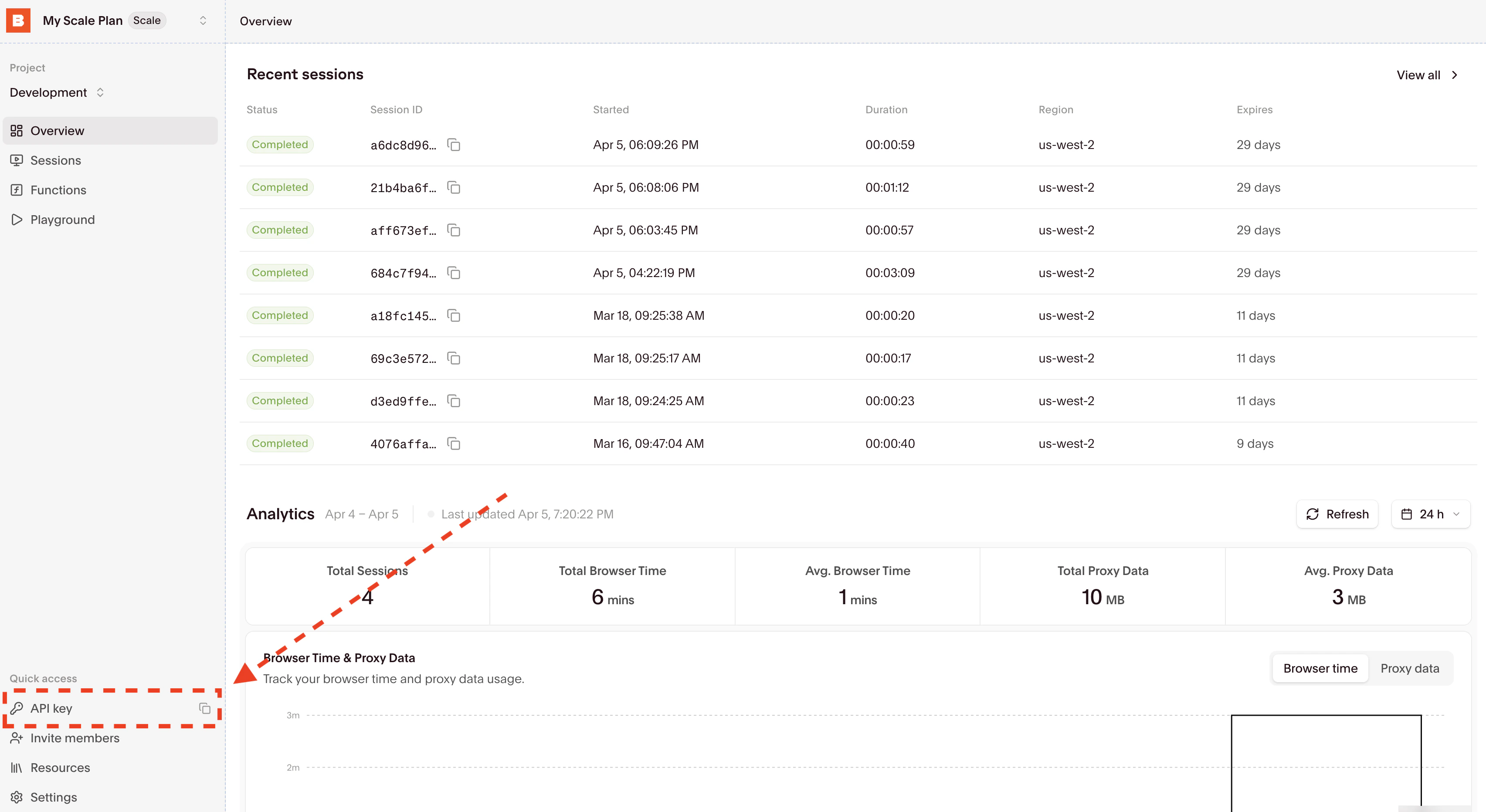 Then copy and set the `BROWSERBASE_API_KEY` environment variable in your `.env` file.
[UV](https://docs.astral.sh/uv/getting-started/installation/) is a modern package manager for Python.
```bash theme={null}
uv venv
```
```bash theme={null}
source .venv/bin/activate # follow the `uv venv` output
uv pip install browserbase browser-use python-dotenv
```
Browser Use provides a simple `Browser` class that accepts a CDP URL from Browserbase. Create a `main.py` file:
```python main.py theme={null}
import asyncio
import os
from dotenv import load_dotenv
from browserbase import Browserbase
from browser_use import Agent, Browser, BrowserProfile, ChatAnthropic
load_dotenv()
async def main():
bb = Browserbase(api_key=os.environ["BROWSERBASE_API_KEY"])
session = bb.sessions.create()
print(f"Session ID: {session.id}")
print(f"Debug URL: https://www.browserbase.com/sessions/{session.id}")
browser = Browser(
browser_profile=BrowserProfile(cdp_url=session.connect_url)
)
llm = ChatAnthropic(model="claude-sonnet-4-6")
agent = Agent(
task=(
"Go to https://www.macrumors.com/contact.php and fill in the form. "
"Make sure to use the selectors and submit the form"
),
llm=llm,
browser=browser,
)
result = await agent.run()
print(f"Result: {result}")
await browser.stop()
if __name__ == "__main__":
asyncio.run(main())
```
Run your script:
```bash theme={null}
uv run main.py
```
You should see your Browserbase session start in [Browserbase](https://www.browserbase.com/sessions). The debug URL prints to the console for real-time session monitoring.
**Important environment variables**
Make sure you have these environment variables in your `.env` file:
* `BROWSERBASE_API_KEY`
* `ANTHROPIC_API_KEY` (or another LLM provider key)
**Notes**
* The `BrowserProfile(cdp_url=...)` connects to your Browserbase session via CDP
* Browser Use handles browser lifecycle, Playwright management, and cleanup automatically
* You can configure the LLM by passing a `llm` parameter to `Agent` (e.g. `ChatAnthropic`, `ChatOpenAI`)
* Reach out at [support@browserbase.com](mailto:support@browserbase.com) for additional support
Configure Browserbase to add additional web-browsing capabilities to your
Browser Use.
Then copy and set the `BROWSERBASE_API_KEY` environment variable in your `.env` file.
[UV](https://docs.astral.sh/uv/getting-started/installation/) is a modern package manager for Python.
```bash theme={null}
uv venv
```
```bash theme={null}
source .venv/bin/activate # follow the `uv venv` output
uv pip install browserbase browser-use python-dotenv
```
Browser Use provides a simple `Browser` class that accepts a CDP URL from Browserbase. Create a `main.py` file:
```python main.py theme={null}
import asyncio
import os
from dotenv import load_dotenv
from browserbase import Browserbase
from browser_use import Agent, Browser, BrowserProfile, ChatAnthropic
load_dotenv()
async def main():
bb = Browserbase(api_key=os.environ["BROWSERBASE_API_KEY"])
session = bb.sessions.create()
print(f"Session ID: {session.id}")
print(f"Debug URL: https://www.browserbase.com/sessions/{session.id}")
browser = Browser(
browser_profile=BrowserProfile(cdp_url=session.connect_url)
)
llm = ChatAnthropic(model="claude-sonnet-4-6")
agent = Agent(
task=(
"Go to https://www.macrumors.com/contact.php and fill in the form. "
"Make sure to use the selectors and submit the form"
),
llm=llm,
browser=browser,
)
result = await agent.run()
print(f"Result: {result}")
await browser.stop()
if __name__ == "__main__":
asyncio.run(main())
```
Run your script:
```bash theme={null}
uv run main.py
```
You should see your Browserbase session start in [Browserbase](https://www.browserbase.com/sessions). The debug URL prints to the console for real-time session monitoring.
**Important environment variables**
Make sure you have these environment variables in your `.env` file:
* `BROWSERBASE_API_KEY`
* `ANTHROPIC_API_KEY` (or another LLM provider key)
**Notes**
* The `BrowserProfile(cdp_url=...)` connects to your Browserbase session via CDP
* Browser Use handles browser lifecycle, Playwright management, and cleanup automatically
* You can configure the LLM by passing a `llm` parameter to `Agent` (e.g. `ChatAnthropic`, `ChatOpenAI`)
* Reach out at [support@browserbase.com](mailto:support@browserbase.com) for additional support
Configure Browserbase to add additional web-browsing capabilities to your
Browser Use.