> ## Documentation Index
> Fetch the complete documentation index at: https://docs.browserbase.com/llms.txt
> Use this file to discover all available pages before exploring further.
# Browsers for Managed Agents
> Hand your Anthropic Managed Agents a full cloud browser
This guide shows how to equip your Managed Agents with browser, search, and fetch tooling to navigate the web. The [`browse` CLI](https://www.npmjs.com/package/browse) powers your agents to run UI testing, conduct deep document research, fill web forms, and complex browser automations.
One CLI for skills, browser primitives, debugging, and cloud sessions, designed to be driven by AI Agents.
## 1. Create an environment
Create an environment with the `browse` npm package installed. For open-web browser agents, set networking to unrestricted. Use limited networking when you want to scope the agent to specific websites.
In the Anthropic Console, create a new Managed Agents environment. Add `browse` as a default npm package and set networking to **Unrestricted**.
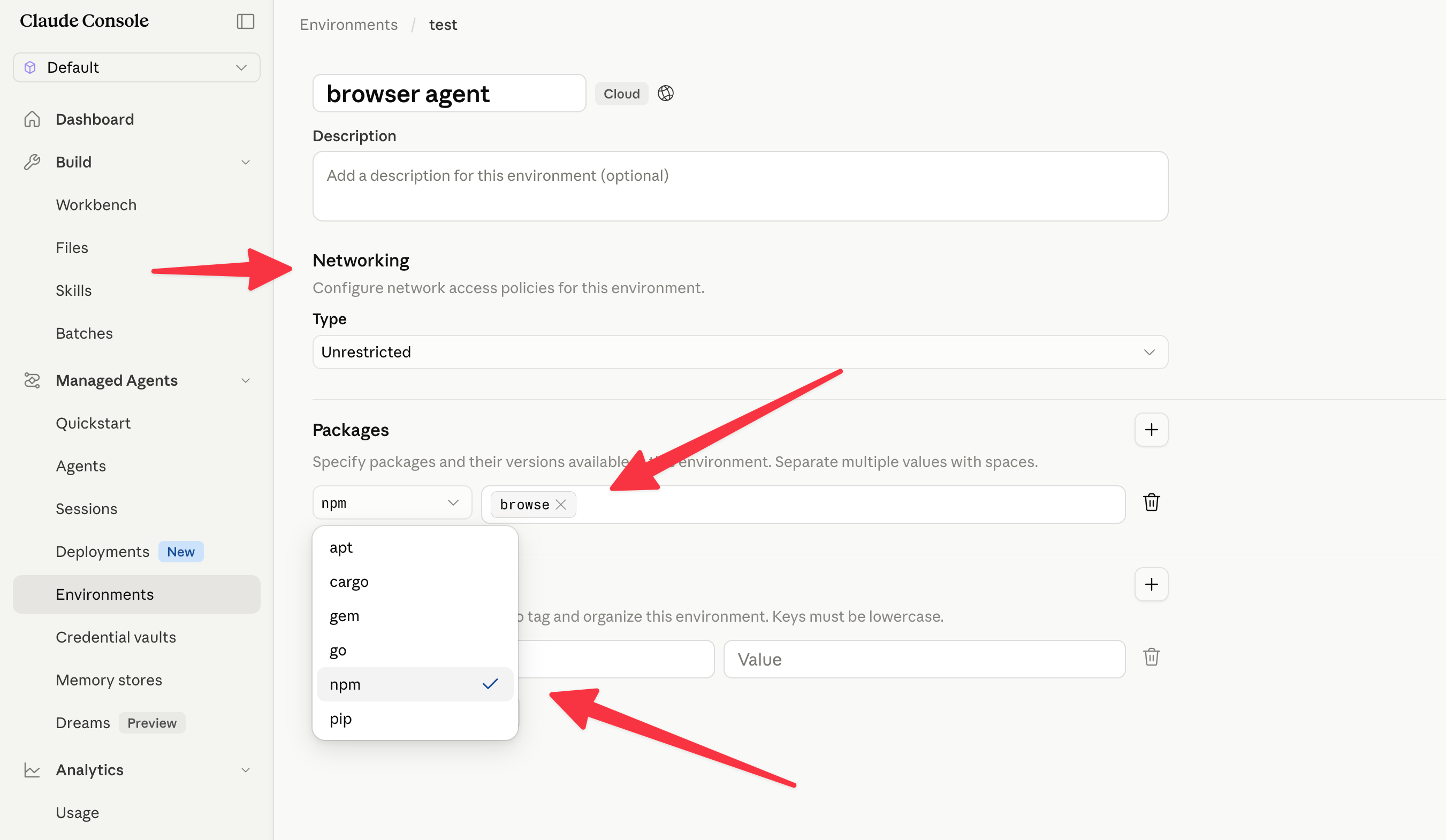 Use `ant beta:environments create`. The `--config` flag accepts structured literals; `ant beta:environments create --help` shows the available flags.
```bash theme={null}
ENVIRONMENT_ID=$(ant beta:environments create \
--name "browserbase-env" \
--config '{type: cloud, packages: {type: packages, npm: [browse]}, networking: {type: unrestricted}}' \
--transform id --raw-output)
```
```typescript theme={null}
import Anthropic from "@anthropic-ai/sdk";
const client = new Anthropic();
const environment = await client.beta.environments.create({
name: "browserbase-env",
config: {
type: "cloud",
packages: {
type: "packages",
npm: ["browse"],
},
networking: { type: "unrestricted" },
},
});
console.log(`MANAGED_ENVIRONMENT_ID=${environment.id}`);
```
The [`browse` CLI](https://www.npmjs.com/package/browse) is designed for agents to inspect and operate webpages. It exposes commands like `browse click`, `browse snapshot`, `browse screenshot`, and `browse network`, and can drive local Chromium, any CDP connection, or Browserbase cloud sessions.
## 2. Create a credential vault
Create a credential vault so the agent can securely read your Browserbase API key without hardcoding it in prompts.
Create a vault that will hold an environment-variable credential.
Choose **Environment variable** as the credential vault type.
Use `ant beta:environments create`. The `--config` flag accepts structured literals; `ant beta:environments create --help` shows the available flags.
```bash theme={null}
ENVIRONMENT_ID=$(ant beta:environments create \
--name "browserbase-env" \
--config '{type: cloud, packages: {type: packages, npm: [browse]}, networking: {type: unrestricted}}' \
--transform id --raw-output)
```
```typescript theme={null}
import Anthropic from "@anthropic-ai/sdk";
const client = new Anthropic();
const environment = await client.beta.environments.create({
name: "browserbase-env",
config: {
type: "cloud",
packages: {
type: "packages",
npm: ["browse"],
},
networking: { type: "unrestricted" },
},
});
console.log(`MANAGED_ENVIRONMENT_ID=${environment.id}`);
```
The [`browse` CLI](https://www.npmjs.com/package/browse) is designed for agents to inspect and operate webpages. It exposes commands like `browse click`, `browse snapshot`, `browse screenshot`, and `browse network`, and can drive local Chromium, any CDP connection, or Browserbase cloud sessions.
## 2. Create a credential vault
Create a credential vault so the agent can securely read your Browserbase API key without hardcoding it in prompts.
Create a vault that will hold an environment-variable credential.
Choose **Environment variable** as the credential vault type.
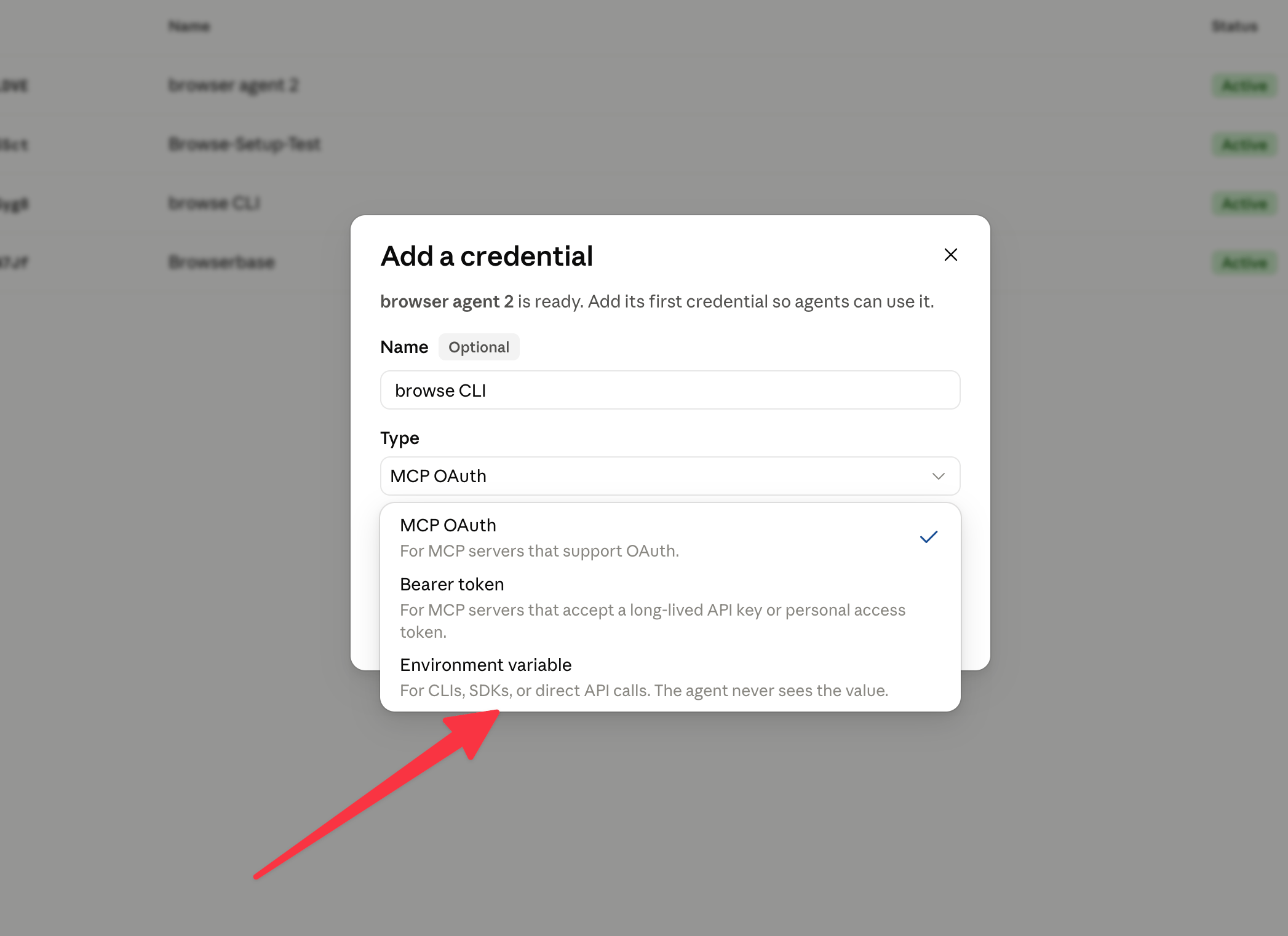 Create the vault first. You will add the environment-variable credential in the next step.
```bash theme={null}
VAULT_ID=$(ant beta:vaults create \
--display-name "Browserbase" \
--metadata '{service: browserbase}' \
--transform id --raw-output)
```
```typescript theme={null}
const vault = await client.beta.vaults.create({
display_name: "Browserbase",
metadata: {
service: "browserbase",
},
});
console.log(`MANAGED_VAULT_ID=${vault.id}`);
```
Name the variable `BROWSERBASE_API_KEY` and set its value to your Browserbase API key. Use limited networking with `*.browserbase.com` as the allowed host.
Add `BROWSERBASE_API_KEY`, paste your Browserbase API key, and choose **Limited** networking with `*.browserbase.com`.
Create the vault first. You will add the environment-variable credential in the next step.
```bash theme={null}
VAULT_ID=$(ant beta:vaults create \
--display-name "Browserbase" \
--metadata '{service: browserbase}' \
--transform id --raw-output)
```
```typescript theme={null}
const vault = await client.beta.vaults.create({
display_name: "Browserbase",
metadata: {
service: "browserbase",
},
});
console.log(`MANAGED_VAULT_ID=${vault.id}`);
```
Name the variable `BROWSERBASE_API_KEY` and set its value to your Browserbase API key. Use limited networking with `*.browserbase.com` as the allowed host.
Add `BROWSERBASE_API_KEY`, paste your Browserbase API key, and choose **Limited** networking with `*.browserbase.com`.
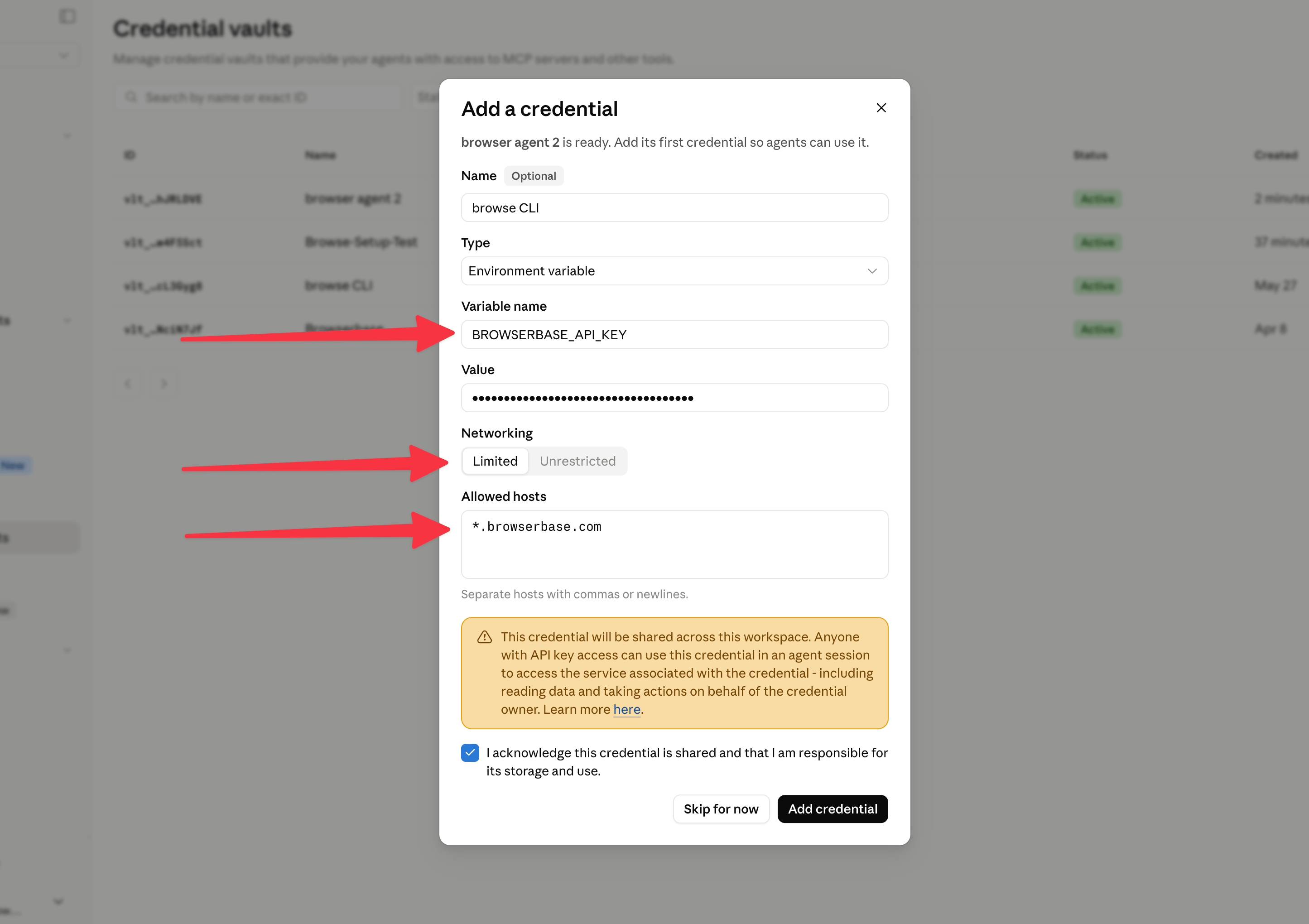 `ant beta:vaults:credentials create --help` exposes the credential command. The environment-variable credential carries the variable name, secret value, and allowed hosts.
```bash theme={null}
ant beta:vaults:credentials create \
--vault-id "$VAULT_ID" \
--display-name "BROWSERBASE_API_KEY" \
--auth "{type: environment_variable, name: BROWSERBASE_API_KEY, value: \"$BROWSERBASE_API_KEY\", allowed_hosts: [\"*.browserbase.com\"]}"
```
```typescript theme={null}
await client.beta.vaults.credentials.create(vault.id, {
display_name: "BROWSERBASE_API_KEY",
auth: {
type: "environment_variable",
name: "BROWSERBASE_API_KEY",
value: process.env.BROWSERBASE_API_KEY!,
allowed_hosts: ["*.browserbase.com"],
},
});
```
If your SDK types do not yet include environment-variable credentials, use the Console or CLI path for this vault step and keep the rest of the SDK flow unchanged.
## 3. Create the agent
Create a Managed Agent that knows `browse` is available in the environment. Keep the system prompt short and let the CLI provide command details through `browse --help`.
```yaml theme={null}
name: browser agent
model:
id: claude-opus-4-8
speed: standard
description: Runs shell commands to check CLI tools and environment variables.
system: You are a browser agent. Use the `browse` CLI to operate a headless Chromium environment. Run `browse --help` to view the commands interface.
mcp_servers: []
tools:
- configs:
- name: web_fetch
enabled: false
- name: web_search
enabled: false
default_config:
enabled: true
permission_policy:
type: always_allow
type: agent_toolset_20260401
skills: []
metadata: {}
```
You can use this .yml to configure your agent. Optionally disable native `web_fetch` and `web_search` to harness Browserbase's Fetch and Search APIs via the `browse` CLI.
Configure the agent with the browser-agent system prompt and shell tool access.
`ant beta:vaults:credentials create --help` exposes the credential command. The environment-variable credential carries the variable name, secret value, and allowed hosts.
```bash theme={null}
ant beta:vaults:credentials create \
--vault-id "$VAULT_ID" \
--display-name "BROWSERBASE_API_KEY" \
--auth "{type: environment_variable, name: BROWSERBASE_API_KEY, value: \"$BROWSERBASE_API_KEY\", allowed_hosts: [\"*.browserbase.com\"]}"
```
```typescript theme={null}
await client.beta.vaults.credentials.create(vault.id, {
display_name: "BROWSERBASE_API_KEY",
auth: {
type: "environment_variable",
name: "BROWSERBASE_API_KEY",
value: process.env.BROWSERBASE_API_KEY!,
allowed_hosts: ["*.browserbase.com"],
},
});
```
If your SDK types do not yet include environment-variable credentials, use the Console or CLI path for this vault step and keep the rest of the SDK flow unchanged.
## 3. Create the agent
Create a Managed Agent that knows `browse` is available in the environment. Keep the system prompt short and let the CLI provide command details through `browse --help`.
```yaml theme={null}
name: browser agent
model:
id: claude-opus-4-8
speed: standard
description: Runs shell commands to check CLI tools and environment variables.
system: You are a browser agent. Use the `browse` CLI to operate a headless Chromium environment. Run `browse --help` to view the commands interface.
mcp_servers: []
tools:
- configs:
- name: web_fetch
enabled: false
- name: web_search
enabled: false
default_config:
enabled: true
permission_policy:
type: always_allow
type: agent_toolset_20260401
skills: []
metadata: {}
```
You can use this .yml to configure your agent. Optionally disable native `web_fetch` and `web_search` to harness Browserbase's Fetch and Search APIs via the `browse` CLI.
Configure the agent with the browser-agent system prompt and shell tool access.
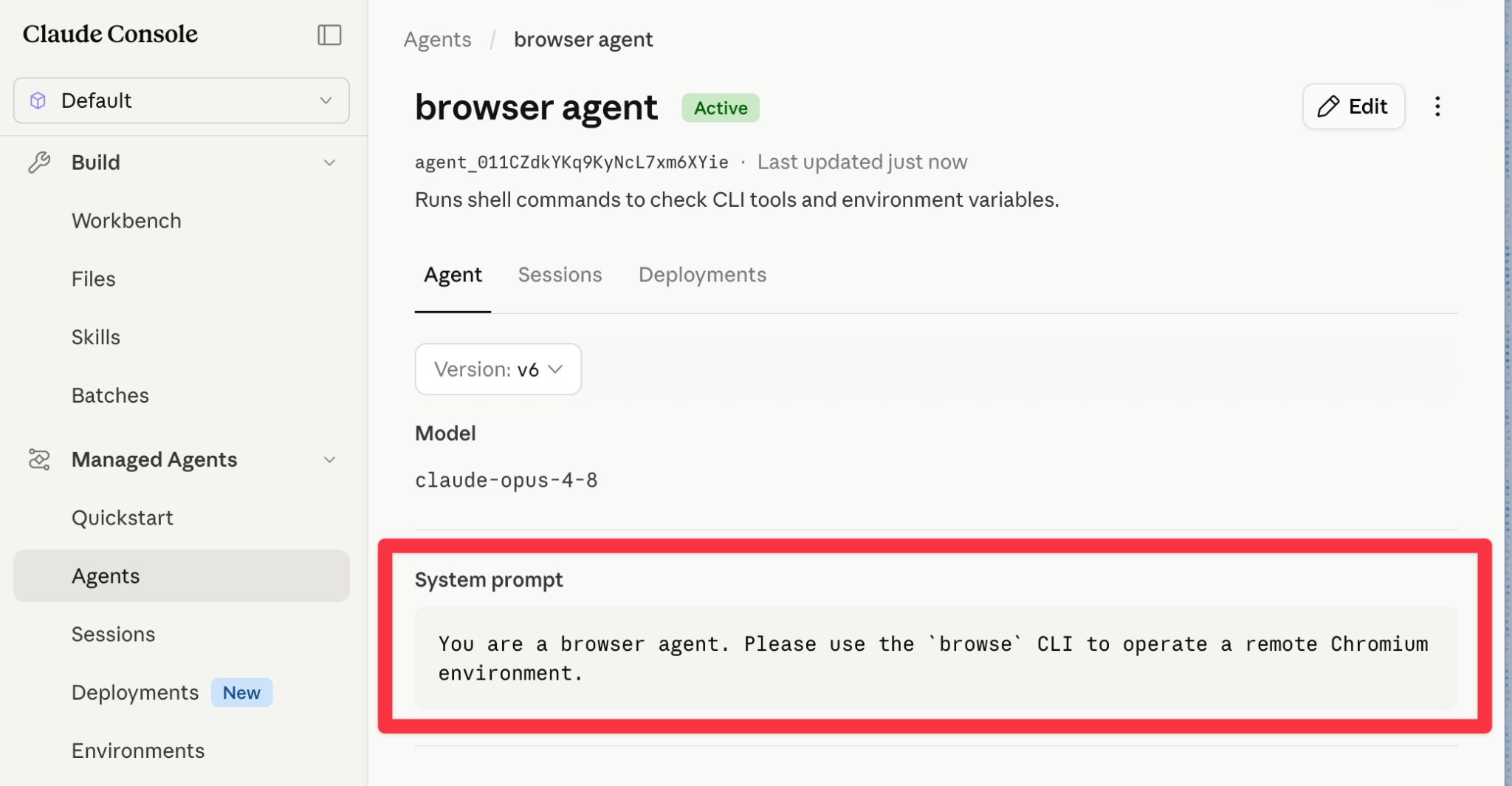 Use `ant beta:agents create`. The `agent_toolset_20260401` toolset gives the agent shell access, and the environment supplies `browse`.
```bash theme={null}
AGENT_ID=$(ant beta:agents create \
--name "browser agent" \
--model '{id: claude-opus-4-8, speed: standard}' \
--description "Runs shell commands to check CLI tools and environment variables." \
--system 'You are a browser agent. Use the `browse` CLI to operate a headless Chromium environment. Run `browse --help` to view the commands interface.' \
--tool '{"type":"agent_toolset_20260401","configs":[{"name":"web_fetch","enabled":false},{"name":"web_search","enabled":false}],"default_config":{"enabled":true,"permission_policy":{"type":"always_allow"}}}' \
--transform id --raw-output)
```
```typescript theme={null}
const SYSTEM_PROMPT =
"You are a browser agent. Use the `browse` CLI to operate a headless Chromium environment. Run `browse --help` to view the commands interface.";
const agent = await client.beta.agents.create({
name: "browser agent",
model: {
id: "claude-opus-4-8",
speed: "standard",
},
description:
"Runs shell commands to check CLI tools and environment variables.",
system: SYSTEM_PROMPT,
tools: [
{
type: "agent_toolset_20260401",
configs: [
{ name: "web_fetch", enabled: false },
{ name: "web_search", enabled: false },
],
default_config: {
enabled: true,
permission_policy: { type: "always_allow" },
},
},
],
});
console.log(`MANAGED_AGENT_ID=${agent.id}`);
```
## 4. Start a session
Start a Managed Agents session, attach the environment and vault, then ask the agent to complete a browser task such as:
```text theme={null}
Please find the price of the Fellow Kettle on Target.com and add it to cart.
```
```text theme={null}
Find driving traffic time from SFO to Union Square.
```
```text theme={null}
Please run a full E2E test for UI regressions on this preview URL: https://example.com
```
```text theme={null}
Please check if Adam Smith is a licensed accountant in California.
```
Start a session from the Anthropic Console with the agent, environment, and Browserbase credential vault you created.
Use `ant beta:agents create`. The `agent_toolset_20260401` toolset gives the agent shell access, and the environment supplies `browse`.
```bash theme={null}
AGENT_ID=$(ant beta:agents create \
--name "browser agent" \
--model '{id: claude-opus-4-8, speed: standard}' \
--description "Runs shell commands to check CLI tools and environment variables." \
--system 'You are a browser agent. Use the `browse` CLI to operate a headless Chromium environment. Run `browse --help` to view the commands interface.' \
--tool '{"type":"agent_toolset_20260401","configs":[{"name":"web_fetch","enabled":false},{"name":"web_search","enabled":false}],"default_config":{"enabled":true,"permission_policy":{"type":"always_allow"}}}' \
--transform id --raw-output)
```
```typescript theme={null}
const SYSTEM_PROMPT =
"You are a browser agent. Use the `browse` CLI to operate a headless Chromium environment. Run `browse --help` to view the commands interface.";
const agent = await client.beta.agents.create({
name: "browser agent",
model: {
id: "claude-opus-4-8",
speed: "standard",
},
description:
"Runs shell commands to check CLI tools and environment variables.",
system: SYSTEM_PROMPT,
tools: [
{
type: "agent_toolset_20260401",
configs: [
{ name: "web_fetch", enabled: false },
{ name: "web_search", enabled: false },
],
default_config: {
enabled: true,
permission_policy: { type: "always_allow" },
},
},
],
});
console.log(`MANAGED_AGENT_ID=${agent.id}`);
```
## 4. Start a session
Start a Managed Agents session, attach the environment and vault, then ask the agent to complete a browser task such as:
```text theme={null}
Please find the price of the Fellow Kettle on Target.com and add it to cart.
```
```text theme={null}
Find driving traffic time from SFO to Union Square.
```
```text theme={null}
Please run a full E2E test for UI regressions on this preview URL: https://example.com
```
```text theme={null}
Please check if Adam Smith is a licensed accountant in California.
```
Start a session from the Anthropic Console with the agent, environment, and Browserbase credential vault you created.
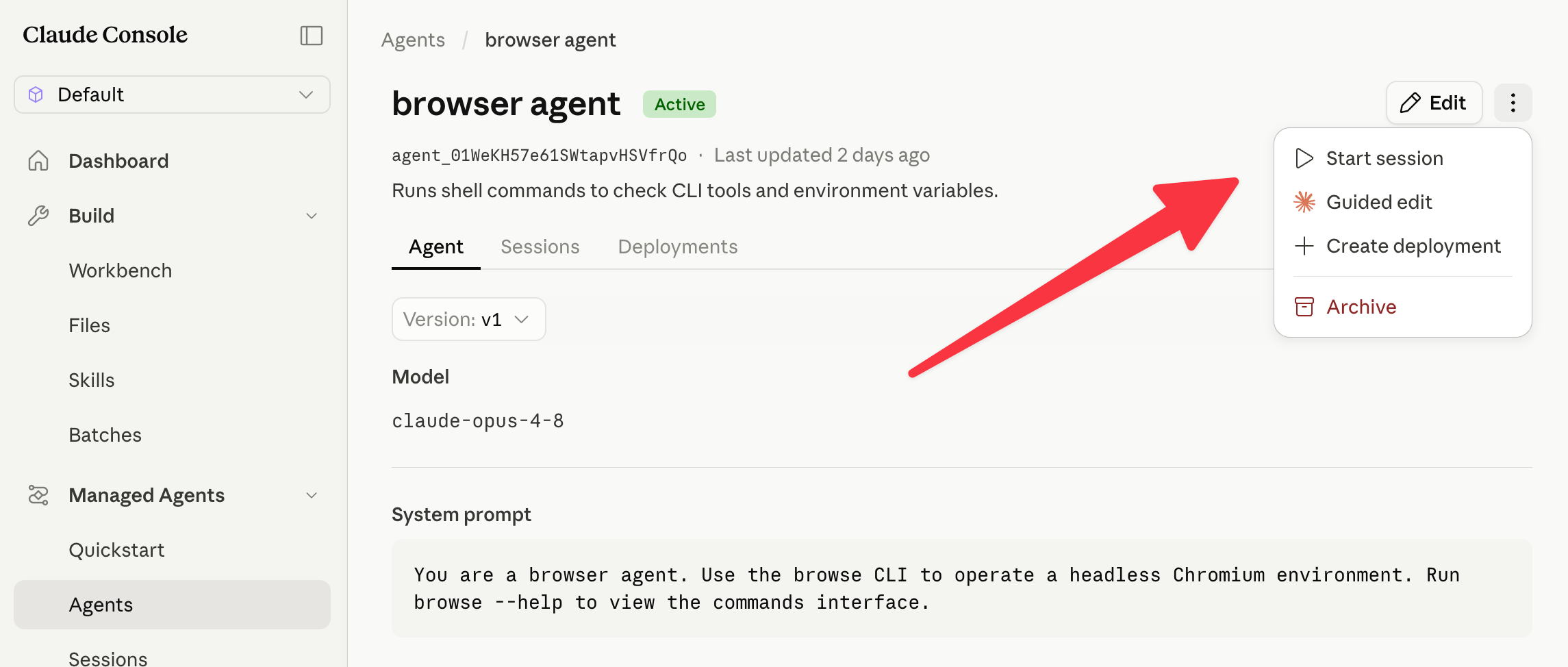 Create a session with `ant beta:sessions create`, then send a user event. Open the stream in a second terminal if you want to watch events as they arrive.
```bash theme={null}
SESSION_ID=$(ant beta:sessions create \
--agent "$AGENT_ID" \
--environment-id "$ENVIRONMENT_ID" \
--vault-id "$VAULT_ID" \
--title "Browserbase quickstart" \
--transform id --raw-output)
```
```bash theme={null}
ant beta:sessions:events stream \
--session-id "$SESSION_ID" \
--max-items -1
```
```bash theme={null}
ant beta:sessions:events send \
--session-id "$SESSION_ID" \
--event '{type: user.message, content: [{type: text, text: "Please find the price of the Fellow Kettle on Target.com and add it to cart."}]}'
```
```typescript theme={null}
const session = await client.beta.sessions.create({
agent: agent.id,
environment_id: environment.id,
vault_ids: [vault.id],
title: "Browserbase quickstart",
});
const stream = await client.beta.sessions.events.stream(session.id);
await client.beta.sessions.events.send(session.id, {
events: [
{
type: "user.message",
content: [
{
type: "text",
text: "Please find the price of the Fellow Kettle on Target.com and add it to cart.",
},
],
},
],
});
for await (const event of stream) {
if (event.type === "agent.message") {
for (const block of event.content) {
process.stdout.write(block.text);
}
} else if (event.type === "agent.tool_use") {
console.log(`\n[Using tool: ${event.name}]`);
} else if (event.type === "session.status_idle") {
console.log("\n\nAgent finished.");
break;
}
}
```
## 5. Watch the browser session
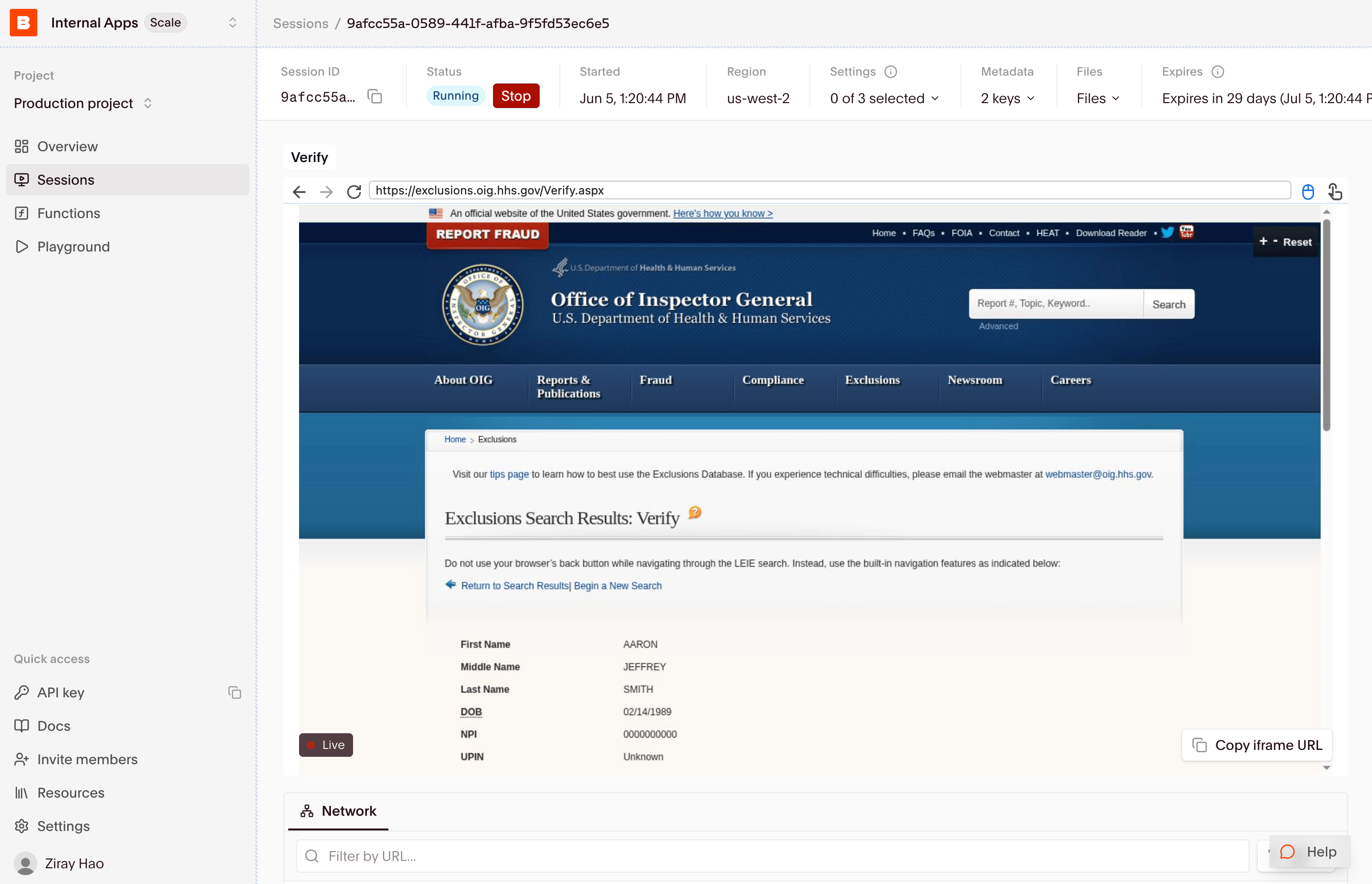
When the Managed Agent uses Browserbase through `browse`, the browser session appears in the [Browserbase sessions panel](https://browserbase.com/sessions). Open the session to watch Live View, inspect logs, and review the recording after the run.
Create a session with `ant beta:sessions create`, then send a user event. Open the stream in a second terminal if you want to watch events as they arrive.
```bash theme={null}
SESSION_ID=$(ant beta:sessions create \
--agent "$AGENT_ID" \
--environment-id "$ENVIRONMENT_ID" \
--vault-id "$VAULT_ID" \
--title "Browserbase quickstart" \
--transform id --raw-output)
```
```bash theme={null}
ant beta:sessions:events stream \
--session-id "$SESSION_ID" \
--max-items -1
```
```bash theme={null}
ant beta:sessions:events send \
--session-id "$SESSION_ID" \
--event '{type: user.message, content: [{type: text, text: "Please find the price of the Fellow Kettle on Target.com and add it to cart."}]}'
```
```typescript theme={null}
const session = await client.beta.sessions.create({
agent: agent.id,
environment_id: environment.id,
vault_ids: [vault.id],
title: "Browserbase quickstart",
});
const stream = await client.beta.sessions.events.stream(session.id);
await client.beta.sessions.events.send(session.id, {
events: [
{
type: "user.message",
content: [
{
type: "text",
text: "Please find the price of the Fellow Kettle on Target.com and add it to cart.",
},
],
},
],
});
for await (const event of stream) {
if (event.type === "agent.message") {
for (const block of event.content) {
process.stdout.write(block.text);
}
} else if (event.type === "agent.tool_use") {
console.log(`\n[Using tool: ${event.name}]`);
} else if (event.type === "session.status_idle") {
console.log("\n\nAgent finished.");
break;
}
}
```
## 5. Watch the browser session
When the Managed Agent uses Browserbase through `browse`, the browser session appears in the [Browserbase sessions panel](https://browserbase.com/sessions). Open the session to watch Live View, inspect logs, and review the recording after the run.
 ## Tips
Ask it to run `browse --help` first. The CLI is designed for progressive disclosure, so the agent can inspect available commands before acting.
Confirm the credential vault exposes `BROWSERBASE_API_KEY` to the environment, and make sure the vault networking allows `*.browserbase.com`.
Use **Unrestricted** networking on the environment. Use **Limited** networking only when you know the exact hostnames the agent needs.
Use Browserbase Live View while the session is running, then use the session recording and logs in the Browserbase dashboard after it finishes.
## Tips
Ask it to run `browse --help` first. The CLI is designed for progressive disclosure, so the agent can inspect available commands before acting.
Confirm the credential vault exposes `BROWSERBASE_API_KEY` to the environment, and make sure the vault networking allows `*.browserbase.com`.
Use **Unrestricted** networking on the environment. Use **Limited** networking only when you know the exact hostnames the agent needs.
Use Browserbase Live View while the session is running, then use the session recording and logs in the Browserbase dashboard after it finishes.