> ## Documentation Index
> Fetch the complete documentation index at: https://docs.browserbase.com/llms.txt
> Use this file to discover all available pages before exploring further.
# Billing
> Manage your subscription, invoices, and payment details
## Upgrade your plan
To upgrade to Developer or Startup plans, go to [Settings](https://www.browserbase.com/settings), then **Usage & billing > Change plan**.
Upgrading to a Scale plan requires the Browserbase team. [Book a demo](https://www.browserbase.com/contact) to get started. You can also reach us at [sales@browserbase.com](mailto:sales@browserbase.com).
 [Verified](/platform/identity/agent-identity) is available on Scale plans. Learn what Verified includes and how it works.
## Invoices
### Understanding your invoice
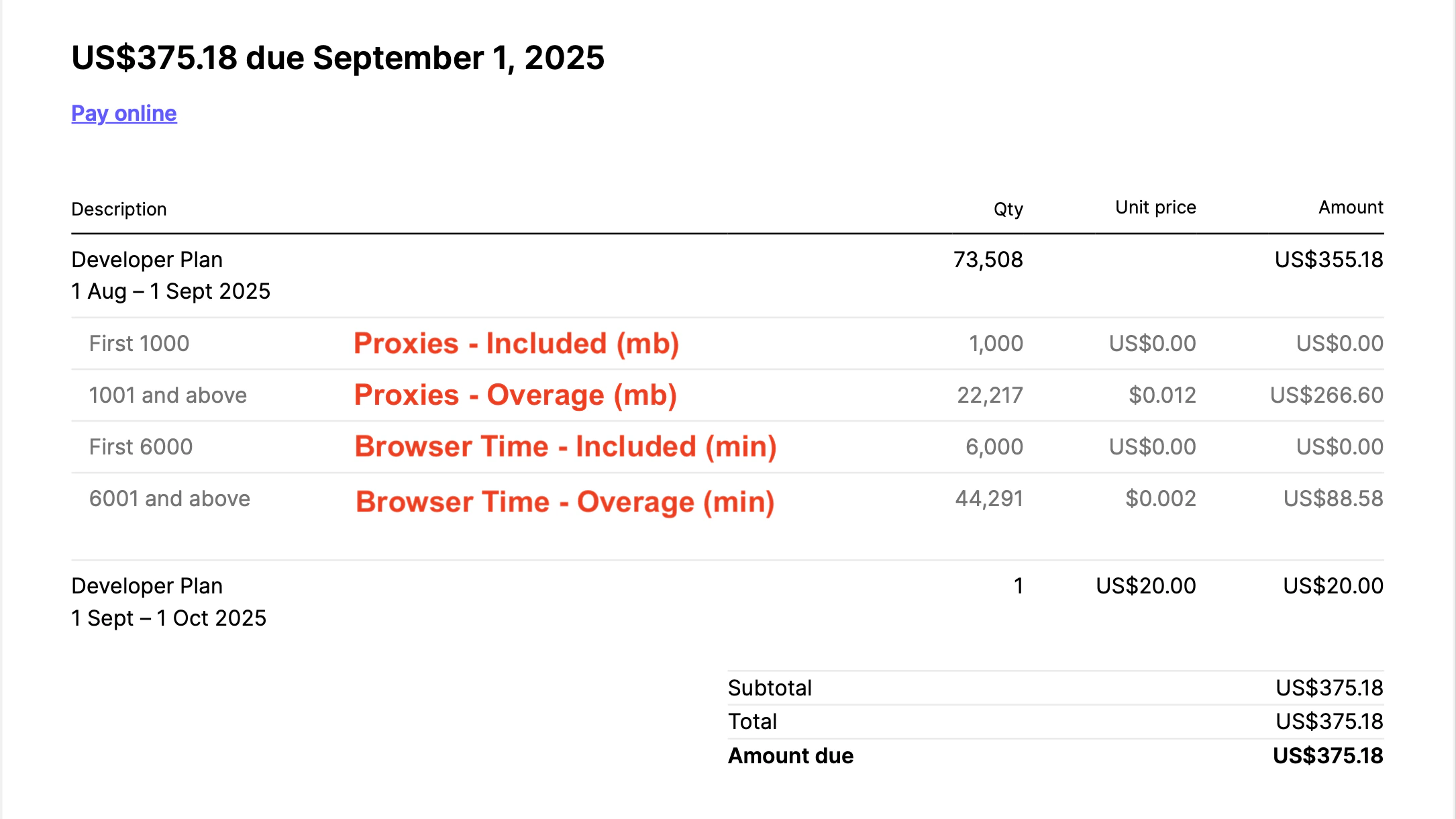
Here's the breakdown of your monthly bill:
* Base Plan Cost
* Proxy Costs
* Browser Time Costs
A Developer Plan with overages appears like this on an invoice:
[Verified](/platform/identity/agent-identity) is available on Scale plans. Learn what Verified includes and how it works.
## Invoices
### Understanding your invoice
Here's the breakdown of your monthly bill:
* Base Plan Cost
* Proxy Costs
* Browser Time Costs
A Developer Plan with overages appears like this on an invoice:
 You can also manage this on your Organization settings page under "Manage Billing": [https://www.browserbase.com/orgs/\{slug}/settings/billing](https://www.browserbase.com/orgs/\{slug}/settings/billing)
### Adding VAT to invoices
To add your tax ID to future invoices:
1. Go to **Settings** > **Usage** > **Manage organization plan**
2. Click **Manage billing** to open the Stripe customer portal
3. Click **Update information** and add your tax ID
Your tax ID will appear on all future invoices.
Need your tax ID added to a previous invoice? Reach out via the [support page](https://portal.usepylon.com/browserbase/forms/talk-to-an-engineer) or [support email](mailto:support@browserbase.com).
## Cancel your plan
To cancel your Browserbase plan, go to [Settings](https://www.browserbase.com/settings), then **Usage & billing > Change plan**.
You can also manage this on your Organization settings page under "Manage Billing": [https://www.browserbase.com/orgs/\{slug}/settings/billing](https://www.browserbase.com/orgs/\{slug}/settings/billing)
### Adding VAT to invoices
To add your tax ID to future invoices:
1. Go to **Settings** > **Usage** > **Manage organization plan**
2. Click **Manage billing** to open the Stripe customer portal
3. Click **Update information** and add your tax ID
Your tax ID will appear on all future invoices.
Need your tax ID added to a previous invoice? Reach out via the [support page](https://portal.usepylon.com/browserbase/forms/talk-to-an-engineer) or [support email](mailto:support@browserbase.com).
## Cancel your plan
To cancel your Browserbase plan, go to [Settings](https://www.browserbase.com/settings), then **Usage & billing > Change plan**.